
מָבוֹא
The Samson Concert 288 Handheld Wireless System is a high-performance UHF wireless solution designed for vocal performances, presentations, educational applications, and other scenarios requiring two users. This system offers easy setup, reliable operation, and premium sound quality.
מה יש בקופסה
Carefully unpack your Concert 288 system and ensure all components are present:
- מקלט CR288
- (2) CH288 Handheld Transmitters (Q6 Dynamic Microphone capsules)
- 1/4" audio cable
- מתאם AC
- ערכת מתלה להרכבה
הגדרה
Follow these steps to set up your Samson Concert 288 Wireless System:
- מיקום מקלט: Position the CR288 receiver in a location that provides a clear line of sight to the area where the handheld transmitters will be used. Avoid placing it near large metal objects or other wireless devices that could cause interference.
- חיבור אנטנה: Attach the two antennas to the antenna connectors on the rear of the CR288 receiver. Ensure they are securely tightened and positioned for optimal reception.
- חיבור חשמל: Connect the supplied AC adapter to the POWER DC IN jack on the rear of the receiver and plug it into an appropriate power outlet.
- פלט שמע: Connect the CR288 receiver to your mixer or amplifier using the appropriate audio cables. The receiver offers balanced XLR outputs (CH A OUT, CH B OUT) for individual channels and an unbalanced 1/4" MIX OUT for a combined signal.
- התקנת סוללת משדר: Open the battery compartment of each CH288 handheld transmitter and insert two fresh AA batteries, observing correct polarity.
- הפעלה: Power on the receiver and then each handheld transmitter. The receiver's display should show the selected channel.
- צימוד תדרים: The system is designed for easy pairing. If necessary, use the IR sync function to match the transmitter frequencies with the receiver channels. Refer to the detailed instructions in the full manual for specific frequency selection and syncing procedures.
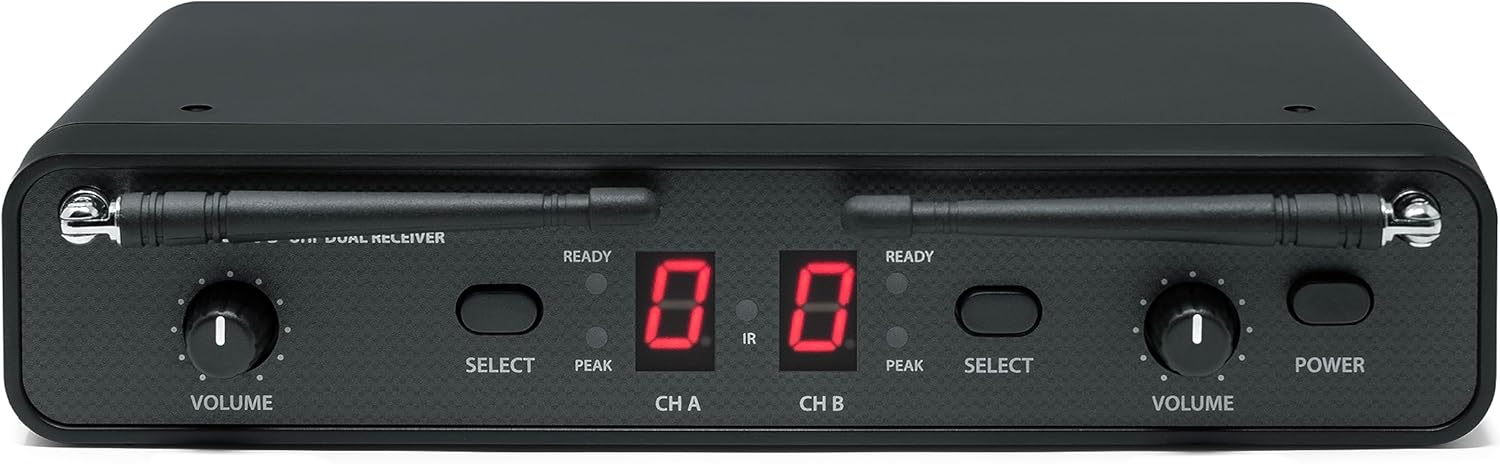
חֲזִית view of the Samson CR288 Dual UHF Receiver, showing volume controls, channel displays, and power button.

מלמעלה למטה view of the Samson CR288 Dual UHF Receiver with antennas extended, indicating optimal setup for signal reception.

אֲחוֹרִי view of the Samson CR288 Dual UHF Receiver, showing power input, balanced XLR outputs for channels A and B, and an unbalanced 1/4" mix output.
פועל
Once the system is set up, follow these guidelines for operation:
- שימוש במיקרופון: Hold the CH288 handheld microphone approximately 2-6 inches from your mouth for optimal sound capture.
- בקרת עוצמת הקול: Adjust the individual volume controls on the CR288 receiver for each channel (CH A and CH B) to achieve the desired audio level.
- פונקציית השתקה: Each handheld transmitter features a mute button. Press it to temporarily silence the microphone without powering it off.
- ניטור: Listen to the audio output through your sound system to ensure clear sound and proper levels.
- לָנוּעַ: Maintain a reasonable distance between the transmitters and the receiver to ensure a stable wireless connection. The effective range can vary based on environmental conditions.

Two Samson CH288 handheld wireless microphones, featuring power/mute buttons and durable construction.
תַחזוּקָה
Proper maintenance ensures the longevity and performance of your wireless system:
- ניקוי: Use a soft, dry cloth to clean the exterior of the receiver and transmitters. Avoid using abrasive cleaners or solvents.
- החלפת סוללה: Replace batteries in the handheld transmitters when the low battery indicator appears or when performance degrades. Always use fresh, high-quality AA batteries.
- אִחסוּן: When not in use for extended periods, remove batteries from the transmitters and store the system in a cool, dry place away from direct sunlight and extreme temperatures.
- טיפול באנטנה: Handle antennas carefully to avoid bending or breaking. Ensure they are properly secured during operation and storage.
פתרון בעיות
If you encounter issues with your Concert 288 system, refer to the following common solutions:
| בְּעָיָה | סיבה אפשרית | פִּתָרוֹן |
|---|---|---|
| אין קול מהמיקרופון | Microphone muted, batteries dead, receiver not powered, incorrect channel selected, audio cable disconnected. | Check mute button, replace batteries, ensure receiver is powered, verify channel pairing, check audio cable connections. |
| אות לסירוגין או נפילות | Out of range, interference from other devices, weak batteries, obstructed line of sight. | Reduce distance to receiver, identify and eliminate interference sources, replace batteries, ensure clear line of sight. |
| Hissing or static noise | Interference, gain levels too high, faulty cable. | Adjust receiver/mixer gain, check for interference, try a different audio cable. |
| איכות סאונד ירודה | Incorrect microphone placement, low battery, interference. | Adjust microphone position, replace batteries, check for interference. |
For more detailed troubleshooting or persistent issues, consult the full product manual or contact Samson support.
מפרטים
| תכונה | פְּרָט |
|---|---|
| מותג | שמשון |
| מספר דגם | SWC288HQ6-H (Concert 288 Handheld) |
| טכנולוגיית קישוריות | אלחוטי (UHF) |
| מספר ערוצים | 2 |
| קלט שמע | Wireless microphones (Q6 Dynamic Microphone capsule) |
| מקור כוח | Battery Powered (Transmitters), AC Adapter (Receiver) |
| סוג הרכבה | Tabletop (Rack mount kit included) |
| מידות פריט (L x W x H) | 13 x 4 x 14 אינץ' |
| משקל פריט | 4 פאונד |
| חומר המארז | מתכת, פלסטיק |
| UPC | 809164213178 |
מידע על אחריות
The Samson Concert 288 Handheld Dual-Channel Wireless System is covered by a אחריות לחלקים ועבודה ל-1 שנים מתאריך הרכישה. אנא שמור את הוכחת הרכישה שלך לצורך תביעות אחריות. אחריות זו מכסה פגמי ייצור ותקלות בשימוש רגיל. היא אינה מכסה נזק שנגרם כתוצאה משימוש לרעה, תאונות, שינויים לא מורשים או התקנה לא נכונה.
תְמִיכָה
For further assistance, technical support, or warranty inquiries, please visit the official Samson webאתר או צרו קשר עם מחלקת שירות הלקוחות שלהם. תוכלו למצוא מידע ומשאבים נוספים ב Samson Store on Amazon.