
הוראות בטיחות חשובות
Read all instructions carefully before using the appliance. Keep this manual for future reference. Always follow basic safety precautions to reduce the risk of fire, electric shock, or injury to persons.
- ודא שמכונת הכביסה מחוברת להארקה כראוי.
- אין להפעיל את המכונה עם כבל חשמל או תקע פגומים.
- הרחק ילדים וחיות מחמד מהמכשיר במהלך פעולתו.
- אין לכבס פריטים המלוכלכים בחומרים דליקים.
- נתקו את המכשיר מהחשמל לפני ניקוי או ביצוע כל תחזוקה.
1. התקנה והתקנה
1.1 פירוק
Carefully remove all packaging materials, including the base packaging and any protective foam. Inspect the machine for any damage incurred during transit. Retain packaging for potential future transport.
1.2 מיקום התקנה
הניחו את מכונת הכביסה על משטח יציב ומפולס. ודאו שיש מספיק מקום סביב המכונה לאוורור וגישה. הימנעו מאור שמש ישיר או מאזורים עם לחות גבוהה.
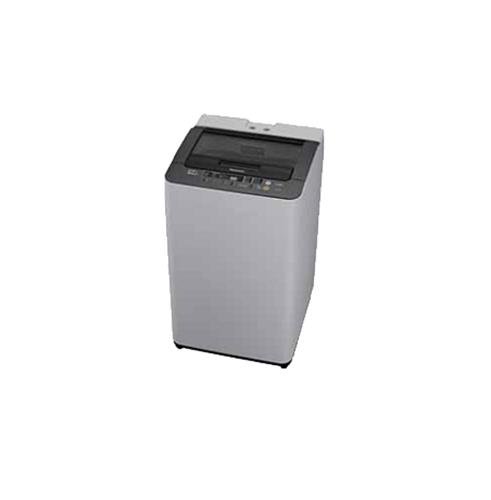
Figure 1: Panasonic NA-F65H3 6.5 Kg Top-loading Washing Machine. This image shows the overall design of the appliance, including the top-loading lid and control panel.
1.3 חיבור אספקת מים
Connect the inlet hose to a cold water tap with a 3/4-inch thread. Ensure all connections are tight to prevent leaks. Do not overtighten. The water pressure should be between 0.03 MPa and 1 MPa.
1.4 Drainage Hose Setup
Position the drain hose correctly. It should be placed into a standpipe or over the edge of a sink, ensuring it is securely fixed to prevent dislodging during operation. The height of the drain hose should be between 80 cm and 100 cm from the floor.
1.5 יישור המכונה
Use a spirit level to ensure the machine is perfectly level. Adjust the leveling feet at the bottom of the machine as needed. A level machine reduces vibration and noise during operation.
1.6 חיבור מתח
חבר את כבל החשמל לשקע חשמלי מוארק. ודא שעוצמת הקולtage and frequency match the specifications listed on the machine's rating label.
2. הוראות הפעלה
2.1 לוח הבקרה נגמרview
The control panel, located on the top rear of the machine, features various buttons and indicators for selecting wash programs, water levels, and special functions. Familiarize yourself with the layout before first use.
- לחצן הפעלה: מדליק/מכבה את המכונה.
- לחצן התחל/השהה: מתחיל או משהה מחזור כביסה.
- בוחר תוכניות: Dial or buttons to choose from 8 wash programs.
- מפלס מים: Adjusts water level (6 settings available).
- עיכוב התחלה: מגדיר זמן התחלה מושהה עבור מחזור הכביסה.
2.2 טעינת כביסה
Open the glass lid and load laundry evenly into the Sazanami drum. Do not overload the machine; ensure there is enough space for clothes to move freely. Close the lid securely.
2.3 הוספת חומר ניקוי ומרכך
Add the appropriate amount of detergent to the detergent dispenser, typically located on the top edge of the drum opening. If using fabric softener, add it to the designated softener compartment. Refer to detergent packaging for recommended quantities.
2.4 בחירת תוכנית כביסה
Turn on the machine using the Power button. Select one of the 8 available wash programs based on your laundry type and soil level. Adjust the water level using the Water Level button (6 settings available). Available wash technologies include:
- שטיפת קצף: Creates fine foam for effective dirt removal.
- Aqua Beat Wash: Powerful water flow for thorough cleaning.
- Dancing Water Flow: Dynamic water movement to prevent tangling.
- שטיפה ספין אקווה: Efficient rinsing with minimal water.
- Power Soak: Pre-soak function for heavily soiled items (90/120/150 min options).
2.5 התחלת מחזור כביסה
Once the program and settings are selected, press the Start/Pause button to begin the wash cycle. The machine will automatically proceed through the wash, rinse, and spin phases. The new auto re-start feature (with LED indicator) will resume operation after a power outage.
3. תחזוקה וטיפול
3.1 ניקוי מסנן הסיבים
The big lint filter, typically located inside the drum near the top rim, should be cleaned regularly, ideally after every few washes, to maintain optimal performance. Remove the filter, clean out accumulated lint under running water, and reinsert it securely.
3.2 Cleaning the Washing Machine
נגב את החלק החיצוני של המכונה בחומר רך, דamp cloth. Clean the detergent dispenser periodically to prevent residue buildup. For the drum, run a 'Tub Clean' or 'Self Clean' cycle if available, or a hot wash with a washing machine cleaner. The anti-bacterial coating helps maintain hygiene.
3.3 הכנה לחורף ואחסון
If storing the machine in an unheated area or during freezing temperatures, drain all water from the hoses and pump to prevent damage. Disconnect water supply and power, and store in a dry place.
4. פתרון תקלות
לפני פנייה לשירות, עיינו בטבלה הבאה לקבלת בעיות נפוצות ופתרונותיהן.
| בְּעָיָה | סיבה אפשרית | פִּתָרוֹן |
|---|---|---|
| המכונה לא מתחילה | Power cord unplugged; Lid not closed; Power outage. | Check power connection; Ensure lid is fully closed; Wait for power to resume (auto re-start feature). |
| מים לא מתנקזים | צינור הניקוז מקופל או חסום; מסנן סיבים סתום. | Straighten drain hose; Clean the lint filter. |
| רעידות/רעש מוגזמות | Machine not level; Laundry unevenly distributed; Transit bolts not removed. | כוונן את רגליות היישור; פזר מחדש את הכביסה; ודא שכל ברגי ההובלה הוסרו במהלך ההתקנה. |
| תוצאות שטיפה גרועות | Overloading; Insufficient detergent; Incorrect program selection. | Reduce load size; Use correct amount of detergent; Select appropriate wash program. |
5. מפרטים
| מותג | פנסוניק |
| דֶגֶם | NA-F65H3 |
| סוּג | Fully-automatic Top-loading Washing Machine |
| יְכוֹלֶת | 6.5 ק"ג |
| תוכניות כביסה | 8 |
| Water Level Settings | 6 |
| סוג תוף | Sazanami Drum |
| תכונות מיוחדות | Glass Lid, Anti-bacterial Filter, Anti-bacterial Coating, Power Soak (90/120/150 min), Foam Wash, Aqua Beat Wash, Dancing Water Flow, Aqua Spin Rinse, Big Lint Filter, Auto Re-start (with LED indicator) |
| צֶבַע | לבן ואפור |
6. אחריות ותמיכה
6.1 מידע אחריות
This Panasonic NA-F65H3 washing machine comes with a אחריות לשנתיים על המוצר from the date of purchase. Please retain your purchase receipt as proof of warranty. The warranty covers manufacturing defects under normal use conditions. For detailed terms and conditions, refer to the warranty card provided with your appliance.
6.2 תמיכת לקוחות
For technical assistance, service requests, or inquiries regarding your Panasonic washing machine, please contact Panasonic customer support. You can find contact details on the official Panasonic webבאתר או במסמכי האחריות.
When contacting support, please have your model number (NA-F65H3) and serial number ready to expedite the service process.