
מָבוֹא
This manual provides instructions for the setup, operation, and maintenance of your DIRECTV Universal Remote Control, model RC65. This remote is designed to operate your DIRECTV receiver and can be programmed to control other audio/video devices such as televisions and sound systems.
Please read this manual thoroughly before using your remote control to ensure proper functionality and to maximize your viewניסיון.
המוצר נגמרview
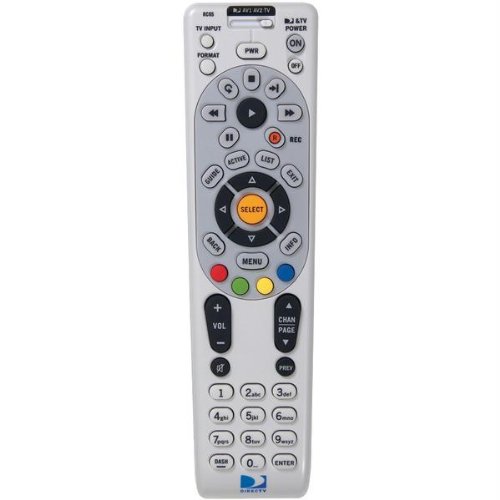
תמונה: חזית view of the DIRECTV Universal Remote Control RC65. This image displays the remote's ergonomic design and the layout of its primary control buttons, including the directional pad, channel and volume controls, and various function keys. The remote is black with white button labels.
The DIRECTV RC65 remote control is a universal remote capable of controlling multiple devices. Its design focuses on ease of use and compatibility with a wide range of audio/video equipment.
הגדרה
1. התקנת סוללה
- אתר את תא הסוללות בגב השלט הרחוק.
- לחץ כלפי מטה על הלשונית והחלק את מכסה הסוללה החוצה.
- הכניסו שתי (2) סוללות AA, וודאו שהקוטבים החיוביים (+) והשליליים (-) מיושרים עם הסימונים בתוך התא.
- החלק את מכסה הסוללה בחזרה למקומו עד שיינעל היטב.
הערה: סוללות אינן כלולות עם השלט רחוק.
2. Programming for DIRECTV Receiver
The remote is typically pre-programmed to operate your DIRECTV receiver. If it does not work, or if you are setting up a new remote, follow these steps:
- כוון את השלט אל מקלט ה-DIRECTV שלך.
- לחץ והחזק את לְהַשְׁתִיק ו לִבחוֹר לחצו בו זמנית על הכפתורים עד שהנורית הירוקה בחלק העליון של השלט תהבהב פעמיים.
- הזן את הקוד 961האור הירוק יהבהב פעמיים.
- הקש על מעלה ערוץ כפתור. האור הירוק יהבהב פעמיים.
- הקש על לִבחוֹר כפתור. האור הירוק יהבהב פעמיים.
- Test the remote by changing channels or adjusting volume.
3. Programming for Other Devices (TV, Audio)
To program the remote to control your television or other audio/video devices, you will need the device's brand code. Refer to the code list provided with your DIRECTV system or search online for "DIRECTV remote codes [your device brand]".
- הפעל את המכשיר שברצונך לתכנת (למשל, הטלוויזיה שלך).
- לחץ והחזק את לְהַשְׁתִיק ו לִבחוֹר לחצו בו זמנית על הכפתורים עד שהנורית הירוקה בחלק העליון של השלט תהבהב פעמיים.
- Press the mode button for the device you are programming (e.g., TV עבור הטלוויזיה, AV1 or AV2 for audio/video devices). The green light will flash once.
- Enter the 5-digit code for your device's brand. The green light will flash twice if the code is accepted.
- כוון את השלט אל המכשיר ולחץ על כּוֹחַ כפתור. אם המכשיר נכבה, התכנות בוצע בהצלחה.
- If the device does not turn off, repeat steps 1-5 with another code for your device's brand.
Tip: If you cannot find a code, try the "Code Search" method: After step 3, instead of entering a code, press מעלה ערוץ repeatedly until the device turns off, then press לִבחוֹר.
הוראות הפעלה
The DIRECTV RC65 remote control features a standard layout for easy navigation and control of your entertainment system.
- MODE Buttons (DIRECTV, TV, AV1, AV2): Select the device you want to control. Press the corresponding button before issuing commands for that device.
- כּוֹחַ: מפעיל או מכבה את המכשיר שנבחר.
- עוצמת הקול מעלה/מטה: Adjusts the volume of the selected audio device (usually TV or AV receiver).
- ערוץ למעלה/למטה: Changes channels on the DIRECTV receiver.
- לְהַשְׁתִיק: השתקה או ביטול השתקת השמע.
- מַדְרִיך: Displays the DIRECTV program guide.
- תפריט: Accesses the DIRECTV system menu.
- SELECT/OK: מאשר בחירות או כניסה לתפריטים.
- ARROW Buttons (UP, DOWN, LEFT, RIGHT): ניווט בין תפריטים ומדריכים.
- תקליט: Records the current program on your DIRECTV DVR.
- PLAY, PAUSE, STOP, REW, FF, SKIP: Control playback of recorded content or live TV (with DVR).
- מידע: מציג מידע על התוכנית הנוכחית.
- יְצִיאָה: יציאה מתפריטים או מדריכים.
Note: Specific button functions may vary slightly depending on your DIRECTV receiver model and programmed devices.
תַחזוּקָה
ניקוי השלט הרחוק
- השתמש במטלית רכה ויבשה כדי לנגב את פני השלט הרחוק.
- עבור לכלוך עיקש, מעט דחוףampנגב את המטלית במים או בחומר ניקוי עדין ולא שוחק. אין לרסס חומר ניקוי ישירות על השלט.
- הימנעו משימוש בכימיקלים חזקים, ממסים או פדים שוחקים, מכיוון שאלה עלולים לפגוע בגימור של השלט או ברכיבים הפנימיים.
החלפת סוללה
Replace batteries when the remote's response becomes sluggish or if the green light at the top does not flash when a button is pressed. Refer to the "Battery Installation" section under Setup for detailed instructions.
- החלף תמיד את שתי הסוללות בו זמנית.
- Use new AA alkaline batteries for optimal performance.
- יש להשליך סוללות ישנות בהתאם לתקנות המקומיות.
פתרון בעיות
שלט לא מגיב
- בדוק סוללות: ודא שהסוללות מוכנסות כהלכה ואינן התרוקנות. החלף אותן במידת הצורך.
- קו הראיה: Make sure there are no obstructions between the remote and the device you are trying to control. The remote uses infrared (IR) signals, which require a clear line of sight.
- מצב נכון: Verify that the correct mode button (DIRECTV, TV, AV1, AV2) is pressed for the device you intend to control.
- איפוס שלט: הוציאו את הסוללות, לחצו על כל הכפתורים מספר פעמים כדי לפרוק שאריות חשמל, ולאחר מכן הכניסו מחדש את הסוללות.
Device Not Responding After Programming
- Verify Code: Double-check that you entered the correct 5-digit code for your device's brand. Try other codes listed for your brand.
- חיפוש קוד: Attempt the "Code Search" method described in the "Programming for Other Devices" section.
- תאימות מכשיר: While the remote has an extensive code library, some older or very new devices may not be fully compatible.
Volume/Channel Control Issues
- נעילת עוצמת הקול: Ensure the volume is not locked to the DIRECTV receiver if you want to control the TV volume. To unlock, press and hold לְהַשְׁתִיק ו לִבחוֹר until the green light flashes twice, then enter 993. לִלְחוֹץ לִבחוֹר.
- בקרת ערוץ: Ensure the remote is in DIRECTV mode to change channels on the receiver.
מפרטים
| תכונה | פְּרָט |
|---|---|
| מותג | DIRECTV |
| שם / מספר הדגם | RC65 |
| תכונה מיוחדת | אוּנִיבֶרְסָלִי |
| צֶבַע | שָׁחוֹר |
| מכשירים תואמים | Television, DIRECTV Receiver, Audio/Video Devices |
| טכנולוגיית קישוריות | אינפרא אדום (IR) |
| סוג בקר | בקרת כפתור |
| סוג סוללה | 2 x סוללות AA (לא כלול) |
| משקל פריט | כ-0.52 פאונד |
מידע על אחריות
This DIRECTV Universal Remote Control (Model RC65) comes with a limited warranty against defects in materials and workmanship under normal use. The warranty period typically covers 90 days from the date of purchase. Please retain your proof of purchase for warranty claims.
This warranty does not cover damage caused by misuse, accident, unauthorized modification, or use with non-DIRECTV approved accessories. For specific warranty terms and conditions, please refer to the documentation included with your DIRECTV system or visit the official DIRECTV support webאֲתַר.
תמיכת לקוחות
If you require further assistance with your DIRECTV Universal Remote Control, please contact DIRECTV customer support:
- תמיכה מקוונת: Visit the official DIRECTV support website for FAQs, troubleshooting guides, and programming code lists.
- תמיכה טלפונית: Refer to your DIRECTV service agreement or bill for the most current customer service phone number.
When contacting support, please have your DIRECTV account information and the remote control model number (RC65) ready.