
מָבוֹא
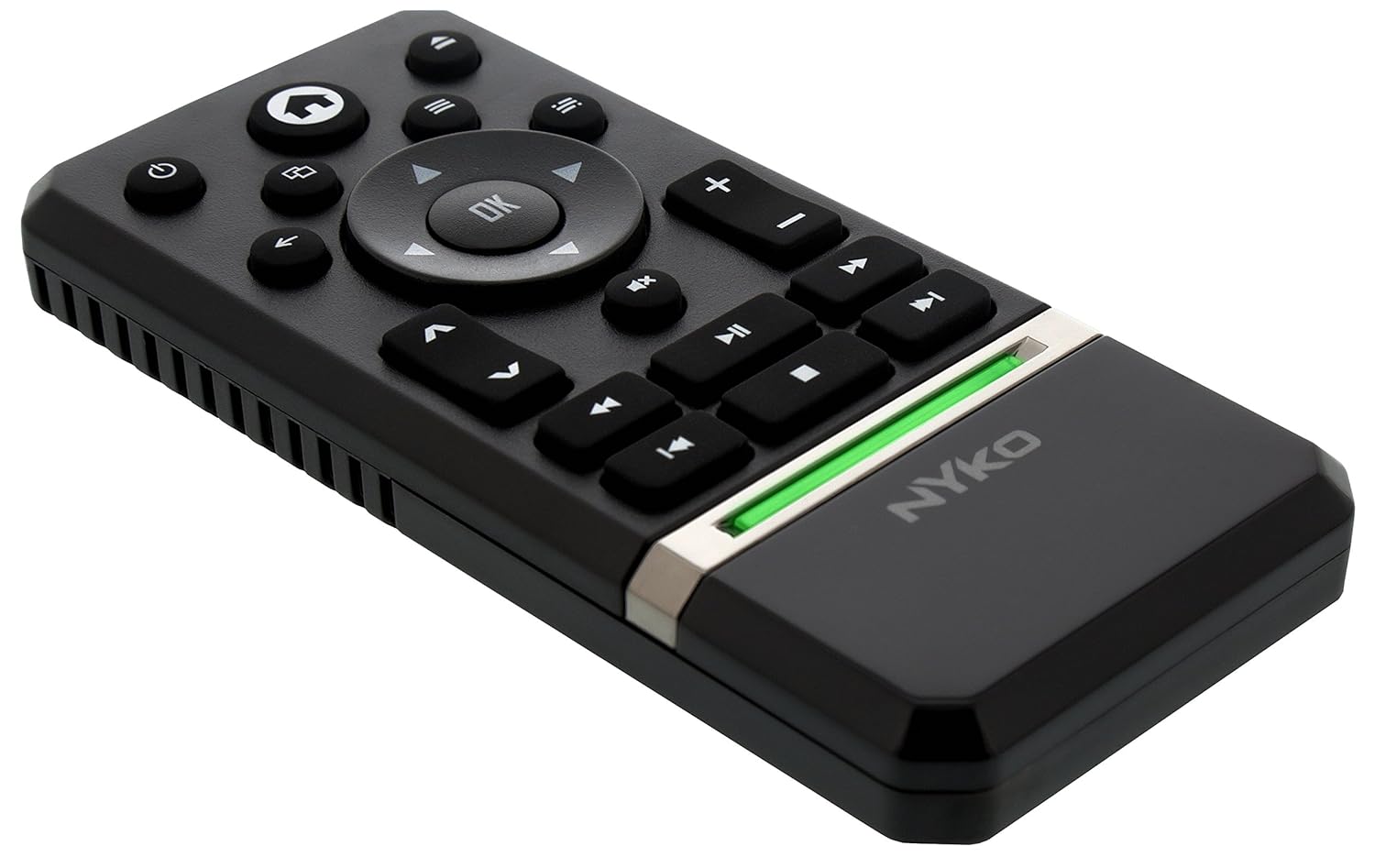
The Nyko Media Remote for Xbox One provides convenient control over your Xbox One console and various media applications. This remote simplifies navigation and playback of streaming content and physical media, offering dedicated buttons for common functions. It also features the ability to power your Xbox One on and off, and control basic functions of your television.

Image: Nyko Media Remote for Xbox One, front view.
תוכן החבילה
- Nyko Media Remote for Xbox One (Model: 86116)
- הערה: סוללות AAA אינן כלולות ויש לרכוש אותן בנפרד.

Image: Nyko Media Remote for Xbox One in its retail packaging.
הגדרה
1. התקנת סוללה
- אתר את תא הסוללות בגב השלט.
- החלק את מכסה הסוללה כלפי מטה כדי לפתוח.
- הכניסו שתי (2) סוללות AAA, תוך הקפדה על קוטביות נכונה (+/-) כפי שמסומן בתוך התא.
- החזר את מכסה הסוללה למקומו על ידי החלקתו כלפי מעלה עד שייכנס למקומו בנקישה.
תמונה: אחורי view of the remote with the battery cover removed, illustrating the AAA battery placement.
2. חיבור ראשוני
The Nyko Media Remote uses infrared (IR) technology. No manual pairing is required for the Xbox One. Simply ensure a clear line of sight between the remote's IR emitter and the Xbox One's IR receiver.
For TV control functions (volume, channels, power), your TV must be configured to respond to the Xbox One's IR signals, typically through the Xbox One's OneGuide settings. The remote sends commands to the Xbox One, which then relays them to your TV via its IR blaster (if configured) or Kinect sensor.
הוראות הפעלה
The Nyko Media Remote provides comprehensive control for your Xbox One and various media applications. Refer to the diagram below for button identification and their primary functions.

תמונה: חזית view of the Nyko Media Remote, displaying all control buttons.
פונקציות כפתור:
| לַחְצָן | פוּנקצִיָה |
|---|---|
| כפתור הפעלה (⏻) | Powers the Xbox One console on or off. |
| כפתור בית (⌂) | Returns to the Xbox One Home screen. |
| View לַחְצָן (🗀) | Accesses additional information or options within an app or game. |
| לחצן תפריט (☰) | פותח תפריטים או אפשרויות תלויי הקשר. |
| משטח כיוון (D-Pad) | ניווט בין תפריטים ותוכן. |
| כפתור אישור | Confirms selections. Can also function as Play/Pause in some apps. |
| כפתור חזרה (←) | חוזר למסך או לתפריט הקודם. |
| OneGuide Button (📱) | Launches the Xbox OneGuide for live TV and media. |
| עוצמת הקול מעלה/הנמכת (⏸ / ⏷) | Adjusts the television volume (requires TV setup via Xbox One). |
| כפתור השתקה (🔇) | Mutes or unmutes television audio. |
| ערוץ למעלה/למטה (▲ / ▼) | Changes television channels (requires TV setup via Xbox One). |
| הרצה אחורה מהירה (⏪) | מריץ אחורה את השמעת המדיה. |
| הפעל/השהה (⏯) | מנגן או משהה את הפעלת המדיה. |
| Fast Forward (⏩) | הפעלת מדיה קדימה. |
| המסלול הקודם (⏮) | מדלג לתחילת הרצועה הנוכחית או הרצועה הקודמת. |
| לְהַפְסִיק (⏹) | עוצר את הפעלת המדיה. |
| המסלול הבא (⏭) | Skips to the next track or chapter. |
Media and App Control:
The remote is designed for seamless control of various Xbox One applications, including:
- OneGuide
- נטפליקס
- הולו פלוס
- וידאו מיידי של אמזון
- Other streaming services and Blu-ray/DVD playback
Dedicated playback buttons (Play, Pause, Fast Forward, Rewind, Stop, Skip) provide intuitive control for movies, music, and other media.
תַחזוּקָה
החלפת סוללה:
When the remote's performance diminishes or it stops responding, it is likely time to replace the batteries. Follow the "Battery Installation" steps in the Setup section to replace the two AAA batteries.
ניקוי:
To clean the remote, gently wipe it with a soft, dry cloth. Avoid using harsh chemicals, abrasive cleaners, or excessive moisture, as these can damage the remote's finish or internal components.
פתרון בעיות
- שלט לא מגיב:
- ודאו שסוללות AAA חדשות מותקנות כהלכה.
- Verify there is a clear line of sight between the remote and the Xbox One console. Obstructions can block the infrared signal.
- Move closer to the Xbox One console. The remote has a maximum effective range of approximately 9 meters (25 feet).
- TV Control (Volume, Channel, Power) Not Working:
- Confirm that your Xbox One's OneGuide settings are properly configured for your television. The remote sends commands to the Xbox One, which then controls the TV.
- Ensure any necessary IR blasters or Kinect sensors are correctly set up and positioned.
- תגובה לסירוגין:
- This can sometimes occur due to weak batteries or environmental interference. Replace batteries and ensure a clear line of sight.
מפרטים
| תכונה | פְּרָט |
|---|---|
| מותג | ניקו |
| שם הדגם | שלט מדיה |
| מספר דגם | 86116 |
| טכנולוגיית קישוריות | אינפרא אדום (IR) |
| מכשירים תואמים | Xbox One, Television (via Xbox One IR blaster/Kinect) |
| סוג סוללה | 2 x AAA סוללות (לא כלול) |
| טווח מקסימלי | עד 9 מטר (25 רגל) |
| משקל פריט | 0.1 פאונד (בערך 45 גרם) |
| צֶבַע | אפור כהה |
| תכונות נוספות | Ergonomic design, dedicated media playback controls. |
אחריות ותמיכה
Nyko products are designed for quality and reliability. For specific warranty details, please refer to the documentation included with your purchase or visit the official Nyko website. The product includes warranty information in multiple languages.
תמיכת לקוחות:
- אֶלֶקטרוֹנִי: customer.support@nyko.com
- טֵלֵפוֹן: +1-888-400-6956
- רישום מקוון: www.nyko.com
- מידע נוסף: http://uqr.me/nykotechnologies/qr/83215

תמונה: אחורי view of the product packaging, detailing features and customer support contact information.