
1. הקדמה
The PAC SWI-RC-1 Steering Wheel Control Interface is designed to seamlessly integrate your vehicle's factory steering wheel controls with an aftermarket radio. This universal interface supports a wide range of vehicles and major radio brands, allowing you to retain the convenience and safety of your steering wheel controls after upgrading your car's audio system.
2. מידע בטיחות
- יש לנתק תמיד את הקוטב השלילי של מצבר הרכב לפני תחילת כל התקנה.
- מומלץ להתקין מקצועית לביצועים ובטיחות מיטביים.
- ודא שכל חיבורי החיווט מאובטחים ומבודדים כראוי כדי למנוע קצר חשמלי.
- Do not operate the vehicle or attempt to program the device while driving.
- הרחק את המכשיר מלחות וטמפרטורות קיצוניות.
3. המוצר נגמרview
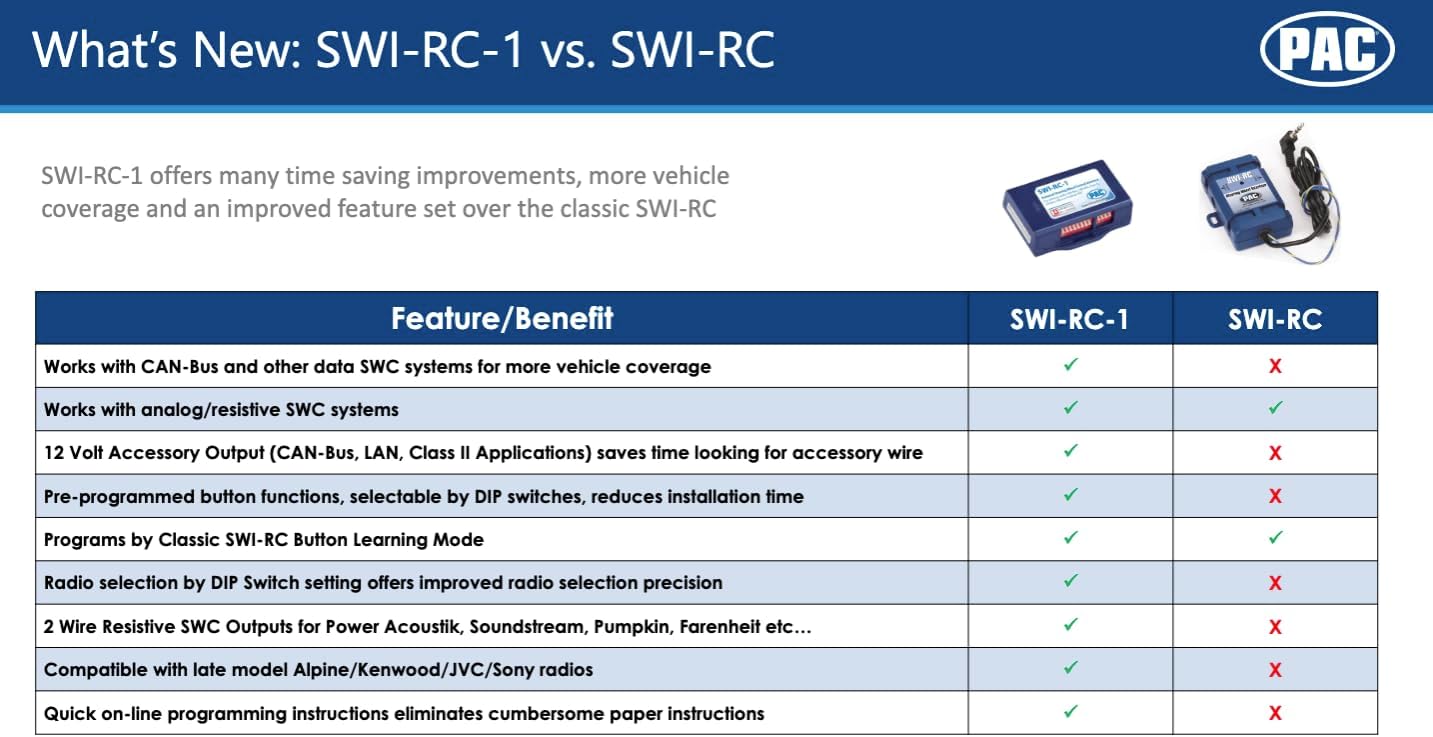
The PAC SWI-RC-1 offers advanced features for integrating steering wheel controls:
- Fast and easy steering wheel control retention for over 3000 vehicles.
- Quick and easy pre-programmed button function by DIP switch selection.
- Works on Analog (resistive) and Data SWC systems.
- Compatible with vehicles featuring CAN-Bus, GMLAN, CLASS II, LIN-Bus, I-BUS, or analog SWC.
- Supports classic, SWI-RC style button programming.
- Customizable button functions including short press, long press, and button reassignment.
- מספק 2 amp, 12-volt accessory output for CAN-Bus, LAN, and Class II applications.
- Compatible with all late model brands of radios with 3.5mm or two-wire connections.

4. תכולת החבילה
Your PAC SWI-RC-1 package should include the following items:
- PAC SWI-RC-1 Interface Module
- רתמת חיווט ראשית
- 3.5mm Jack to Two-Wire Connection Cable
- מדריך הוראות (מסמך זה)
5. התקנה והתקנה
Installation of the PAC SWI-RC-1 involves three main steps:
5.1. רשימת טרום התקנה
- Ensure your aftermarket radio is equipped with a wired remote input (e.g., 3.5mm headphone style jack or a Blue/Yellow wire labeled W/R, REM, Wired Remote, Remote, Rem Cont).
- Gather necessary tools: wire strippers, crimpers, electrical tape, multimeter, and vehicle-specific panel removal tools.
5.2. Step 1: Select Your Device, Vehicle, and Radio via Web אפליקציה
עבור אל pac-audio.com/swi-rc-1 on your PC or mobile device. Follow the on-screen prompts to select your specific vehicle (make, model, year) and aftermarket radio brand and model. This step is crucial for generating the correct DIP switch settings and wiring diagram for your application.

5.3. Step 2: Set the DIP Switches
Based on the information provided by the PAC web app, set the DIP switches on the SWI-RC-1 module. The web app will display a clear image or diagram indicating the correct positions for your specific vehicle and radio combination.
5.4. Step 3: Wire the Module
Follow the detailed wiring diagram provided by the PAC web app. This diagram will show you how to connect the SWI-RC-1's wiring harness to your vehicle's factory wiring and your aftermarket radio. Ensure all connections are made accurately and securely.
הערות חשובות על תאימות:
- Kenwood Models: KDC-X598, KDC-BT318U, KDCBT-758-HD, KDCBT-558U & KDC-X798 are not compatible. These models require the SWI-CP5.
- Clarion CZ500: Does not support remote Bluetooth controls.
- JVC KW-NT1 and KW-NT3HDT: Do not support Presets Up and Down from steering wheel controls.
- Pioneer AVIC-Fxxx Radios: Do not interpret radio preset seeking commands. This is a radio limitation.
- Pioneer Radios with Bluetooth: Steering wheel controls will not adjust phone call volume. Volume must be adjusted on the radio face. This is a radio limitation.
- Pioneer AVIC-Z110BT, Z120BT, Z130BT, Z140BH and AVIC-X920BT, X930BT, X940BT: Only these models support Voice Recognition via wired remote input.
6. הוראות הפעלה
Once installed and configured, the PAC SWI-RC-1 allows you to operate your aftermarket radio using your vehicle's factory steering wheel controls. The functionality of each button can be customized via the PAC web app during the setup process.
- פונקציות סטנדרטיות: Typically, buttons like Volume Up/Down, Seek/Track Up/Down, and Mode/Source will function as expected.
- פונקציות הניתנות להתאמה אישית: The interface supports assigning different functions to a short press versus a long press of a button, allowing for expanded control options. Refer to your specific configuration from the PAC web app for assigned functions.
7. תחזוקה
The PAC SWI-RC-1 is a low-maintenance device. To ensure its longevity and proper function:
- Keep the module and its connections free from dust and debris.
- Avoid exposing the module to excessive moisture or direct sunlight.
- Do not attempt to open the module casinז', מכיוון שהדבר עלול לבטל את האחריות.
8. פתרון תקלות
If you encounter issues with your PAC SWI-RC-1, consider the following:
- אין פונקציונליות: Double-check all wiring connections for proper contact and insulation. Verify that the DIP switches are set correctly according to the PAC web אפליקציה.
- Incorrect Button Response: Revisit the PAC web app to confirm your button programming. Ensure that the correct functions are assigned to each button press (short vs. long).
- Specific Radio Limitations: Refer to the compatibility notes in Section 5.4. Some radio models have inherent limitations that the SWI-RC-1 cannot overcome.
- בעיות חשמל: Ensure the vehicle's battery is properly connected and providing adequate power.
For further assistance, consult the detailed installation guides available on the PAC webאתר או צור קשר עם התמיכה הטכנית.
9. מפרטים
| תכונה | מִפרָט |
|---|---|
| דֶגֶם | SWI-RC |
| מספר דגם של פריט | SWI-RC-1 |
| משקל פריט | 3.52 אונקיות |
| מידות המוצר | 1 x 3 x 1 אינץ' |
| כרך ידtage | 12 וולט |
| תכונות מיוחדות | אַלחוּט |
10. אחריות
The PAC SWI-RC-1 Steering Wheel Control Interface comes with a אחריות לשנה מתאריך הרכישה. אנא שמור את הוכחת הרכישה שלך לצורך תביעות אחריות.
11. תמיכה
For technical support or further inquiries, please contact PAC customer service:
- טֵלֵפוֹן: 1-866-427-2999
- שעות פעילות: Monday to Friday: 8:30 AM to 5:00 PM EST, Saturday: 10:00 AM to 4:00 PM EST
- Webאֲתַר: www.pac-audio.com