
1. הקדמה
Welcome to the user manual for your new Salora SM508 mobile phone. This guide provides essential information to help you set up, operate, maintain, and troubleshoot your device. Please read this manual carefully to ensure proper use and to maximize the performance and longevity of your phone.
2. המוצר נגמרview
The Salora SM508 is a compact and reliable basic mobile phone designed for essential communication. It features a color display, a comfortable keypad, and dual SIM support.
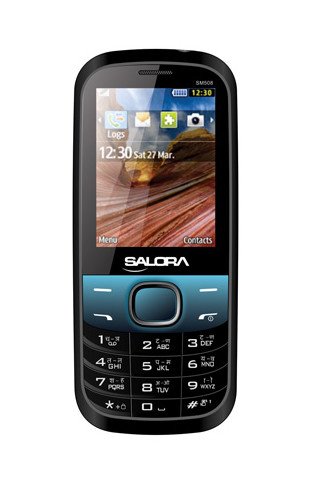
תמונה זו מציגה את החלק הקדמי view of the Salora SM508 mobile phone. It features a color display at the top, a central navigation button, and a standard alphanumeric keypad below. The phone has a black body with blue accents around the navigation cluster.
3. התקנה
3.1 הכנסת כרטיס/י SIM
- כבה את הטלפון והסר את הכיסוי האחורי.
- הסר בזהירות את הסוללה.
- Locate the SIM card slots. The Salora SM508 supports dual SIM cards.
- Insert your SIM card(s) into the designated slot(s) with the gold contacts facing down. Ensure they are securely seated.
3.2 Inserting Battery
- יישר את מגעי הסוללה עם המגעים בתא הסוללה של הטלפון.
- Gently press the 1800 mAh Li-Ion battery into place until it clicks.
- החזירו את הכיסוי האחורי, וודאו שהוא מהודק היטב.
3.3 Inserting Memory Card (Optional)
- With the back cover and battery removed, locate the memory card slot.
- Insert a microSD card (up to 8GB) into the slot with the gold contacts facing down.
- החלף את הסוללה ואת הכיסוי האחורי.
3.4 טעינת המכשיר
- Connect the charger to the charging port on your phone.
- חבר את המטען לשקע חשמל.
- The battery indicator on the screen will show the charging status. Charge the phone fully before first use.
3.5 Initial Power On/Off
- כדי להפעיל: לחץ והחזק את לחצן ההפעלה/סיום שיחה עד שהמסך יידלק.
- כדי לכבות: לחץ והחזק את לחצן ההפעלה/סיום שיחה עד להופעת אפשרויות הכיבוי, לאחר מכן בחר 'כיבוי'.
4. הוראות הפעלה
4.1 ניווט בסיסי
- Use the navigation keys (up, down, left, right) to move through menus and options.
- Press the central 'OK' or 'Select' button to confirm a selection.
- Use the 'Back' or 'Clear' button to return to the previous screen or delete characters.
4.2 ביצוע וקבלת שיחות
- להתקשר: הזינו את מספר הטלפון באמצעות לוח המקשים ולחצו על כפתור החיוג הירוק.
- כדי לקבל שיחה: כאשר הטלפון מצלצל, לחץ על כפתור השיחה הירוק כדי לענות.
- כדי לסיים שיחה: לחץ על כפתור סיום השיחה האדום.
4.3 שליחה וקבלת SMS
- נווטו לתפריט 'הודעות'.
- בחר 'כתוב הודעה' או 'הודעת SMS חדשה'.
- הזן את ההודעה שלך באמצעות לוח המקשים.
- Add the recipient's number or select from contacts.
- לחץ על 'שלח'.
4.4 שימוש במצלמה
- גש לאפליקציית המצלמה מהתפריט הראשי.
- The phone features a 1.3 MP primary (rear) camera.
- מסגר את התמונה שלך באמצעות הצג.
- Press the 'OK' or 'Capture' button to take a photo.
4.5 מולטימדיה וקישוריות
- שקע אודיו: The phone includes a 3.5 mm audio jack for connecting headphones or external speakers.
- בלוטות': Enable Bluetooth from the settings menu to connect to compatible devices for file transfer or hands-free communication.
- GPRS: The phone supports GPRS for basic internet connectivity. Consult your network provider for data plan details.
5. תחזוקה
5.1 ניקוי המכשיר שלך
- השתמש במטלית רכה, יבשה ונטולת סיבים כדי לנקות את מסך הטלפון וגוף הטלפון.
- הימנע משימוש בכימיקלים קשים, ממיסים לניקוי או חומרי ניקוי חזקים.
- Do not allow water or liquids to enter the phone.
5.2 טיפול בסוללה
- הימנעו מחשיפת הסוללה לטמפרטורות קיצוניות (חמות או קור).
- אין לנקב, לפרק או לקצר את הסוללה.
- If the battery is damaged or swollen, discontinue use immediately and replace it with an authorized Salora battery.
5.3 אחסון
- אחסן את הטלפון במקום קריר ויבש, הרחק מאור שמש ישיר ולחות.
- אם מאחסנים את הסוללה לתקופה ממושכת, יש לוודא שהיא טעונה חלקית (כ-50%) כדי לשמר את אורך חייה.
6. פתרון תקלות
If you encounter issues with your Salora SM508, please refer to the following common solutions:
- הטלפון לא נדלק:
ודא שהסוללה טעונה. חבר את המטען והמתן מספר דקות לפני שתנסה להפעיל. בדוק אם הסוללה הוכנסה כראוי. - אין אות רשת:
Check if your SIM card is correctly inserted. Ensure you are in an area with network coverage. Try restarting the phone. - לא ניתן לבצע/לקבל שיחות:
Verify that your SIM card is active and has sufficient balance/plan. Check network signal strength. Ensure call barring or flight mode is not enabled. - בעיות טעינה:
Ensure the charger is properly connected to both the phone and the power outlet. Try using a different compatible charger. Check the charging port for any debris. - לוח המקשים לא מגיב:
הפעל מחדש את הטלפון. אם הבעיה נמשכת, ודא שאין נזק פיזי למקלדת.
If the problem persists after trying these steps, please contact Salora customer support.
7. מפרטים
Below are the detailed technical specifications for the Salora SM508 mobile phone:
| תכונה | מִפרָט |
|---|---|
| מותג | סלורה |
| דֶגֶם | SM508 |
| מַעֲרֶכֶת הַפעָלָה | Android 5.1, Android v5 1 OS (Note: This specification appears to be an error in the source data for a basic phone with a keypad interface. The phone operates on a proprietary feature phone OS.) |
| גודל מסך | 6.1 Centimetres (2.4" TFT Screen) |
| הַחְלָטָה | 320 x 240 פיקסלים |
| מצלמה ראשית | 1.3 מגה פיקסל (אחורי) |
| סוֹלְלָה | 1800 מיליאמפר/שעה, Li-Ion |
| קיבולת אחסון זיכרון | ניתן להרחבה עד 8GB |
| תמיכת SIM | סים כפול |
| טכנולוגיות קישוריות | Bluetooth, GPRS |
| ג'ק אודיו | 3.5 מ"מ |
| ממשק התקן - ראשי | לוח מקשים |
| גורם צורה | בַּר |
| צֶבַע | שחור, כחול |
| משקל פריט | 140 גרם |
| מידות חבילה | 14 x 9.4 x 6.2 ס"מ |
| תאריך ראשון זמין | 18 בפברואר 2014 |
8. אחריות ותמיכה
8.1 מידע אחריות
The Salora SM508 comes with a אחריות יצרן לשנה עבור המכשיר מיום הרכישה. אביזרים המצורפים לאריזה, כולל סוללות, מכוסים על ידי אחריות יצרן ל-6 חודשים מתאריך הרכישה. אחריות זו מכסה פגמי ייצור ובעיות הנובעות משימוש רגיל.
אנא שמור את קבלת הרכישה כהוכחת קנייה לצורך תביעות אחריות.
8.2 תמיכת לקוחות
For any technical assistance, warranty claims, or further inquiries regarding your Salora SM508 mobile phone, please contact Salora customer support directly. Refer to the packaging or the official Salora webאתר לקבלת פרטי הקשר העדכניים ביותר.