
מָבוֹא
This manual provides instructions for the proper use, setup, and maintenance of your Beats by Dr. Dre In-Ear Headphones, Model OMEL-MR-PN-6694832. Please read this manual thoroughly before using the product to ensure optimal performance and longevity.
המוצר נגמרview
The Beats by Dr. Dre In-Ear Headphones are designed for high-quality audio delivery and convenience. Key features include:
- Solid Metal Housing: Constructed with durable metal for enhanced resilience.
- Grid-Iron Tough Build: Engineered for robustness and durability.
- מיקרופון מובנה: Facilitates hands-free calls. Note that inline remote or microphone functionality may be limited with Apple devices.
- Tangle-Free Cables: Designed to prevent tangling for ease of use and storage.
- עיצוב קל משקל ומתקפל: Offers portability and comfort during extended wear.
- בקרת עוצמת הקול: Integrated controls for easy audio adjustments.
- Android Phone Control Support: Optimized for use with Android devices.
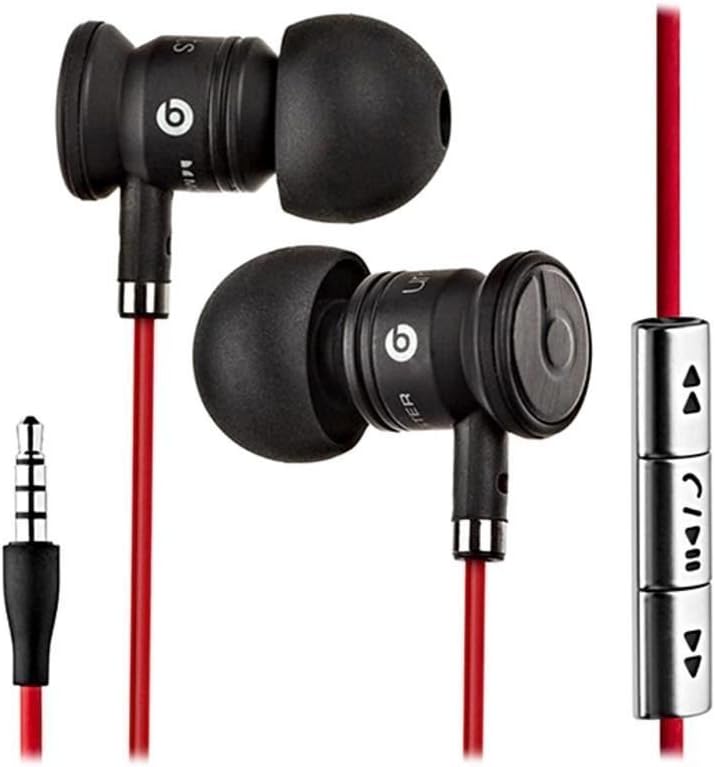
Image: The Beats by Dr. Dre In-Ear Headphones, featuring black earbuds, a red tangle-free cable, and an inline remote with control buttons.
הגדרה
- בחר טיפים לאוזניות: Choose the ear tips that provide the most comfortable and secure fit for your ears. The headphones come with various sizes to ensure optimal sound isolation and comfort.

Image: The Beats by Dr. Dre In-Ear Headphones displayed with a selection of different sized ear tips and a branded carrying pouch.
- התחבר למכשיר: הכנס את שקע האודיו בגודל 3.5 מ"מ ליציאת האוזניות של מכשיר השמע שלך (סמארטפון, טאבלט, נגן MP3 וכו').
- Position Earbuds: Gently insert the earbuds into your ears, ensuring a snug fit. The cable should hang comfortably.
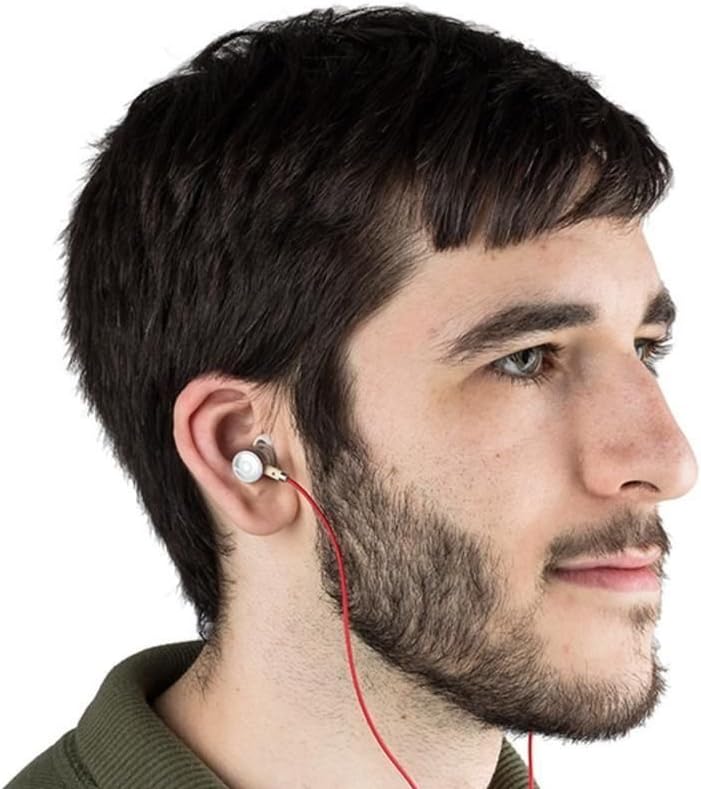
Image: A person wearing the Beats by Dr. Dre In-Ear Headphones, demonstrating proper earbud placement.
הוראות הפעלה
השמעת אודיו
- הפעל/השהה: Press the center button on the inline remote once.
- הרצועה הבאה: לחץ פעמיים במהירות על כפתור המרכז.
- רצועה קודמת: לחץ על הלחצן המרכזי שלוש פעמים במהירות.
- הגבר קול: Press the '+' button on the inline remote.
- להנמיך קול: Press the '-' button on the inline remote.
ניהול שיחות
- מענה/סיום שיחה: לחץ על הלחצן האמצעי פעם אחת במהלך שיחה נכנסת או שיחה פעילה.
- דחה שיחה: Press and hold the center button for approximately two seconds during an incoming call.
פֶּתֶק: Functionality of the inline remote and microphone may be limited or vary when used with Apple devices compared to Android devices.
תַחזוּקָה
- ניקוי: Regularly wipe the earbuds and cable with a soft, dry, lint-free cloth. Do not use harsh chemicals or abrasive materials.
- טיפול בקצה האוזן: הסירו את קצוות האוזניים מעת לעת ונקו אותם עם סבון עדין ומים. ודאו שהם יבשים לחלוטין לפני חיבורם מחדש.
- אִחסוּן: When not in use, store your headphones in the provided carrying pouch to protect them from dust, dirt, and tangling.

Image: The black carrying pouch with the Beats by Dr. Dre logo, designed for headphone storage.
- הימנע מלחות: הרחיקו את האוזניות ממים ולחות מוגזמת.
פתרון בעיות
- אין צליל:
- - Ensure the 3.5mm jack is fully inserted into your device.
- - Check the volume level on both your device and using the inline remote.
- - Test the headphones with another audio device to rule out device issues.
- המיקרופון לא עובד:
- - Verify that your device's microphone settings are correctly configured.
- - Remember that microphone functionality may be limited with Apple devices.
- - Ensure the microphone is not obstructed.
- בעיות בשלט רחוק:
- - Confirm compatibility with your device. Full functionality is primarily supported on Android devices.
- - Ensure the connection is secure.
מפרטים
| תכונה | פְּרָט |
|---|---|
| מותג | מכות |
| מספר דגם | OMEL-MR-PN-6694832 |
| מיקום אוזניים | אין אוזן |
| גורם צורה | אין אוזן |
| טכנולוגיית קישוריות | חוטי |
| משקל פריט | 0.3 אונקיות |
| חומר המארז | מַתֶכֶת |
| תכונות כבלים | סבך חינם |
| תכונות נוספות | Foldable, Lightweight, Volume Control, Android Phone Control |
| סוג בקרה | מְרוּחָק |
סרטון מוצר רשמי
וידאו: סיום רשמיview of the Beats by Dr. Dre In-Ear Headphones, demonstrating key features and design elements. Note: The video narration incorrectly refers to the product as wireless; these headphones are wired as shown in the video and product images.
אחריות ותמיכה
For warranty information and customer support, please refer to the official Beats by Dr. Dre webאתר או צור קשר עם הקמעונאי שלך. שמור את הוכחת הרכישה שלך לצורך תביעות אחריות.
לסיוע נוסף, ניתן לבקר ב חנות ביטס באמזון.