
1. הקדמה
תודה על הרכישהasing the Lexon LR98R1 Onoff LCD Alarm Clock. This manual provides detailed instructions for the proper setup, operation, and maintenance of your device. Please read this manual thoroughly before use and retain it for future reference.
The Lexon Onoff alarm clock features a unique design where flipping the clock activates or deactivates the alarm. It includes an LCD display with a blue electroluminescent backlight for clear visibility.
2. מידע בטיחות
- אין לחשוף את המכשיר לטמפרטורות קיצוניות, לאור שמש ישיר או לחות גבוהה.
- הימנע מלהפיל את המכשיר או לחשוף אותו למכות חזקות.
- Do not attempt to disassemble or modify the alarm clock. This will void the warranty.
- הרחק את המכשיר ממים ומנוזלים אחרים.
- השלך סוללות משומשות בצורה אחראית בהתאם לתקנות המקומיות.
- Use only the specified battery type (2 x AAA).
3. תכולת החבילה
ודא שכל הפריטים נמצאים בחבילה:
- Lexon LR98R1 Onoff LCD Alarm Clock
- מדריך למשתמש (מסמך זה)
הערה: סוללות AAA אינן כלולות ויש לרכוש אותן בנפרד.
4. המוצר נגמרview
Familiarize yourself with the components of your Lexon Onoff alarm clock.
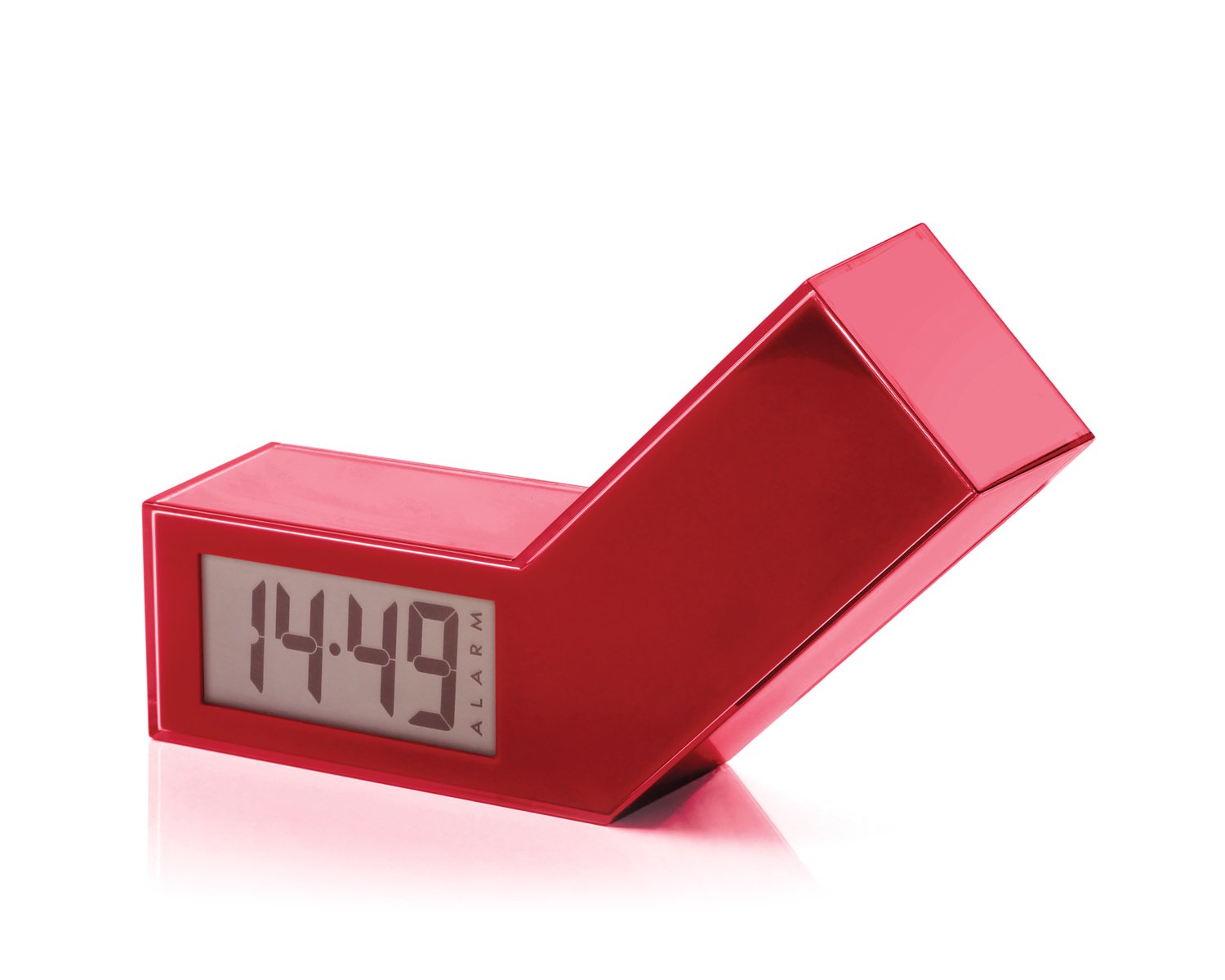
איור 1: חזית view of the Lexon LR98R1 Onoff LCD Alarm Clock. The image displays the alarm clock in its red casing, with the LCD screen visible. The side labeled 'ON' is facing upwards, indicating the alarm is active. The clock has a minimalist rectangular design.
While specific button labels are not visible in the provided image, typical alarm clock controls are usually located on the back or sides. These generally include:
- כפתור הגדרת זמן: To adjust the current time.
- כפתור הגדרת אזעקה: To adjust the alarm time.
- Hour/Minute Adjustment Buttons: To change hour and minute values.
- לחצן נודניק/אור: To temporarily silence the alarm or activate the backlight.
- תא סוללות: Located on the back or bottom.
5. התקנה
5.1 התקנת סוללה
- Locate the battery compartment cover on the back or bottom of the alarm clock.
- החלק או הרם את המכסה כדי לפתוח את התא.
- הכניסו שתי (2) סוללות AAA, תוך הקפדה על הקוטביות הנכונה (+ ו-) כפי שמסומן בתוך התא.
- החזר היטב את מכסה תא הסוללות.
Note: Batteries are not included. Please use new AAA alkaline batteries for optimal performance.
5.2 הפעלה ראשונית
Once batteries are installed, the LCD display should illuminate, and the clock will typically start at a default time (e.g., 12:00 AM). You will then need to set the current time and alarm.
6. הוראות הפעלה
6.1 הגדרת השעה הנוכחית
- לחץ והחזק את זמן מוגדר button (or similar, refer to device markings) until the hour digits begin to flash.
- השתמש ב- שָׁעָה ו דַקָה adjustment buttons to set the correct hour and minute.
- לִלְחוֹץ זמן מוגדר שוב כדי לאשר ולצאת ממצב הגדרת זמן.
6.2 הגדרת זמן האזעקה
- לחץ והחזק את ערכת התראה button (or similar) until the alarm hour digits begin to flash.
- השתמש ב- שָׁעָה ו דַקָה adjustment buttons to set your desired alarm time.
- לִלְחוֹץ ערכת התראה again to confirm and exit alarm setting mode.
6.3 Activating/Deactivating the Alarm (Onoff Feature)
The Lexon Onoff alarm clock features a unique flip mechanism:
- אֶל לְהַפְעִיל the alarm, place the clock with the side labeled "ON" facing upwards. An alarm icon should appear on the LCD display.
- אֶל לנטרל the alarm, flip the clock so the side labeled "כבוי" is facing upwards. The alarm icon should disappear from the display.
6.4 Silencing the Alarm / Snooze Function
- כאשר האזעקה נשמעת, לחץ על נודניק / אור button (usually a large button on top) to temporarily silence the alarm. The alarm will sound again after a few minutes (typically 5-10 minutes).
- To completely turn off the alarm for the day, flip the clock to the "כבוי" עמדה.
6.5 תאורה אחורית לתצוגה
הקש על נודניק / אור button to activate the blue electroluminescent backlight for a few seconds, allowing you to view הזמן בתנאי תאורה חלשים.
7. תחזוקה
7.1 ניקוי
Wipe the surface of the alarm clock with a soft, dry cloth. Do not use abrasive cleaners, solvents, or chemical sprays, as these may damage the finish or electronic components.
7.2 החלפת סוללה
When the display dims or the alarm function becomes unreliable, it is time to replace the batteries. Follow the battery installation steps in Section 5.1. Always replace both AAA batteries at the same time.
8. פתרון תקלות
| בְּעָיָה | סיבה אפשרית | פִּתָרוֹן |
|---|---|---|
| התצוגה ריקה או עמומה. | הסוללות מתות או מותקנות בצורה לא נכונה. | החליפו את הסוללות בסוללות AAA חדשות, תוך הקפדה על קוטביות נכונה. |
| האזעקה לא נשמעת. | Alarm is not activated (clock is in "OFF" position) or alarm time is not set. | Flip the clock to the "ON" position. Verify the alarm time is set correctly (Section 6.2). Ensure batteries are not low. |
| הזמן אינו נכון. | Time was not set correctly or batteries were removed/replaced. | Reset the current time (Section 6.1). |
| Backlight does not work. | סוללות חלשות. | החלף סוללות. |
9. מפרטים
| מספר דגם | LR98R1 |
| מותג | לקסון |
| סוג תצוגה | LCD with Blue Electroluminescent Backlight |
| מקור כוח | 2 x סוללות AAA (לא כלולות) |
| חוֹמֶר | ABS / Injected Polycarbonate |
| מידות (L x W x H) | 13.5 x 3.5 x 8 ס"מ (כ-5.3 x 1.4 x 3.1 אינץ') |
| סוג תנועה | קְוָרץ |
| תכונות מיוחדות | Onoff flip alarm activation/deactivation, Snooze function |
10. אחריות ותמיכה
The Lexon LR98R1 Onoff LCD Alarm Clock comes with a אחריות יצרן לשנה מתאריך הרכישה. אחריות זו מכסה פגמים בחומרים ובעבודה בשימוש רגיל.
האחריות אינה מכסה:
- נזק שנגרם מתאונה, שימוש לרעה, שימוש לרעה, הצפה, שריפה, רעידת אדמה או סיבות חיצוניות אחרות.
- Damage caused by operating the product outside the permitted or intended uses described in this manual.
- Damage caused by service performed by anyone who is not an authorized representative of Lexon.
- Products or parts that have been modified to alter functionality or capability without the written permission of Lexon.
For warranty claims or technical support, please contact Lexon customer service through their official website or your retailer. Please have your proof of purchase and model number (LR98R1) ready.