
1. הקדמה
Welcome to the Teknetics EuroTek Metal Detector user manual. This guide provides essential information for the proper assembly, operation, maintenance, and troubleshooting of your new metal detector. The EuroTek is designed for both beginners and experienced hobbyists, offering precise target identification and versatile performance in various environments.
Please read this manual thoroughly before using your detector to ensure optimal performance and longevity of the device.
2. מידע בטיחות
Always prioritize safety when using your metal detector. Adhere to the following guidelines:
- Respect Property Rights: תמיד יש לקבל אישור לפני חיפוש בשטח פרטי.
- Avoid Hazardous Areas: Do not use the detector near underground cables, gas lines, or other utilities. Be aware of your surroundings.
- הגנת עיניים: Wear appropriate eye protection when digging to prevent injury from debris.
- בטיחות סוללה: Use only recommended batteries. Do not mix old and new batteries, or different types of batteries. Dispose of batteries responsibly.
- תנאי מזג האוויר: Avoid using the control housing in heavy rain. The search coil is waterproof, but the control unit is not.
3. תכולת החבילה
Upon opening your Teknetics EuroTek package, please verify that all the following components are present:
- Teknetics EuroTek Control Housing
- 8-Inch Concentric Waterproof Search Coil
- Upper Stem with Armrest
- גזע תחתון
- Stem Locking Collars
- Search Coil Bolt and Wing Nut
- מדריך למשתמש
4. הוראות הרכבה
Follow these steps to assemble your Teknetics EuroTek Metal Detector:
- חבר את סליל החיפוש: Insert the lower stem into the search coil yoke. Align the holes and secure with the provided bolt and wing nut. Ensure it is snug but allows for slight angle adjustment.
- חבר גבעולים: Slide the lower stem into the upper stem. Adjust the length to a comfortable position and secure it with the locking collar.
- Mount the Control Housing: Slide the control housing onto the upper stem. Ensure it clicks securely into place.
- התקן סוללות: Open the battery compartment on the back of the control housing. Insert one 9V alkaline battery, observing the polarity markings. Close the compartment securely.
- לעטוף את הכבל: Carefully wrap the search coil cable around the stem, leaving enough slack near the coil for angle adjustment. Plug the coil connector into the corresponding port on the control housing.
- כוונון משענת היד: Position the armrest for comfortable use.

Figure 1: Fully assembled Teknetics EuroTek Metal Detector.
5. Controls and Display Overview
The Teknetics EuroTek features an intuitive control panel and LCD display for easy operation.
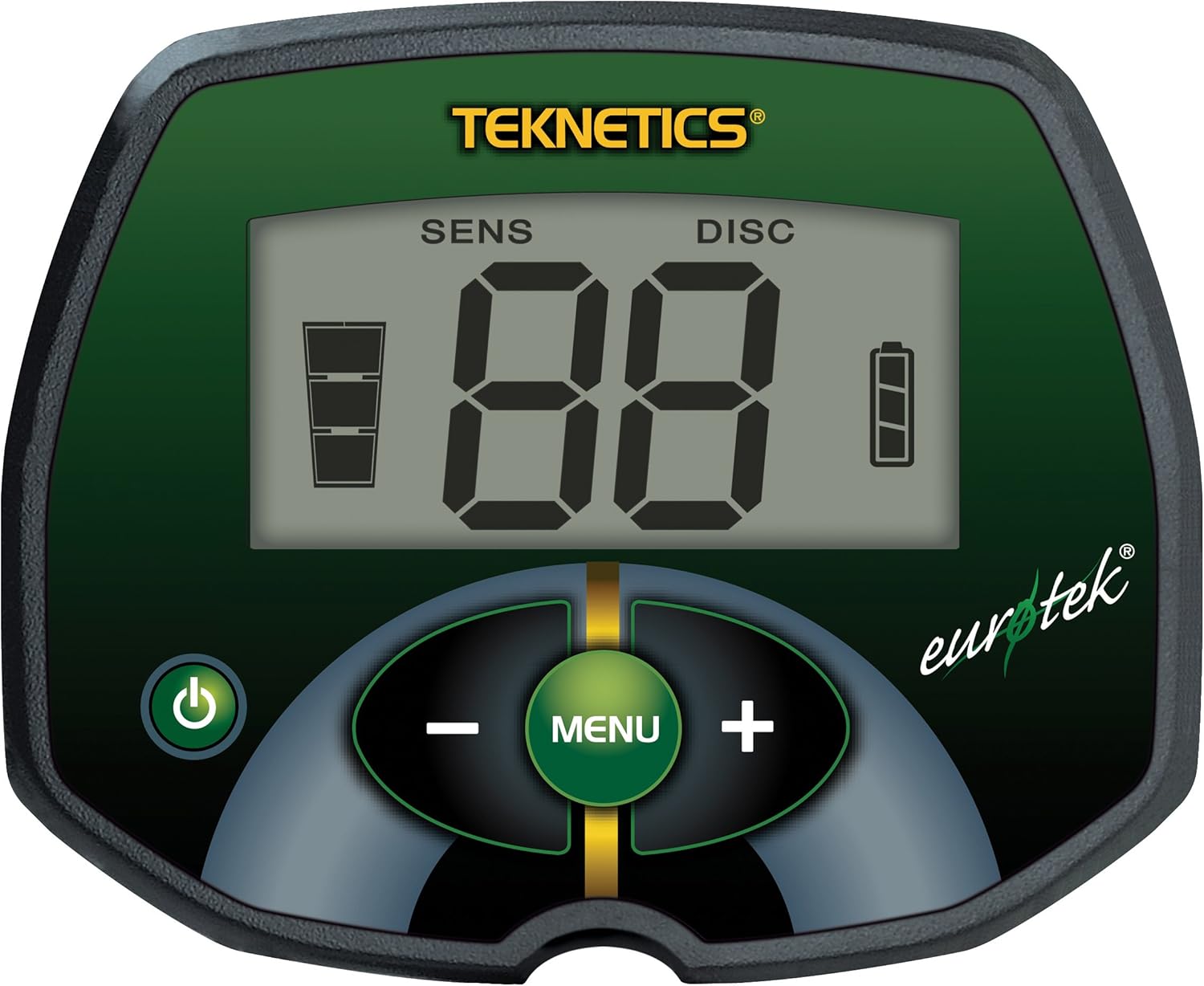
איור 2: תקריב view of the EuroTek control panel.
5.1. תצוגת LCD
- SENS (רגישות): Indicates the current sensitivity level. Higher sensitivity increases detection depth but can also increase interference.
- דיסק (אפליה): Shows the current discrimination level. This setting allows you to filter out unwanted metals (e.g., iron).
- Target ID (VDI Numbers): A two-digit number (0-99) that helps identify the probable type of metal detected. Different metals produce different VDI ranges.
- מחוון סוללה: Displays the remaining battery life. Replace batteries when the indicator shows low power.
5.2. כפתורי בקרה
- כפתור הפעלה (⏻): Press to turn the detector ON or OFF.
- לחצן MENU: Used to cycle through adjustable settings (Sensitivity, Discrimination).
- כפתור פלוס (+): Increases the value of the selected setting.
- כפתור מינוס (-): Decreases the value of the selected setting.
6. הוראות הפעלה
6.1. הפעלה והגדרה ראשונית
- לחץ על לחצן ההפעלה (⏻) to turn on the detector.
- The detector will perform a brief self-test.
- כוונון רגישות (SENS): Press the MENU button until SENS is displayed. Use the PLUS (+) and MINUS (-) buttons to adjust the sensitivity. Start with a moderate level and increase it gradually until you hear occasional false signals, then reduce it slightly.
- Adjust Discrimination (DISC): Press the MENU button until DISC is displayed. Use the PLUS (+) and MINUS (-) buttons to set the discrimination level. A higher DISC setting will filter out more ferrous (iron) targets, but may also cause you to miss some desirable targets.
6.2. Understanding Target Identification
The EuroTek provides a two-digit VDI (Visual Discrimination Indicator) number on the LCD display to help identify detected targets. Lower numbers typically indicate ferrous metals, while higher numbers suggest non-ferrous metals like coins or jewelry. Familiarize yourself with common VDI ranges for targets you wish to find.
6.3. צלילי שמע
The detector produces distinct audio tones for different types of metals. Generally, low tones indicate ferrous targets, and higher tones indicate non-ferrous targets. Pay attention to these audio cues as they provide valuable information about the detected object.
6.4. Sweeping Technique
Hold the detector with the search coil parallel to the ground, approximately 1-2 inches above the surface. Sweep the coil slowly from side to side in overlapping arcs. Maintain a consistent speed and height for best results. When a target is detected, the VDI number will appear, and an audio tone will sound.

Figure 3: The waterproof search coil allows for detection in shallow water.
6.5. Using the Waterproof Search Coil
The 8-inch concentric search coil is waterproof, allowing for detection in shallow water, wet sand, and other damp environments. Ensure the control housing remains dry, as it is not waterproof. After use in water, rinse the coil with fresh water and dry thoroughly.
7. תחזוקה
Proper maintenance will extend the life and performance of your Teknetics EuroTek Metal Detector.
- ניקוי: נגב את סליל החיפוש והגבעול בעזרת מודעהamp cloth after each use. Avoid harsh chemicals. Keep the control housing clean and dry.
- טיפול בסוללה: הסר את הסוללות אם הגלאי לא ישמש למשך תקופה ממושכת כדי למנוע דליפה.
- אִחסוּן: Store the detector in a cool, dry place. Avoid extreme temperatures.
- בדיקת כבלים: בדוק מעת לעת את כבל סליל החיפוש לאיתור סימני בלאי או נזק.
8. פתרון תקלות
If you encounter issues with your Teknetics EuroTek, refer to the following common problems and solutions:
| בְּעָיָה | סיבה אפשרית | פִּתָרוֹן |
|---|---|---|
| הגלאי לא נדלק. | סוללה מתה או מותקנת בצורה שגויה. | Replace with a fresh 9V alkaline battery, ensuring correct polarity. |
| Erratic signals or false alarms. | High sensitivity setting, electromagnetic interference (EMI), mineralized ground. | Reduce sensitivity. Move away from power lines, cell phones, or other electronic devices. Sweep slower. |
| עומק גילוי גרוע. | Low sensitivity, incorrect sweep speed, small target size. | Increase sensitivity. Ensure consistent, slow sweep. Target size affects depth. |
| עוצמת הקול חזקה מדי. | The EuroTek does not have a built-in volume control. | Use headphones with their own volume control for comfortable listening. |
| Inaccurate depth indicator. | Depth indicators are approximations and can vary based on target size, shape, and ground conditions. | Use the depth indicator as a general guide. Practice with known targets to understand its behavior. |
If the problem persists after attempting these solutions, please contact Teknetics customer support.
9. מפרטים
Key technical specifications for the Teknetics EuroTek Metal Detector (Model ETEK-SKD):
| תכונה | פְּרָט |
|---|---|
| מותג | Teknetics |
| מספר דגם | ETEK-SKD |
| חפש סליל | 8-inch Concentric, Waterproof |
| מקור כוח | סוללה אחת של 9V (נדרשת) |
| משקל פריט | 2.4 פאונד (כ-1.09 ק"ג) |
| מידות המוצר | מידות: אורך 128.3 ס"מ, רוחב 20.3 ס"מ, גובה 12.7 ס"מ (כ-50.5 ס"מ, אורך 8 ס"מ, רוחב 5 ס"מ) |
| אורך מתכוונן | כֵּן |
| חוֹמֶר | ABS פלסטיק |
| דירוג הגנה בינלאומי | IP65 (Control housing is not waterproof) |
10. אחריות ותמיכת לקוחות
Teknetics products are known for their quality and reliability. The Teknetics EuroTek Metal Detector typically comes with a 5-year limited warranty, covering defects in materials and workmanship under normal use. Please refer to the warranty card included with your product for specific terms and conditions.
For technical assistance, warranty claims, or general inquiries, please contact Teknetics customer support through their official website or the contact information provided in your product packaging. When contacting support, please have your model number (ETEK-SKD) and purchase date available.