
1. הקדמה
תודה על הרכישהasing the Fonestar AS-170RU Hi-Fi Amplifier. This device is designed to provide high-fidelity stereo audio amplification, featuring a built-in USB/MP3 player, AM/FM digital tuner, and multiple audio inputs. This manual provides detailed instructions for safe installation, operation, and maintenance of your ampאנא קרא מדריך זה בעיון לפני השימוש ושמור אותו לעיון עתידי.
2. הוראות בטיחות
- ספק כוח: להבטיח את amplifier is connected to a power supply matching the voltage specified on the unit. Disconnect the power cord from the outlet if the unit will not be used for an extended period.
- אוורור: אין לחסום פתחי אוורור. יש לוודא מרווח מספיק סביב היחידה לזרימת אוויר תקינה ולמנוע התחממות יתר.
- מים ולחות: אין לחשוף את היחידה לגשם, לחות או נוזלים מטפטפים/מתיזים. אין להניח חפצים מלאים בנוזלים, כגון אגרטלים, על היחידה.
- מקורות חום: הרחק את היחידה ממקורות חום כגון רדיאטורים, אוגרי חום, תנורים או מכשירים אחרים (כולל ampמחצבים) המייצרים חום.
- ניקוי: נקה רק עם מטלית יבשה. אין להשתמש בחומרי ניקוי נוזליים או בחומרי ניקוי אירוסולים.
- שֵׁרוּת: אל תנסה לתת שירות למוצר זה בעצמך. הפנה את כל השירות לאנשי שירות מוסמכים.
- מיקום: הנח את היחידה על משטח יציב ושטוח. הימנע מהצבתה באור שמש ישיר או בקרבת שדות מגנטיים חזקים.
3. תכולת החבילה
אנא ודאו שהפריטים הבאים כלולים בחבילה שלכם:
- Fonestar AS-170RU Hi-Fi Ampחיים יותר
- שְׁלַט רָחוֹק
- אנטנת AM
- אנטנת FM
- מדריך למשתמש (מסמך זה)
4. המוצר נגמרview
4.1 לוח קדמי
The front panel provides access to essential controls and the display.
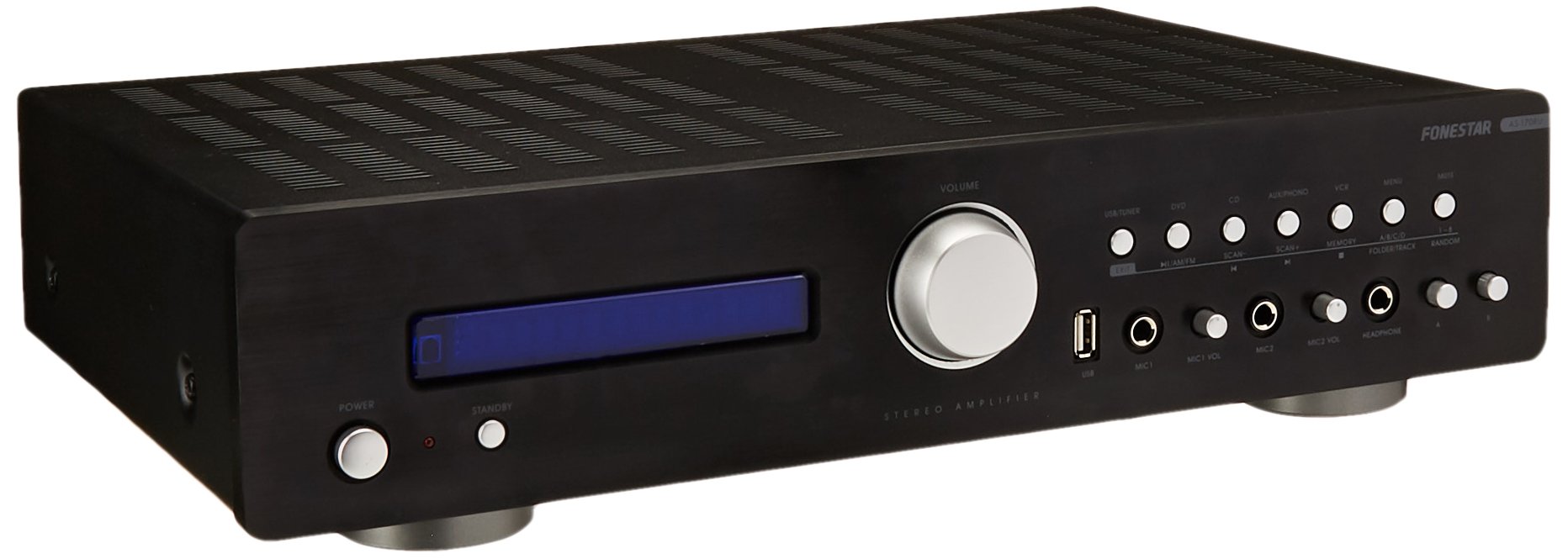
Image: Fonestar AS-170RU Front Panel. תמונה זו מציגה את החלק הקדמי view של amplifier, showing the VFD display, USB port, headphone output, input selectors, volume knob, and other control buttons.
- לחצן הפעלה: הופך את ampחיים יותר לסירוגין.
- תצוגת VFD: Shows current input, volume level, tuner information (frequency, RDS), and USB/MP3 track details (ID3 tag).
- יציאת USB: For connecting USB storage devices to play MP3 files.
- יציאת אוזניות: שקע 6.3 מ"מ לחיבור אוזניות.
- בוררי קלט: Buttons for choosing audio sources (CD, DVD, VCR, AUX/Phono, USB/Tuner).
- בקרת עוצמת הקול: Rotary knob to adjust the master volume level.
- כניסות מיקרופון: Two 6.3mm microphone jacks with independent volume control.
- בקרות טון: Buttons or menu options for adjusting Bass, Treble, and Balance.
4.2 פאנל אחורי
The rear panel contains all the necessary connections for your audio sources, speakers, and antennas.

Image: Fonestar AS-170RU Rear Panel. This image illustrates the rear connections of the amplifier, including speaker terminals (A/B), various RCA input jacks (CD, DVD, VCR, AUX/Phono), REC OUT, PRE OUT, AMP IN, and antenna connections (FM COAX, AM LOOP ANT).
- Speaker Outputs (A/B): Terminals for connecting two pairs of speakers. Supports 4-16 ohms for A or B, or 8-16 ohms for A+B.
- כניסות שמע (RCA):
- קלט CD: For connecting a CD player.
- DVD Input: For connecting a DVD player or other audio source.
- VCR Input: For connecting a VCR or other audio source.
- AUX/PHONO Input: For connecting auxiliary devices or a turntable (Phono input may require a pre-amplifier if your turntable does not have one built-in).
- REC OUT: יציאת RCA לחיבור למכשיר הקלטה.
- PRE OUT: RCA output for connecting to an external power ampחיים יותר.
- AMP IN: RCA input for connecting an external pre-ampחיים יותר.
- חיבורי אנטנה:
- FM COAX 75Ω: לחיבור אנטנת FM.
- AM LOOP ANT: For connecting the supplied AM loop antenna.
שלט רחוק 4.3
The included remote control allows convenient operation of the ampליפר מרחוק.

Image: Fonestar AS-170RU Remote Control. This image shows the remote control unit with various buttons for power, input selection, volume, mute, tuner functions, USB playback controls, and tone adjustments.
- המתנה: הפעלה/כיבוי.
- בוררי קלט: Buttons for CD, DVD, VCR, AUX/PHONO, USB/TUNER.
- עוצמת הקול מעלה/הורדת (VOL +/-): כוונון עוצמת הקול הראשית.
- לְהַשְׁתִיק: משתיק את פלט השמע.
- AM/FM: Switches between AM and FM tuner modes.
- לִסְרוֹק: Scans for radio stations.
- זיכרון: Stores radio station presets.
- בקרות השמעה דרך USB: Play/Pause, Stop, Skip Track, Folder/Track navigation.
- EQ OFF / BASS / TREBLE: Access tone controls.
- RDS / ID3: Displays RDS information for radio or ID3 tag ל- MP3 files.
5. התקנה
5.1 חיבור רמקולים
- להבטיח את ampהמכשיר כבוי ומנותק משקע החשמל.
- Connect your speakers to the "SPEAKERS OUTPUT" terminals on the rear panel.
- התאם את ההדק החיובי (+) של amplifier (red) to the positive (+) terminal of your speaker, and the negative (-) terminal (black) to the negative (-) terminal.
- The AS-170RU supports two groups of speakers (A and B). You can connect one pair to "SPEAKERS A" and another to "SPEAKERS B".
- ודא שהעכבה של הרמקולים שלך תואמת את amplifier's specifications: 4-16 ohms for A or B, or 8-16 ohms for A+B.
5.2 חיבור מקורות שמע
Use RCA cables to connect your audio components to the corresponding input jacks on the rear panel.
- נגן תקליטורים: Connect to the "CD" input.
- נגן DVD: Connect to the "DVD" input.
- וידיאו: Connect to the "VCR" input.
- Auxiliary Device (e.g., smartphone, tablet): Connect to the "AUX/PHONO" input.
- פָּטֵיפוֹן: Connect to the "AUX/PHONO" input. If your turntable does not have a built-in pre-amplifier, you may need an external phono pre-ampחיים יותר.
5.3 אנטנות חיבור
- אנטנת FM: Connect the supplied FM wire antenna to the "FM COAX 75Ω" terminal. Extend the wire for optimal reception.
- אנטנת AM: Connect the supplied AM loop antenna to the "AM LOOP ANT" terminals. Position the loop for best reception.
5.4 חיבור מתח
לאחר שכל חיבורי השמע והרמקולים בוצעו, חברו את החשמל amplifier's power cord into a suitable AC power outlet.
6. הוראות הפעלה
6.1 פעולה בסיסית
- הפעלה/כיבוי: Press the Power button on the front panel or the STANDBY button on the remote control to turn the ampחיים יותר לסירוגין.
- בחר מקור קלט: Press the desired input selector button on the front panel (CD, DVD, VCR, AUX/PHONO) or the remote control (CD, DVD, VCR, AUX/PHONO, USB/TUNER).
- התאם את עוצמת הקול: Rotate the Volume knob on the front panel or use the VOL +/- buttons on the remote control to adjust the sound level.
- לְהַשְׁתִיק: Press the MUTE button on the remote control to temporarily silence the audio. Press it again to restore sound.
6.2 השמעת USB/MP3
- Insert a USB storage device (flash drive) into the USB port on the front panel.
- Select "USB/TUNER" as the input source. The amplifier will automatically detect and begin playing MP3 files.
- Use the playback controls on the remote control (Play/Pause, Stop, Skip Track, Folder/Track) to navigate and control your music.
- The VFD display will show track information, including ID3 tags אם זמין.
- ה amplifier supports up to 65,000 indexable folders and files, with a maximum of 8 folder levels.
6.3 AM/FM Tuner Operation
- Select "USB/TUNER" as the input source, then press the AM/FM button on the remote control to switch between AM and FM bands.
- סריקה אוטומטית: Press the SCAN button on the remote control to automatically search for and store available radio stations.
- כוונון ידני: Use the tuning buttons (usually arrow keys) on the remote control to manually adjust the frequency.
- תחנות מוגדרות מראש: ה amplifier supports 64 presets. Use the MEMORY button to store and recall your favorite stations.
- פונקציית RDS: If available, press the RDS button on the remote control to display Radio Data System information (e.g., station name, program type).
6.4 כניסות מיקרופון
- Connect microphones to the 6.3mm MIC 1 and MIC 2 jacks on the front panel.
- Adjust the independent volume controls for each microphone to achieve the desired level.
6.5 Tone and Balance Control
ה amplifier allows adjustment of bass, treble, and balance through its menu system or dedicated buttons on the remote control. Refer to the remote control section for specific buttons like EQ OFF, BASS, TREBLE.
7. תחזוקה
- ניקוי: נתק את החשמל לפני הניקוי. השתמש במטלית רכה ויבשה כדי לנגב את המשטחים החיצוניים. אין להשתמש בחומרי ניקוי שוחקים, שעווה או ממסים.
- אוורור: בדקו מעת לעת שפתחי האוורור נקיים מאבק ופסולת.
- אִחסוּן: אם מאחסנים את המכשיר לתקופה ממושכת, נתקו אותו משקע החשמל ואחסנו אותו במקום קריר ויבש, הרחק מאור שמש ישיר וטמפרטורות קיצוניות.
8. פתרון תקלות
If you encounter problems with your amplifier, refer to the following table for possible solutions.
| בְּעָיָה | סיבה אפשרית | פִּתָרוֹן |
|---|---|---|
| אין כוח | כבל חשמל לא מחובר; שקע חשמל פגום; Ampמגן במצב המתנה. | Ensure power cord is securely plugged in. Test the outlet with another device. Press the Power/STANDBY button. |
| אין קול | נבחרה קלט שגוי; עוצמת קול נמוכה מדי; רמקולים לא מחוברים כראוי; פונקציית השתקה פעילה. | Select the correct input source. Increase volume. Check speaker connections. Deactivate MUTE. |
| קליטת רדיו גרועה | Antenna not connected or poorly positioned; Interference. | Connect and adjust the position of the AM/FM antennas. Move the ampהרחק ממכשירים אלקטרוניים אחרים. |
| השמעת USB לא עובדת | USB device not inserted correctly; Incompatible file format; USB device faulty. | Ensure USB device is fully inserted. Check if files are MP3 format. Try a different USB device. |
| Amplifier turns off unexpectedly or cycles power | Overheating; Short circuit in speaker wiring; Internal fault. | Ensure adequate ventilation. Check speaker wires for frayed strands causing short circuits. If the problem persists, disconnect power and contact qualified service personnel. |
9. מפרטים
- דֶגֶם: AS-170RU
- תפוקת חשמל: 80 + 80 W RMS at 4 Ω
- עכבת רמקול: 4-16 Ω (A or B), 8-16 Ω (A+B)
- הֲגָנָה: 3 circuits (short circuits, overload, overvoltage)
- נגן USB: MP3 file playback, ID3 tag support. Max 65,000 indexable folders/files, max 8 folder levels.
- כַּונָן: Digital AM/FM, 64 presets, RDS.
- כניסות: 2 x Microphone (6.3mm), 4 x RCA (CD, DVD, VCR, AUX/Phono), 1 x RCA (AMP IN).
- פלטים: 1 x RCA (REC OUT), 1 x RCA (PRE OUT), Headphone (6.3mm).
- לְהַצִיג: Blue VFD.
- בקרת צלילים: Bass, Treble, Balance (via menu/remote).
- מידות: 40 x 40 x 60 ס"מ (כ-15.7 x 15.7 x 23.6 אינץ')
- מִשׁקָל: 7.2 ק"ג (כ-15.87 פאונד)
10. אחריות ותמיכה
For warranty information and technical support, please refer to the warranty card included with your product or contact your authorized Fonestar dealer. Do not attempt to repair the unit yourself, as this may void your warranty.