
1. הקדמה
Thank you for choosing the Fonestar AS-24U Hi-Fi USB/SD/MP3 Amplifier. This manual provides essential information for the safe and efficient operation of your device. Please read it thoroughly before use and retain it for future reference.
2. הוראות בטיחות
- ספק כוח: להבטיח את ampהממיר מחובר למקור חשמל התואם את עוצמת הקול שצוינהtage (230V).
- אוורור: אין לחסום פתחי אוורור. יש להשאיר מרווח מספיק סביב היחידה לזרימת אוויר תקינה ולמנוע התחממות יתר.
- לַחוּת: שמור את amplifier away from water, moisture, and high humidity environments. Do not expose it to dripping or splashing.
- מקורות חום: הימנעו מהצבת היחידה בקרבת מקורות חום כגון רדיאטורים, אוגרי חום, תנורים או מכשירים אחרים המייצרים חום.
- ניקוי: נתקו את כבל החשמל לפני הניקוי. השתמשו במטלית יבשה ורכה. אין להשתמש בחומרי ניקוי נוזליים או בחומרי ניקוי בתרסיס.
- שֵׁרוּת: אל תנסה לתת שירות למוצר זה בעצמך. הפנה את כל השירות לאנשי שירות מוסמכים.
- כניסת חפץ/נוזל: לעולם אל תדחף חפצים מכל סוג לתוך מוצר זה דרך פתחים מכיוון שהם עלולים לגעת בנפח מסוכןtagנקודות או חלקים קצרים שעלולים לגרום לשריפה או להתחשמלות.
3. המוצר נגמרview
3.1 לוח קדמי
The front panel features controls for power, input selection, volume adjustment, and USB/SD media playback. It also includes a display for media information.
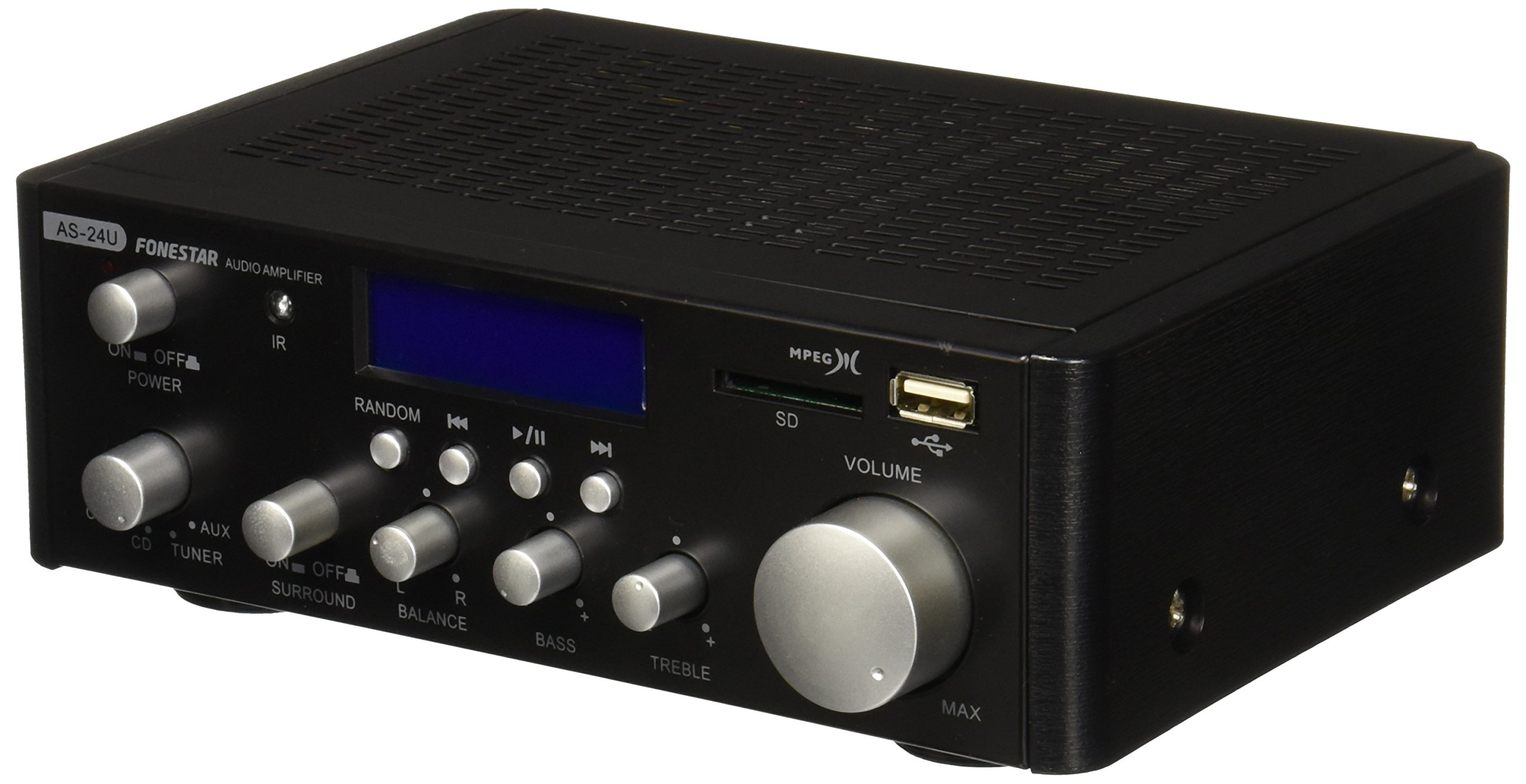
תמונה 1: חזית view of the Fonestar AS-24U amplifier, showing the main controls and display.
3.2 פאנל אחורי
The rear panel provides all necessary connections for audio input sources, speaker outputs, and power.

תמונה 2: אחורי view of the Fonestar AS-24U amplifier, detailing input/output ports and power connection.
- INPUT (AUX, TUNER, CD): RCA stereo inputs for connecting external audio sources.
- SPEAKER OUT (STEREO): Spring clip terminals for connecting passive speakers (4-8 Ω).
- SPEAKER OUT (SURROUND): Additional spring clip terminals for surround speakers (8 Ω).
- כוח ב: AC power input for the main power cable.
- כרךTAGבורר אלקטרוני: Switch for selecting between 115V and 230V power input. Ensure this is set correctly for your region.
שלט רחוק 3.3
השלט הרחוק המצורף מאפשר הפעלה נוחה של amplifier's media playback functions.
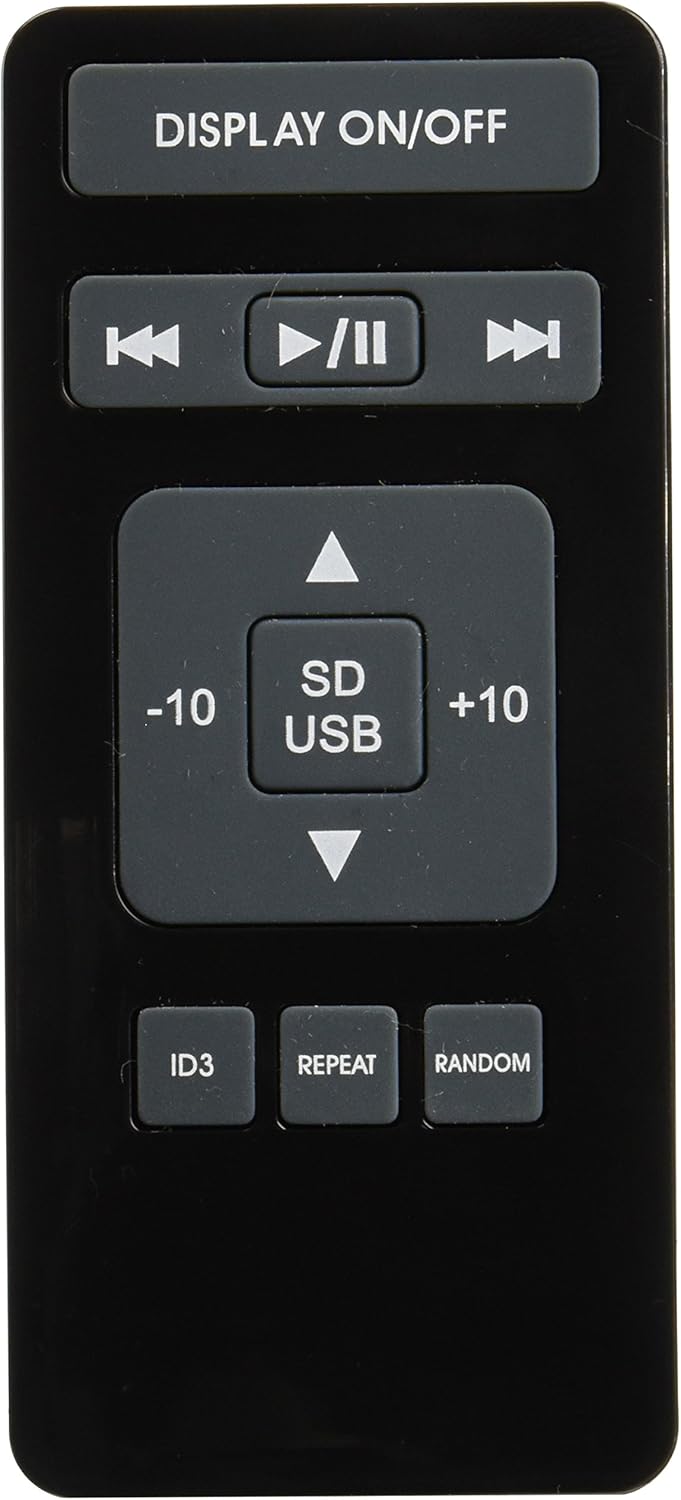
Image 3: Remote control for the Fonestar AS-24U amplifier, showing buttons for media playback and display control.
- תצוגה מופעלת / מושבתת: Toggles the front panel display.
- הפעלה/השהיה, הקודם/הבא: Controls for media playback.
- SD/USB: Selects between SD card and USB drive as the media source.
- -10/+10: Skips tracks by 10.
- ID3: מציג ID3 tag מידע עבור MP3 files.
- לַחֲזוֹר עַל: מחליף מצבי חזרה (למשל, חזרה על אחד, חזרה על הכל).
- אַקרַאִי: Toggles random playback.
4. התקנה
4.1 חיבור רמקולים
- להבטיח את ampהמפיץ כבוי ומנותק מהחשמל.
- Connect your passive speakers to the SPEAKER OUT terminals on the rear panel.
- התאם את ההדק החיובי (+) על amplifier to the positive (+) terminal on your speaker, and the negative (-) to the negative (-).
- For stereo speakers, use the 4-8 Ω terminals. For surround speakers, use the 8 Ω terminals. Ensure your speakers' impedance matches the ampמפרטי הליפר.
4.2 חיבור מקורות שמע
- Connect your audio devices (e.g., CD player, tuner, auxiliary device) to the corresponding RCA INPUT jacks (CD, TUNER, AUX) on the rear panel.
- Ensure left and right channels are correctly matched (red for right, white for left).
4.3 חיבור מתח
- אימות ה-VOLTAGE SELECTOR switch on the rear panel is set to the correct voltage for your region (e.g., 230V).
- Connect the power cable to the POWER IN socket on the rear panel and then to a suitable wall outlet.
5. הוראות הפעלה
5.1 הפעלה/כיבוי
לחץ על כפתור ההפעלה בלוח הקדמי כדי להפעיל את amplifier on or off. A soft start protection circuit is integrated.
5.2 בחירת מקור קלט
Use the input selector knob or buttons on the front panel to choose between CD, TUNER, AUX, USB, or SD inputs.
5.3 כוונון עוצמת הקול
Rotate the main volume knob on the front panel to adjust the overall sound level. Start with a low volume and gradually increase it to a comfortable listening level.
5.4 השמעת USB/SD
- הכנס כונן הבזק מסוג USB או כרטיס SD המכיל קבצי שמע מסוג MP3 files into the respective slot on the front panel.
- Select the USB or SD input using the input selector.
- Use the playback controls (Play/Pause, Previous/Next) on the front panel or remote control to manage your music.
- The remote control allows for additional functions like skipping 10 tracks (+10/-10), displaying ID3 tags, repeating tracks, and random playback.
6. תחזוקה
6.1 ניקוי
כדי לנקות את amplifier, first unplug it from the power outlet. Use a soft, dry cloth to wipe down the exterior surfaces. Do not use abrasive cleaners, waxes, or solvents as they may damage the finish.
6.2 אחסון
אם מאחסנים את amplifier for an extended period, ensure it is unplugged, clean, and stored in a cool, dry place away from direct sunlight and extreme temperatures.
7. פתרון תקלות
- אין כוח:
- בדוק אם כבל החשמל מחובר היטב לשני המכשירים ampשקע החשמל בקיר.
- ודא ששקע הקיר תקין.
- אימות ה-VOLTAGE SELECTOR switch is set correctly.
- אין צליל:
- ודא שנבחר מקור הקלט הנכון.
- בדקו את כל חיבורי הרמקולים לקוטביות נכונה וחיבור בטוח.
- ודא שעוצמת הקול מוגברת ואינה מושתקת.
- בדוק עם מקור שמע אחר.
- סאונד מעוות:
- הפחת את עוצמת הקול.
- בדוק את תאימות העכבה של הרמקול.
- Ensure audio cables are not damaged and are securely connected.
- USB/SD Playback Issues:
- ודא שכונן ה-USB או כרטיס ה-SD מעוצבים לכונן תואם file מערכת (למשל, FAT32).
- ודא שהשמע fileהם בפורמט MP3.
- נסה כונן USB או כרטיס SD אחר.
8. מפרטים
| מותג | FONESTAR |
| דֶגֶם | AS-24U |
| Stereo Power Output | 25 + 25 W max, 15 + 15 W RMS (4 Ω), 12 + 12 W RMS (8 Ω) |
| Surround Power Output | 10 + 10 W max, 6 + 6 W RMS (8 Ω) |
| תשומות | 3 stereo (CD, Tuner, AUX), 2 x RCA 400 mV |
| הגנות | Soft start, short circuit, overload |
| כרך ידtage | 230 וולט |
| מידות (L x W x H) | 5 x 5 x 10 ס"מ (כ-50 x 50 x 100 מ"מ) |
| מִשׁקָל | 1.9 ק"ג |
| קישוריות רמקול | חוטי |
9. אחריות ותמיכה
This Fonestar AS-24U amplifier comes with a standard manufacturer's warranty. Please refer to the warranty card included with your purchase for specific terms and conditions. For technical support, service, or warranty claims, please contact your retailer or the official Fonestar customer service.