
1. הקדמה
This manual provides instructions for the OEM RMT-B119A remote control, designed as a replacement or secondary remote for various Sony Blu-ray player models. This remote offers full functionality for controlling your Blu-ray player's features.
Compatible Sony Blu-ray Player Models:
- BDP-BX59
- BDP-S390
- BDP-S590
- BDP-BX110
- BDP-S1100
- BDP-S3100
- BDP-BX310
2. התקנה
2.1 התקנת סוללה
השלט רחוק דורש שתי (2) סוללות AAA (לא כלולות). בצע את השלבים הבאים כדי להתקין את הסוללות:
- אתר את מכסה תא הסוללות בגב השלט הרחוק.
- לחץ על הלשונית כלפי מטה והחליק את המכסה כלפי מטה כדי לפתוח את התא.
- הכנס שתי סוללות AAA, וודא שהקוטבים החיוביים (+) והשליליים (-) מיושרים כהלכה עם הסימונים בתוך התא.
- החלק את מכסה תא הסוללה בחזרה למקומו עד שיישמע נקישה בטוחה.
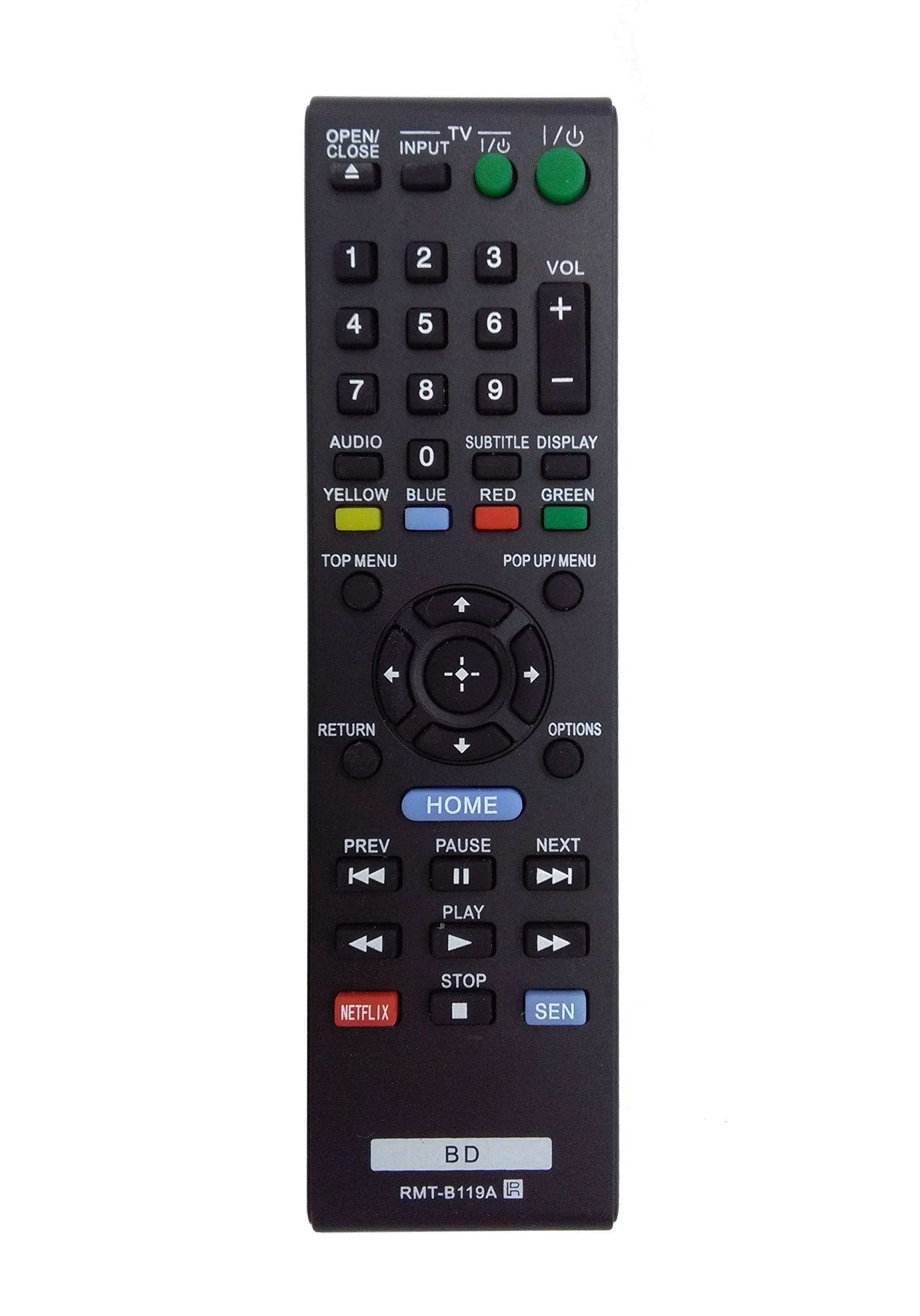
Image: The OEM RMT-B119A remote control, showing the full button layout on the front and a partial view of the open battery compartment on the back, revealing the battery terminals.
3. הוראות הפעלה
3.1 Remote Control Layout and Button Functions
Familiarize yourself with the buttons on your RMT-B119A remote control. Below is a description of each button's primary function.
Image: The OEM RMT-B119A remote control, displaying all buttons and their labels.
- כוח (קלט/פלט): מפעיל או מכבה את נגן ה-Blu-ray.
- OPEN/CLOSE (▲): פותח או סוגר את מגש התקליטורים.
- קֶלֶט: Switches the input source on the connected TV (if programmed).
- טֵלֶוִיזִיָה: Switches the remote to TV control mode (if programmed).
- לוח מספרים (0-9): Used for direct track selection, chapter selection, or entering numerical data.
- נפח (+/-): Adjusts the volume level (typically for the connected TV, if programmed).
- שֶׁמַע: Changes the audio track or language during playback.
- SUBTITLE DISPLAY: Toggles subtitle display on or off, or cycles through available subtitle languages.
- YELLOW, BLUE, RED, GREEN: Color-coded function buttons, typically used for specific features within menus or interactive content. Their function varies depending on the disc or menu.
- תפריט עליון: Accesses the main menu of the Blu-ray disc.
- POP UP/MENU: Displays the pop-up menu during disc playback.
- Directional Pad (↑↓←→): מנווט בין תפריטים ואפשרויות.
- Center Button (Enter/Select): מאשר בחירה או מזין פריט תפריט.
- לַחֲזוֹר: חוזר למסך או לתפריט הקודם.
- אפשרויות: Displays context-sensitive options or settings.
- בית: Accesses the Blu-ray player's home menu.
- PREV (◀◀): דילוג לתחילת הרצועה/פרק הנוכחיים או לרצועה/פרק הקודמים.
- PAUSE (▌▌): מושהה את ההפעלה.
- NEXT (▶▶): Skips to the next track or chapter.
- נגן (▶): מתחיל או ממשיך את ההשמעה.
- עצור (■): מפסיק את ההשמעה.
- נטפליקס: Direct access button for the Netflix streaming service.
- SEN: Direct access button for the Sony Entertainment Network (now PlayStation Video/Music).
- BD: Likely a dedicated button for Blu-ray Disc functions or to switch to Blu-ray mode.
4. תחזוקה
כדי להבטיח את תפקודו התקין ואורך החיים של השלט הרחוק, יש להקפיד על הנחיות התחזוקה הבאות:
- ניקוי: נגבו את השלט הרחוק במטלית רכה ויבשה. במקרה של לכלוך עיקש, נגבו מעטampיש לשטוף את המטלית במים או בחומר ניקוי עדין ולא שוחק. יש להימנע משימוש בכימיקלים חזקים או ממסים.
- החלפת סוללה: Replace batteries when the remote's response becomes sluggish or it stops functioning. Always replace both batteries at the same time with new ones of the same type.
- אִחסוּן: Store the remote in a cool, dry place away from direct sunlight, extreme temperatures, and high humidity. If the remote will not be used for an extended period, remove the batteries to prevent leakage.
- הימנע מטיפות: הגן על השלט מפני פגיעות פיזיות, מכיוון שנפילות עלולות לפגוע ברכיבים הפנימיים.
5. פתרון תקלות
If you experience issues with your remote control, refer to the following table for common problems and solutions:
| בְּעָיָה | סיבה אפשרית | פִּתָרוֹן |
|---|---|---|
| השלט לא עובד. | סוללות מתות או שהוכנסו בצורה שגויה. | החליפו סוללות בחדשות, תוך הקפדה על קוטביות נכונה (+/-). |
| השלט עובד לסירוגין. | סוללה חלשה או חסימה. | Replace batteries. Ensure no objects are blocking the remote's signal path to the Blu-ray player. |
| השלט רחוק לא שולט בטלוויזיה. | Remote not programmed for TV or TV mode not selected. | This remote is primarily for Blu-ray players. TV control functionality may require specific programming not covered by this manual, or may not be supported by this OEM model. |
| הכפתורים לא מגיבים או דביקים. | לכלוך או פסולת מתחת לכפתורים. | Clean the remote control surface. Avoid spilling liquids on the remote. |
6. מפרטים
- מותג: OEM
- מספר דגם: RMT-B119A
- טכנולוגיית קישוריות: אינפרא אדום (IR)
- מכשירים תואמים: Sony Blu-ray Players (specific models listed in Introduction)
- מקור כוח: 2 x סוללות AAA (לא כלולות)
- טווח מקסימלי: בערך 10 מטר (33 רגל)
- תכונה מיוחדת: עיצוב ארגונומי
7. אחריות ותמיכה
This OEM RMT-B119A remote control comes with a אחריות ל-30 יום מיום הרכישה, כיסוי פגמי ייצור. אנא שמור את הוכחת הרכישה שלך לצורך תביעות אחריות.
For technical support or warranty inquiries, please contact the retailer or manufacturer directly. Refer to your purchase documentation for specific contact information.