
1. הקדמה
תודה על הרכישהasing the KLH R5100 Surround Sound Receiver. This receiver is designed to provide high-quality audio and video performance for your home entertainment system. It features multiple audio and video inputs, surround sound processing, and a powerful amplifier to deliver an immersive listening experience. Please read this manual thoroughly before operating the unit to ensure proper setup and optimal performance.
2. מידע בטיחות חשוב
כדי להפחית את הסיכון להתחשמלות, שריפה או נזק ליחידה, אנא הקפידו על אמצעי הזהירות הבאים:
- מקור כוח: חבר את היחידה אך ורק לספק חשמל AC 120V, 60Hz.
- אוורור: ודא אוורור נאות. אין לחסום פתחי אוורור. השאירו מספיק מקום מסביב ליחידה לזרימת אוויר תקינה.
- מים ולחות: אין לחשוף את היחידה לגשם, לחות או לחות מוגזמת. אין להניח חפצים מלאים בנוזלים, כגון אגרטלים, על היחידה.
- חוֹם: הרחק את היחידה ממקורות חום כגון רדיאטורים, אוגרי חום, תנורים או מכשירים אחרים (כולל ampמחצבים) המייצרים חום.
- ניקוי: נתקו את המכשיר משקע החשמל לפני הניקוי. השתמשו במטלית יבשה לניקוי.
- שֵׁרוּת: אל תנסה לטפל ביחידה זו בעצמך. יש לפנות לכל טיפול וטיפול באנשי שירות מוסמכים.
- כבלים: הגן על כבל החשמל מפני הליכה או צביטה, במיוחד בתקעים, בשקעי נוחות ובנקודה שבה הם יוצאים מהיחידה.
3. תכולת החבילה
אנא ודאו שהחבילה שלכם מכילה את הפריטים הבאים:
- KLH R5100 Surround Sound Receiver
- יחידת שלט רחוק
- מדריך למשתמש
- כבלי אודיו/וידאו (סוג RCA)
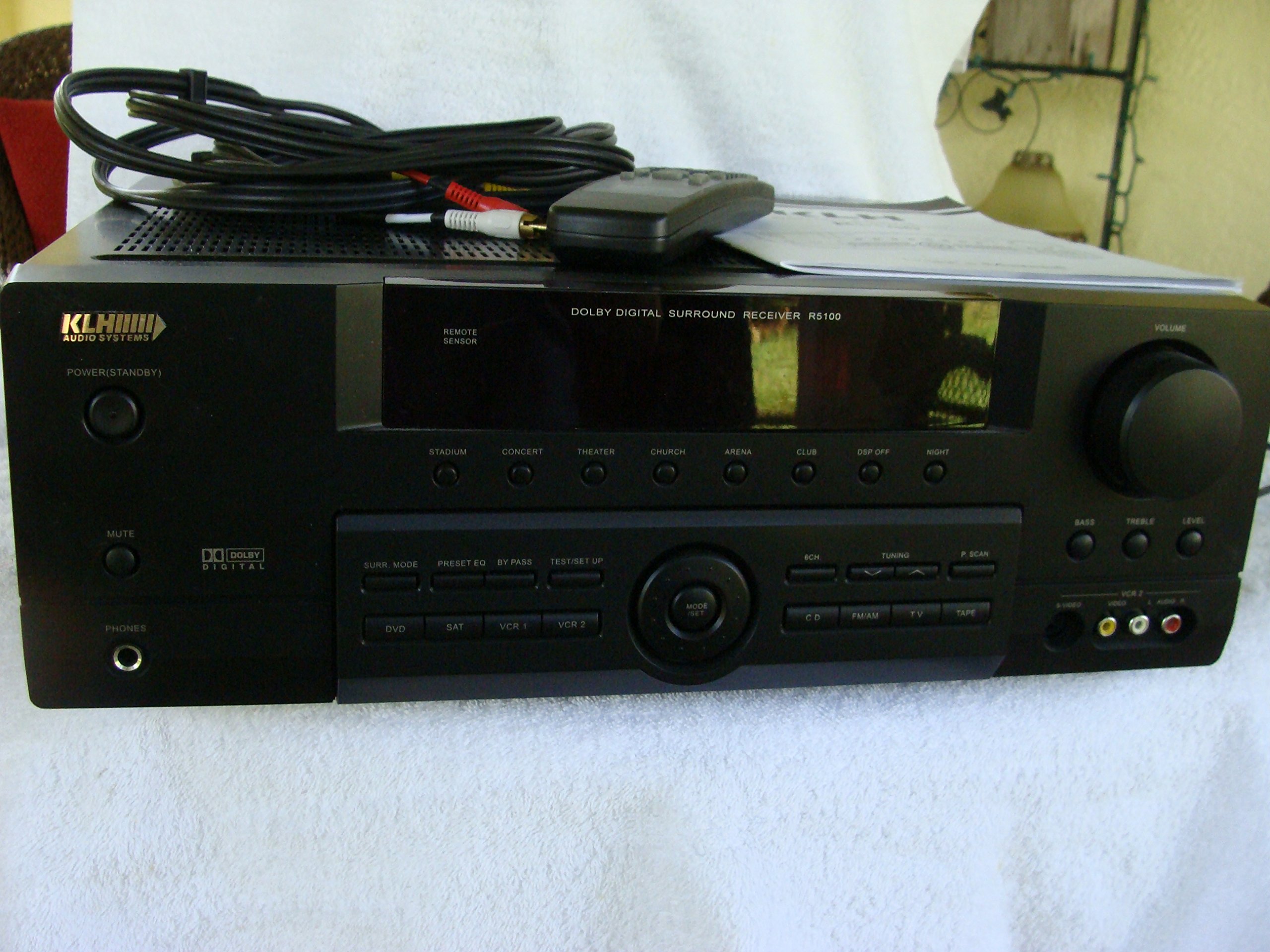
Image: The KLH R5100 receiver, its remote control, user manual, and included audio/video cables.
4. המוצר נגמרview
4.1 בקרות בלוח הקדמי
הפאנל הקדמי מספק גישה לבקרות ומחוונים חיוניים לתפעול יומיומי.

תמונה: מפורט view of the receiver's front panel, highlighting the display, volume control, and input selection buttons.
- לחצן הפעלה: מפעיל או מכבה את המקלט.
- בוררי קלט: Buttons for DVD, SAT, VCR 1, VCR 2, CD, FM/AM, TV, TAPE to choose your audio/video source.
- ידית עוצמת הקול: מכוונן את עוצמת הפלט הכוללת.
- Surround Mode Buttons: Select various sound fields like Stadium, Concert, Theater, Church, Arena, Club, DSP Off, Night.
- Bass/Treble/Level: Controls for adjusting audio tone and individual channel levels.
- שקע אוזניות: להאזנה פרטית.
4.2 חיבורי לוח אחורי
The rear panel houses all input and output terminals for connecting your audio and video components, as well as speakers.

Image: The full rear panel of the receiver, displaying all connection ports for audio, video, and speakers.
- מסופי רמקולים: Connections for Main (Front Left/Right), Center, and Rear (Surround Left/Right) speakers.
- כניסות שמע (RCA): For connecting CD players, tape decks, VCRs, TVs, and other stereo audio sources.
- Video Inputs/Outputs (RCA/S-Video): For connecting video sources like DVD players, VCRs, and TVs.
- כניסות שמע דיגיטליות (אופטי/קואקסיאלי): For connecting digital audio sources like DVD players or set-top boxes.
- 6CH Direct Input: For connecting external multi-channel decoders or players with 5.1 analog outputs.
- סאב וופר יציאה: יציאת RCA לחיבור סאב וופר אקטיבי.
- מסופי אנטנה: For FM and AM antennas.
4.3 יחידת שלט רחוק
The remote control provides convenient access to all receiver functions from your listening position.

תמונה: תקריב view of the remote control unit, detailing its buttons for various functions.
- הפעלה/כיבוי: מפעיל או מכבה את המקלט.
- בוררי קלט: Dedicated buttons for each input source (DVD, CD, TV, etc.).
- עוצמת הקול מעלה/הנמכת: כוונון עוצמת הקול הראשית.
- לְהַשְׁתִיק: משתיק זמנית את פלט השמע.
- מצב סראונד: Cycles through available surround sound modes.
- Level/Test: For adjusting individual speaker levels and running a test tone.
- בקרות טיונר: For FM/AM station tuning and memory functions.
5. התקנה
5.1 חיבור הרמקולים
Ensure the receiver is unplugged from the power outlet before making any connections.
- רמקולים קדמיים: Connect your main left and right speakers to the 'MAIN SPEAKERS (8Ω)' terminals. Ensure correct polarity (+ to + and - to -).
- רמקול מרכזי: Connect your center channel speaker to the 'CENTER SPEAKER (8Ω)' terminals.
- רמקולים אחוריים: Connect your surround left and right speakers to the 'REAR SPEAKERS (8Ω)' terminals.
- Subwoofer: Connect an active subwoofer to the 'SUBWOOFER OUT' RCA jack using a single RCA cable.

תמונה: מפורט view of the speaker connection terminals on the rear panel.
5.2 חיבור מקורות שמע/וידאו
Use appropriate cables (RCA, Optical, Coaxial) to connect your source components to the receiver.
- נגן DVD: Connect the audio output of your DVD player to the 'DVD' audio input jacks (RCA) on the receiver. For digital audio, use either the 'DIGITAL IN OPTICAL' or 'DIGITAL IN COAXIAL' input. Connect the video output to the 'DVD' video input.
- נגן תקליטורים: Connect the audio output of your CD player to the 'CD' audio input jacks (RCA).
- TV/Cable Box: Connect the audio output of your TV or cable box to the 'TV' audio input jacks (RCA). Connect video output to the 'TV' video input.
- מכשירים אחרים: Use 'SAT', 'VCR 1', 'VCR 2', or 'TAPE' inputs for other audio/video components as needed.

Image: A close-up of the digital audio inputs (Coaxial, Optical) and the 6-channel direct input section on the rear panel.
5.3 חיבור אנטנה
חברו את אנטנות ה-FM וה-AM המצורפות למסופים המתאימים שלהן בפאנל האחורי לקליטת רדיו.
6. הוראות הפעלה
6.1 פעולה בסיסית
- הפעלה: Press the Power button on the front panel or remote control.
- בחר קלט: Press the desired input selector button (e.g., 'DVD', 'CD') on the front panel or remote control to choose your source.
- התאם את עוצמת הקול: Turn the Volume knob on the front panel or use the Volume Up/Down buttons on the remote control.
6.2 Surround Sound Modes
The R5100 offers various sound modes to enhance your listening experience:
- אִצטַדיוֹן: Simulates the acoustics of a large stadium.
- קוֹנצֶרט: Creates a concert hall ambiance.
- תֵאַטרוֹן: Optimized for movie playback, enhancing dialogue and effects.
- כְּנֵסִיָה: Replicates the spaciousness of a church.
- Arena: Provides a wide, open sound field.
- מוֹעֲדוֹן: Simulates a lively club environment.
- DSP Off: Disables digital sound processing for a direct stereo signal.
- לַיְלָה: Reduces dynamic range for late-night listening without disturbing others.
Press the 'SURR. MODE' button on the remote or front panel to cycle through these modes.
בקרת 6.3 צלילים
Use the BASS and TREBLE controls on the front panel or remote to adjust the low and high frequency response. The LEVEL controls allow for fine-tuning of individual speaker output levels.
6.4 תפעול מקלט
כדי להאזין לרדיו:
- Press the 'FM/AM' input selector.
- Use the 'TUNING' buttons on the front panel or remote to find stations.
- Press 'MEMORY' to store favorite stations, and 'P.SCAN' to scan through presets.
7. תחזוקה
To ensure the longevity and optimal performance of your KLH R5100 receiver, follow these maintenance guidelines:
- ניקוי: נגבו את המשטחים החיצוניים בעזרת מטלית רכה ויבשה. אין להשתמש בחומרי ניקוי שוחקים, שעווה או ממיסים, מכיוון שהם עלולים לפגוע בגימור.
- אוורור: Regularly check that the ventilation openings are not obstructed by dust or debris. Use a soft brush or vacuum cleaner to gently remove any build-up.
- כבל חשמל: Inspect the power cord periodically for any signs of damage. If damaged, discontinue use and contact qualified service personnel.
- אִחסוּן: אם מאחסנים את המכשיר לתקופה ממושכת, נתקו אותו משקע החשמל וכסו אותו כדי להגן עליו מפני אבק.
8. פתרון תקלות
If you encounter problems with your receiver, refer to the following common issues and solutions before seeking professional service.
| בְּעָיָה | סיבה אפשרית | פִּתָרוֹן |
|---|---|---|
| אין כוח | כבל החשמל מנותק; שקע החשמל אינו פעיל | Ensure power cord is securely plugged in; Check power outlet with another device |
| אין קול | Incorrect input selected; Speakers not connected properly; Volume too low; Mute function active | Select correct input source; Check speaker connections and polarity; Increase volume; Deactivate Mute |
| השלט רחוק לא עובד | Batteries depleted; Obstruction between remote and receiver; Remote sensor blocked | Replace batteries; Remove any obstructions; Ensure remote sensor on receiver is clear |
| קליטת רדיו גרועה | אנטנה לא מחוברת או ממוקמת בצורה גרועה | Connect antennas securely; Adjust antenna position for better reception |
| צליל מעוות | Input signal too high; Speaker impedance mismatch; Damaged cables | Reduce source volume; Ensure speakers match 8Ω impedance; Check and replace damaged cables |
9. מפרטים
The following are the technical specifications for the KLH R5100 Surround Sound Receiver:
- מספר דגם: R5100
- מידות המוצר: 16.88 x 6.88 x 15.75 אינץ'
- משקל פריט: 24.2 פאונד
- מקור כוח: 120 וולט AC, 60 הרץ
- צריכת חשמל: 320W
- מצב פלט אודיו: לְהַקִיף
- תצורת ערוץ סאונד סראונד: 5.1
- טכנולוגיית קישוריות: RCA, 3.5mm Jack, Optical, Coaxial
- מכשירים תואמים: רמקולים
- סוג בקר: מְרוּחָק
- תכונה מיוחדת: Advanced Room Calibration (as per product listing, though specific details may vary)
- צֶבַע: שָׁחוֹר
10. אחריות ותמיכה
For warranty information and customer support, please refer to the documentation included with your purchase or contact KLH customer service directly. Keep your proof of purchase for any warranty claims.