
ביירדינמיק 721360
Beyerdynamic Stegos TB Wireless Boundary Microphone User Manual
דגם: 721360
מָבוֹא
This manual provides comprehensive instructions for the setup, operation, and maintenance of your Beyerdynamic Stegos TB Wireless Boundary Microphone. Please read this manual thoroughly before using the device to ensure optimal performance and longevity.
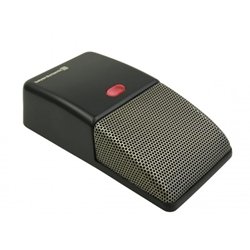
Image: Beyerdynamic Stegos TB Wireless Boundary Microphone. This image displays the compact, black wireless boundary microphone, designed for discreet placement on surfaces like conference tables.
הוראות בטיחות חשובות
- אין לחשוף את המכשיר למים או ללחות מוגזמת.
- הימנע מטמפרטורות קיצוניות.
- אל תנסה לפתוח או לשנות את המכשיר. יש לפנות לכל טיפול וטיפול באנשי מקצוע מוסמכים.
- השתמשו רק במקורות חשמל ואביזרים שצוינו.
- הרחק מהישג ידם של ילדים.
תוכן החבילה
ודא שכל הפריטים נמצאים בחבילה:
- Beyerdynamic Stegos TB Wireless Boundary Microphone
- כבל טעינה USB (מיקרו USB)
- מדריך למשתמש (מסמך זה)
הגדרה
1. טעינת המיקרופון
- Connect the Micro USB end of the charging cable to the microphone's charging port.
- Connect the standard USB end of the cable to a powered USB port (e.g., computer, USB wall adapter).
- The LED indicator on the microphone will show charging status.
- לאחר טעינה מלאה, נתק את כבל הטעינה.
2. חיבור למכשיר
The Stegos TB microphone connects wirelessly to compatible devices, typically personal computers, for video conferencing applications.
- Ensure the microphone is charged and powered on.
- Activate Bluetooth on your personal computer or compatible device.
- Put the microphone into pairing mode (refer to the device's specific button combination, usually holding a power/pairing button). The LED indicator will typically flash to indicate pairing mode.
- On your computer, search for available Bluetooth devices. Select "Beyerdynamic Stegos TB" from the list.
- Once paired, the LED indicator on the microphone will show a solid light, indicating a successful connection.
- In your computer's sound settings or video conferencing software, select the "Beyerdynamic Stegos TB" as the input audio device.
הוראות הפעלה
הפעלה/כיבוי
- To power on: Press and hold the power button for approximately 3 seconds. The LED indicator will illuminate.
- To power off: Press and hold the power button for approximately 3 seconds. The LED indicator will turn off.
פונקציית השתקה
The microphone features a mute function for privacy during calls.
- To mute: Press the mute button once. The LED indicator may change color or flash to indicate mute status.
- To unmute: Press the mute button again. The LED indicator will return to its normal operating state.
Placement for Optimal Performance
For best audio pickup, place the Stegos TB microphone on a flat surface in the center of the participants. Its omnidirectional polar pattern ensures 360-degree sound capture.
תַחזוּקָה
ניקוי
- Wipe the microphone's exterior with a soft, dry, or slightly damp בַּד.
- אין להשתמש בכימיקלים חזקים, ממסים או חומרי ניקוי שוחקים.
- Ensure no liquid enters the microphone grille or ports.
אִחסוּן
When not in use for extended periods, store the microphone in a cool, dry place, away from direct sunlight and extreme temperatures. It is recommended to fully charge the battery before long-term storage and recharge it every few months to maintain battery health.
פתרון בעיות
| בְּעָיָה | סיבה אפשרית | פִּתָרוֹן |
|---|---|---|
| המיקרופון לא נדלק. | סוללה חלשה או ריקה. | Charge the microphone using the provided USB cable. |
| Cannot connect wirelessly. | Bluetooth is off on the device; microphone not in pairing mode; out of range. | Ensure Bluetooth is enabled. Put microphone into pairing mode. Move microphone closer to the device. |
| No audio input from microphone. | Microphone is muted; incorrect audio input selected on computer/software. | Unmute the microphone. Select "Beyerdynamic Stegos TB" as the input device in your system settings or application. |
| איכות שמע ירודה. | Microphone too far from speaker; environmental noise; interference. | Place microphone closer to speakers. Reduce background noise. Ensure no obstructions between microphone and receiving device. |
מפרטים
- מותג: ביירדינמית
- דֶגֶם: Stegos TB (721360)
- טכנולוגיית קישוריות: Wireless (USB for charging)
- סוג מחבר: מיקרו USB (לטעינה)
- תכונה מיוחדת: אַלחוּט
- מכשירים תואמים: מחשב אישי
- צֶבַע: שָׁחוֹר
- דפוס קוטבי: כל-כיווני
- מקור כוח: מופעל על סוללה
- שימושים מומלצים: ועידת וידאו
מידע על אחריות
Beyerdynamic products are covered by a limited warranty. For specific warranty terms and conditions, please refer to the warranty card included with your product or visit the official Beyerdynamic webאתר. שמור את הוכחת הרכישה שלך לצורך תביעות אחריות.
Note: Warranty details are subject to change and may vary by region.
תמיכה ויצירת קשר
For further assistance, technical support, or service inquiries, please contact Beyerdynamic customer support through their official webאתר או פרטי הקשר המופיעים באריזת המוצר.
רִשְׁמִי Webאֲתַר: www.beyerdynamic.com
אנא ודאו כי מספר הדגם (721360) והמספר הסידורי שלכם מוכנים בעת פנייה לתמיכה.
Ask a question about this manual
Ask about setup, troubleshooting, compatibility, parts, safety, or missing instructions. Manuals+ will review the question and use this page’s manual context to help answer it.