
1. הקדמה
The D-Link GO-SW-5G is a 5-Port Unmanaged Gigabit Desktop Switch designed for home and small office environments. This device provides a simple and cost-effective solution to expand your network connectivity, offering high-speed Gigabit Ethernet ports for reliable data transfer. It incorporates D-Link's Green Technology for energy efficiency, reduced heat generation, and extended product lifespan.
This switch is a plug-and-play device, requiring no complex configuration or software installation, making it easy to integrate into an existing network.
2. תכולת החבילה
אנא ודא שכל הפריטים המפורטים להלן כלולים בחבילה שלך:
- D-Link GO-SW-5G 5-Port Gigabit Desktop Switch
- מתאם מתח
- מדריך להתקנה מהירה
אם פריטים חסרים או ניזוקים, אנא פנו לחנות שלכם לקבלת סיוע.
3. הוראות התקנה
The D-Link GO-SW-5G switch is designed for easy plug-and-play installation. Follow these steps to set up your device:
3.1. חבר את מתאם החשמל
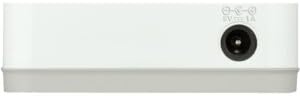
- Locate the power input port on the side of the D-Link GO-SW-5G switch.
- חבר את מתאם החשמל המצורף ליציאה זו.
- חבר את הקצה השני של מתאם החשמל לשקע חשמלי רגיל.
- The power LED on the front of the switch will illuminate, indicating that the device is receiving power.

איור 1: צַד view of the D-Link GO-SW-5G switch with the power input port.
3.2. התחבר לרשת שלך
- Using a standard Ethernet cable (RJ45), connect one end to an available LAN port on your router (not your modem).
- Connect the other end of this Ethernet cable to any of the five available ports on the back of the D-Link GO-SW-5G switch.
- The corresponding LED on the front of the switch will light up, indicating an active connection.
איור 2: אֲחוֹרִי view of the D-Link GO-SW-5G switch with five Ethernet ports.
3.3. Connect Network Devices
- Connect your network devices (e.g., computers, gaming consoles, network printers, smart TVs) to the remaining available Ethernet ports on the D-Link GO-SW-5G switch using Ethernet cables.
- Each connected device will have its corresponding LED on the front of the switch illuminate, confirming a successful connection.

איור 3: חֲזִית view of the D-Link GO-SW-5G switch showing active port LEDs.
4. הוראות הפעלה
The D-Link GO-SW-5G is an unmanaged switch, meaning it operates automatically without requiring user configuration. Once connected as described in the Setup section, it will begin forwarding network traffic between connected devices.
- משא ומתן אוטומטי: The switch automatically detects the network speed (10/100/1000 Mbps) and duplex mode (half/full) of connected devices and adjusts accordingly.
- MDI/MDIX אוטומטי: All ports support automatic MDI/MDIX crossover, eliminating the need for crossover cables when connecting to other switches or hubs.
- מחווני LED: Each port has an LED indicator on the front panel. A lit LED indicates an active link, and blinking indicates network activity.
5. תחזוקה
To ensure optimal performance and longevity of your D-Link GO-SW-5G switch, consider the following maintenance guidelines:
- מיקום: יש להניח את המתג במקום קריר ויבש, הרחק מאור שמש ישיר, מקורות חום ולחות מוגזמת. יש לוודא אוורור נאות סביב המכשיר.
- ניקוי: Use a soft, dry cloth to clean the exterior of the switch. Avoid using liquid or aerosol cleaners, as they may damage the device.
- ניהול כבלים: שמרו על כבלי אתרנט מאורגנים בצורה מסודרת כדי למנוע סבכים וניתוקים מקריים.
- מחזור הפעלה: If you experience network issues, a simple power cycle (unplugging the power adapter for 10 seconds and then plugging it back in) can often resolve minor problems.
6. פתרון תקלות
If you encounter issues with your D-Link GO-SW-5G switch, refer to the following common troubleshooting steps:
- אין נורית LED הפעלה:
- ודא שמתאם החשמל מחובר היטב הן למתג והן לשקע חשמלי תקין.
- ודא ששקע החשמל תקין על ידי חיבור מכשיר אחר.
- No Link/Activity LED for a Connected Device:
- ודא שכבל ה-Ethernet מחובר היטב הן ליציאת המתג והן להתקן הרשת.
- נסה כבל Ethernet אחר כדי לשלול כבל פגום.
- ודא שההתקן המחובר דולק ושהמתאם הרשת שלו פועל כראוי.
- נסה לחבר את המכשיר ליציאה אחרת במתג.
- מהירות רשת איטית:
- Verify that all connected devices and cables support Gigabit Ethernet (1000 Mbps) for optimal performance. The switch will operate at the lowest common speed.
- Ensure your router and internet service provider (ISP) plan support the desired speeds.
- Perform a power cycle on the switch and your router.
- קישוריות לסירוגין:
- בדוק אם יש חיבורי כבלים רופפים.
- Ensure the switch is not overheating; provide adequate ventilation.
- בדוק עם כבלי Ethernet שונים.
7. מפרטים
| מותג | D-Link |
| מספר דגם | GO-SW-5G/B |
| מספר יציאות | 5 |
| סוג מתג | לא מנוהל |
| קצב העברת נתונים | 1 ג'יגה-ביט לשנייה (10/100/1000 מגה-ביט לשנייה) |
| מִמְשָׁק | RJ45 |
| צֶבַע | לָבָן |
| משקל פריט | 0.22 פאונד |
| כרך ידtage | 100-240 וולט |
| מכשירים תואמים | PC, Mac, and other Ethernet-enabled devices |
| החלפת בד | 10 Gbps |
| UPC | 790069365669 |
8. אחריות ותמיכה
אחריות מוגבלת: The D-Link GO-SW-5G switch comes with a 3-year limited warranty. For detailed terms and conditions, please refer to the warranty information included in your package or visit the official D-Link webאֲתַר.
תמיכה טכנית: For technical assistance, product registration, or to download the latest firmware and documentation, please visit the תמיכה ב-D-Link Webאֲתַר or contact D-Link customer service.