
מָבוֹא
The Jabra Music Street2 Bluetooth Stereo Headset is designed to provide high-quality audio and hands-free communication. This manual provides essential information for the proper use, maintenance, and troubleshooting of your device. Please read it carefully before use.
הגדרה
1. טעינת האוזניות
Before first use, fully charge the headset. Connect the micro-USB charging cable to the charging port on the headset and the other end to a USB power source.
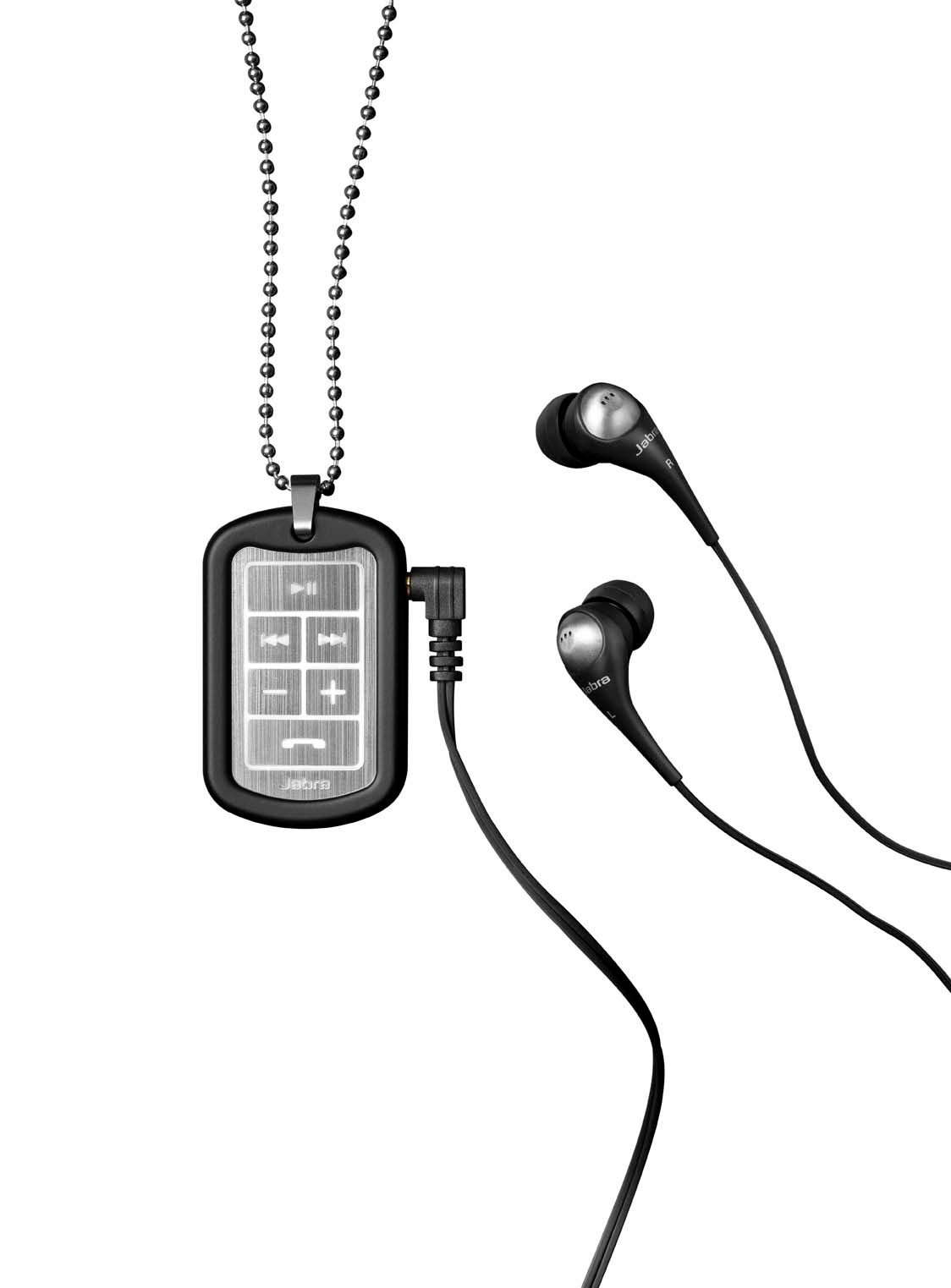
Image: The Jabra Music Street2 headset, highlighting the micro-USB charging port located on the side of the control unit.
- טעינה מלאה אורכת בדרך כלל כשעתיים.
- מחוון ה-LED יציג את מצב הטעינה (למשל, אדום לטעינה, כחול לטעינה מלאה).
2. שיוך עם התקן בלוטות'
- וודא שהדיבורית האישית כבויה.
- Press and hold the Multi-function button (usually the play/pause button) for approximately 5-7 seconds until the LED indicator flashes blue rapidly. This indicates pairing mode.
- במכשיר התומך ב-Bluetooth שלך (סמארטפון, טאבלט וכו'), עבור אל הגדרות ה-Bluetooth והפעל את ה-Bluetooth.
- חפש available devices. "Jabra Street2" should appear in the list.
- Select "Jabra Street2" to connect. If prompted for a passcode, enter "0000" (four zeros).
- לאחר הצימוד המוצלח, נורית החיווי תהבהב בכחול באיטיות.
The headset can remember multiple paired devices but can only be connected to one at a time.
הוראות הפעלה
הפעלה/כיבוי
- הפעלה: Press and hold the Multi-function button until the LED flashes blue.
- כיבוי: Press and hold the Multi-function button until the LED flashes red and then turns off.
בקרת מוזיקה
- הפעל/השהה: לחץ פעם אחת על כפתור הרב-פונקציה.
- הרצועה הבאה: לחץ על כפתור "הרצועה הבאה" (מסומן בדרך כלל בחץ קדימה).
- רצועה קודמת: לחץ על כפתור "הרצועה הקודמת" (מסומן בדרך כלל בחץ אחורה).
- הגבר קול: לחץ על כפתור "+".
- להנמיך קול: לחץ על כפתור "-".
ניהול שיחות
- תשובה לשיחה: לחץ פעם אחת על כפתור הרב-פונקציה.
- סיום שיחה: לחץ על לחצן הרב-תכליתי פעם אחת במהלך שיחה.
- דחה שיחה: לחץ והחזק את הלחצן הרב-תכליתי למשך 2 שניות.
- חיוג חוזר למספר האחרון: לחץ פעמיים על כפתור הרב-תכליתי כאשר אינך בשיחה.
- חיוג קולי: Press the Multi-function button once when not on a call (if supported by your phone).
The headset automatically switches between music and calls.
תַחזוּקָה
- Keep the headset dry. Moisture can damage the electronic circuits.
- Avoid extreme temperatures. High temperatures can shorten the life of electronic devices, damage batteries, and warp or melt certain plastics.
- Do not attempt to open the headset. Unauthorized modifications can damage the unit and void your warranty.
- Clean the headset with a soft, dry cloth. Do not use harsh chemicals or detergents.
- Store the headset in a cool, dry place when not in use for extended periods.
פתרון בעיות
אין כוח
- Ensure the headset is fully charged. Connect it to a power source and check the charging indicator.
לא ניתן להתאים למכשיר
- Make sure the headset is in pairing mode (LED flashing blue rapidly).
- ודא ש-Bluetooth מופעל במכשיר שלך ושהוא נמצא בטווח קליטה (בדרך כלל 10 מטרים או 33 רגל).
- Try turning off and on both the headset and your Bluetooth device.
- If previously paired, try deleting "Jabra Street2" from your device's Bluetooth list and re-pairing.
אין סאונד או איכות סאונד ירודה
- בדוק את עוצמת הקול הן באוזניות והן במכשיר המחובר.
- ודא שהאוזניות מחוברות כראוי למכשיר שלך.
- התקרבו למכשיר שלכם כדי למנוע הפרעות.
- Ensure the ear buds are correctly inserted and fit snugly to block external noise.
Calls Not Switching Automatically
- Verify that the headset is the active audio device for calls on your phone's Bluetooth settings.
- Some phone models may require manual selection of the audio output during a call.
מפרטים
| שם הדגם | Jabra Music Street2 |
| גרסת בלוטות' | 3.0 + EDR |
| טווח אלחוטי | עד 10 מטר (33 רגל) |
| זמן דיבור | עד 8 שעות |
| זמן המתנה | עד 9.5 ימים |
| זמן טעינה | בערך שעתיים |
| קישוריות | Bluetooth, 3.5 mm Jack (for wired connection if applicable) |
| תכונות | Virtual surround sound, power bass, noise-blocking ear buds, automatic music/call switching |
אחריות ותמיכה
Jabra products are covered by a limited warranty. For specific warranty terms and conditions, please refer to the warranty card included with your product or visit the official Jabra webאֲתַר.
For technical support, frequently asked questions, or to download the latest software/firmware updates, please visit the official Jabra support page:
You may also contact Jabra customer service directly for assistance.