
1. התקנה
1.1 פתיחת הקופסה ובדיקה ראשונית
Carefully remove all components from the packaging. Verify that all items listed in the 'What's in the box' section are present and undamaged.
- ASUS 32GB Transformer Pad TF300T 10.1-Inch Tablet
- ספק כוח
- תעודת אחריות לשנה

Image: The ASUS Transformer Pad TF300T tablet alongside its retail packaging.
1.2 טעינת המכשיר
Before first use, connect the tablet to the power supply and charge it fully. The charging port is located on the bottom edge of the tablet. A full charge ensures optimal performance and battery calibration.
1.3 הפעלה/כיבוי
- כדי להפעיל: Press and hold the power button, located on the top edge of the tablet, until the ASUS logo appears on the screen.
- כדי לכבות: Press and hold the power button until a menu appears. Select 'Power off' and confirm.
- לאתחל: מתפריט ההפעלה, בחר 'הפעלה מחדש'.
1.4 אשף ההתקנה הראשונית
עם ההפעלה הראשונה, הטאבלט ידריך אותך בתהליך ההתקנה הראשוני. זה כולל:
- בחירת שפה: בחר את השפה המועדפת עליך.
- חיבור Wi-Fi: Connect to an available Wi-Fi network to enable internet access.
- הגדרת חשבון Google: Sign in with an existing Google account or create a new one. This is essential for accessing the Google Play Store and other Google services.
- הגדרות תאריך ושעה: Configure the correct date and time.
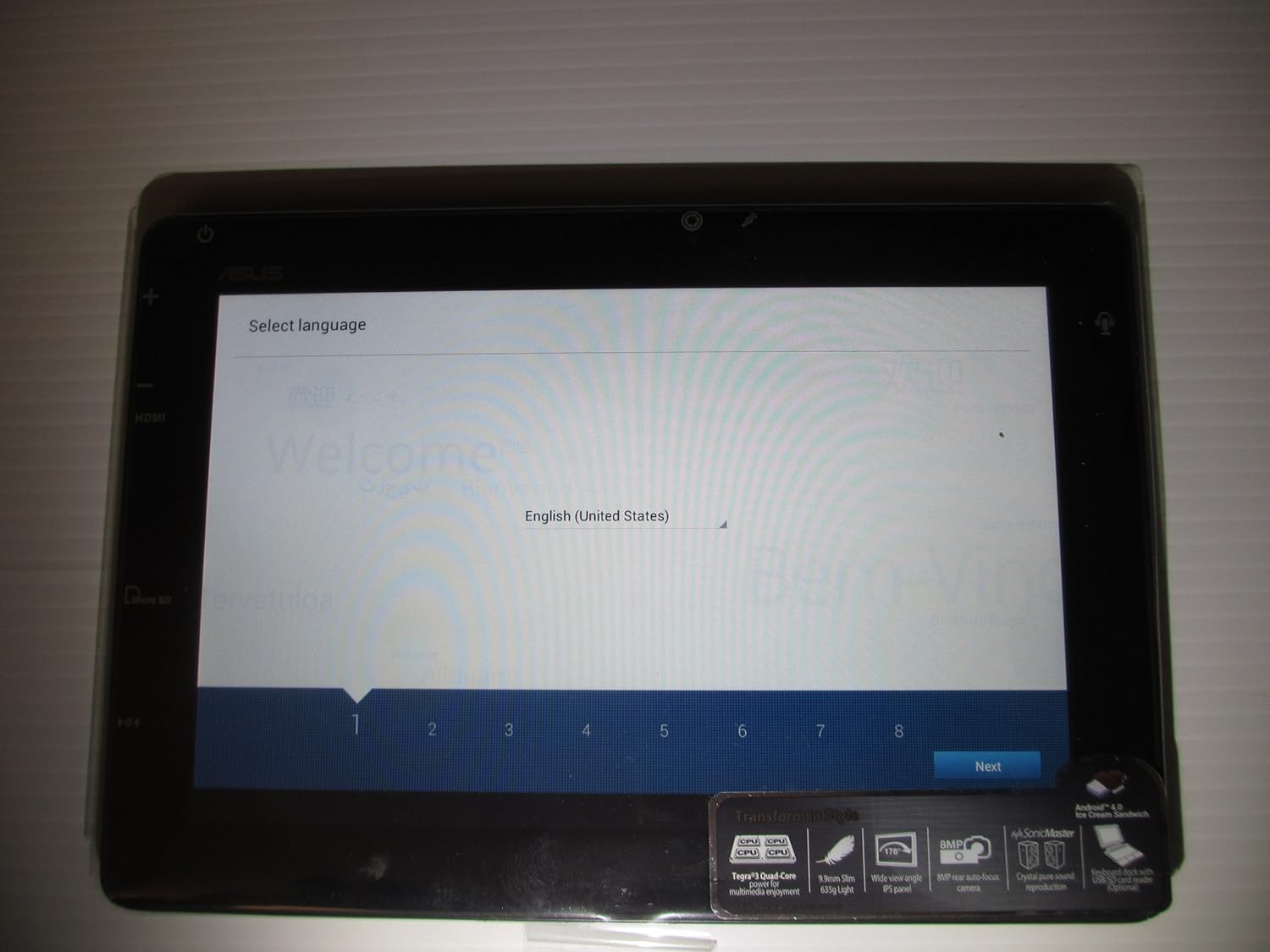
Image: The ASUS Transformer Pad TF300T screen showing the 'Select Language' prompt, with 'English (United States)' highlighted.
2. הוראות הפעלה
2.1 Basic Navigation and Touchscreen Gestures
The ASUS Transformer Pad TF300T utilizes a multi-touch display for interaction. Common gestures include:
- בֶּרֶז: בחר פריט או פתח יישום.
- הקש והחזק: גישה לתפריטי הקשר או הזזת סמלים.
- לִגנוֹב: Navigate through home screens, lists, or web דפים.
- צביטה-להגדלה: Enlarge or reduce content size (e.g., photos, web דפים).
2.2 Android 4.0 (Ice Cream Sandwich) Overview
The tablet runs on Android 4.0, providing a user-friendly interface. Key features include:
- מסכי בית: Customizable screens for app shortcuts and widgets.
- סרגל התראות: Located at the top, displays alerts and quick settings.
- מגירת אפליקציות: Access to all installed applications.
- אפליקציות אחרונות: Button to quickly switch between recently used applications.
2.3 קישוריות
The TF300T supports various connectivity options:
- Wi-Fi (802.11bgn): Connect to wireless networks for internet access. Configure via Settings > Wi-Fi.
- Bluetooth 3.0: Pair with compatible devices such as headphones, speakers, or keyboards. Configure via Settings > Bluetooth.
- GPS: Integrated Global Positioning System for location services and navigation.
2.4 Ports and Slots
The tablet features several ports for expanded functionality:
- מיקרו HDMI: חיבור לצגים חיצוניים או טלוויזיות.
- Docking Port: For connecting to the optional keyboard dock.
- שקע אוזניות/מיקרופון 3.5 מ"מ: עבור פלט וקלט שמע.
- חריץ לכרטיס מיקרו SD: Expand storage capacity with a Micro SD card.
2.5 שימוש במצלמה
The TF300T is equipped with two cameras:
- מצלמה קדמית (1.2 מגה פיקסל): Suitable for video calls and self-portraits.
- מצלמה אחורית (8 מגה פיקסל): לצילום תמונות וסרטונים.
Access the camera application from the home screen or app drawer to take pictures or record videos.
2.6 Optional Keyboard Dock
The ASUS Transformer Pad TF300T is compatible with an optional keyboard dock (sold separately). This dock provides:
- מקלדת פיזית: For enhanced typing experience.
- Additional Battery: Extends the tablet's battery life.
- יציאת USB: לחיבור התקני USB.
- חריץ לכרטיס SD: For additional storage expansion.

תמונה: תקריב view of the ASUS Transformer Pad TF300T, highlighting key features such as the NVIDIA Tegra 3 processor, IPS panel, 8MP camera, SonicMaster audio, and Android 4.0 Ice Cream Sandwich operating system.
3. תחזוקה
3.1 ניקוי ההתקן
- מָסָך: השתמשו במטלית רכה ונטולת סיבים, מעט רטובהampנשטפו במים או בחומר ניקוי למסכים, כדי לנגב בעדינות את הצג. הימנעו מכימיקלים חזקים.
- גוּף: Wipe the tablet's body with a soft, dry cloth. Keep liquids away from ports and openings.
3.2 עדכוני תוכנה
Regularly check for and install software updates to ensure optimal performance, security, and access to new features. Updates can typically be found in Settings > About tablet > System updates.
3.3 ניהול אחסון
The tablet comes with 32GB of internal storage. To manage storage effectively:
- מחיקת אפליקציות שאינן בשימוש: Uninstall applications you no longer need.
- נקה את המטמון: Regularly clear the cache of applications.
- Use Micro SD Card: Store photos, videos, and documents on an external Micro SD card to free up internal space.
4. פתרון תקלות
4.1 בעיות ופתרונות נפוצים
| לְהַנפִּיק | פתרון אפשרי |
|---|---|
| Tablet is unresponsive or frozen | לחץ והחזק את לחצן ההפעלה למשך 10-15 שניות כדי לאלץ הפעלה מחדש. |
| בעיות חיבור Wi-Fi | Ensure Wi-Fi is enabled in settings. Restart the tablet and your Wi-Fi router. Forget and reconnect to the network. |
| Slow performance or lag | Close unused applications. Clear app caches. Check for system updates. Consider a factory reset if issues persist. |
| הסוללה מתרוקנת במהירות | Reduce screen brightness. Disable Wi-Fi/Bluetooth/GPS when not in use. Close background apps. Check battery usage in settings to identify power-hungry apps. |
| Apps crashing or not installing | Ensure sufficient storage space. Clear Google Play Store cache. Restart the tablet. |
4.2 איפוס להגדרות היצרן
If persistent issues occur, a factory reset can restore the tablet to its original state. Warning: This will erase all data on the tablet. Back up important data before proceeding.
- עבור אל הגדרות > גיבוי ואיפוס.
- Select 'Factory data reset'.
- Confirm the action. The tablet will restart and erase all data.
5. מפרטים
Detailed technical specifications for the ASUS Transformer Pad TF300T-B1-BL:
| תכונה | מִפרָט |
|---|---|
| מותג | ASUS |
| שם הדגם | Transformer Pad |
| מספר דגם | TF300T-B1-BL |
| מַעֲרֶכֶת הַפעָלָה | Android 4.0 (Ice Cream Sandwich) |
| מעבד | NVIDIA Tegra 3 Quad-Core (1.2 GHz) |
| מעבד גרפי | Nvidia Tegra 3 |
| גודל מסך | 10.1 אינץ' |
| רזולוציית תצוגה | 1280 x 800 Pixels (WXGA IPS Touch Panel) |
| זיכרון RAM | 1 GB DDR3 |
| קיבולת אחסון | זיכרון פלאש (SSD) בנפח 32 ג'יגה-בייט |
| אחסון ניתן להרחבה | חריץ לכרטיס מיקרו SD |
| מצלמה קדמית | 1.2 מגה פיקסל |
| מצלמה אחורית | 8 מגה פיקסל |
| קישוריות אלחוטית | 802.11bgn Wi-Fi, Bluetooth 3.0, GPS |
| נמלים | 1x Micro HDMI, 1x Docking, 1x 3.5mm Headphone/Microphone |
| חיי סוללה | Up to 10 Hours (22W/h Lithium Polymer) |
| חיישנים | G-Sensor, E-Compass, Light Sensor, Gyroscope |
| משקל פריט | 1.4 פאונד |
| UPC | 886227185054 |
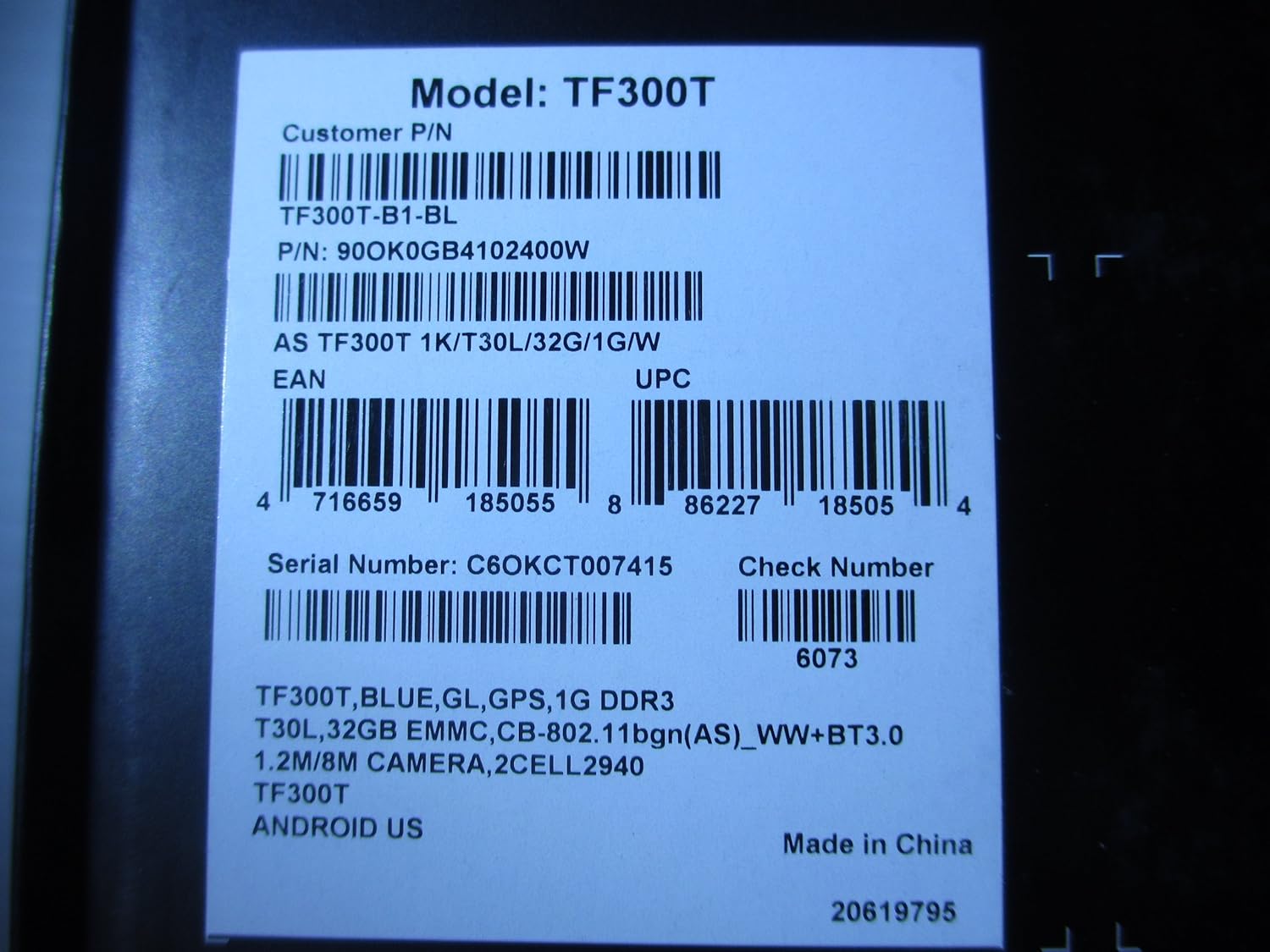
Image: A product label displaying the model number TF300T, part number TF300T-B1-BL, serial number C6OKCT007415, and UPC 886227185054.
6. אחריות ותמיכה
6.1 מידע אחריות
The ASUS Transformer Pad TF300T comes with a 1-Year North American Warranty. This warranty covers manufacturing defects under normal use conditions. Please refer to the warranty card included in your product packaging for full terms and conditions.
6.2 תמיכת לקוחות
For technical assistance, troubleshooting beyond this manual, or warranty claims, please contact ASUS customer support. You can find contact information and additional resources on the official ASUS webאֲתַר:
- בקר ב חנות ASUS באמזון לקבלת מידע על המוצר.
- Refer to the official ASUS support website for service centers and contact details.