
1. הקדמה
תודה על הרכישהasing the Gemini PS3-USB 3 Channel 10-Inch Mixer. This manual provides essential information for the proper setup, operation, and maintenance of your mixer. Please read this manual thoroughly before use to ensure optimal performance and to prevent damage.
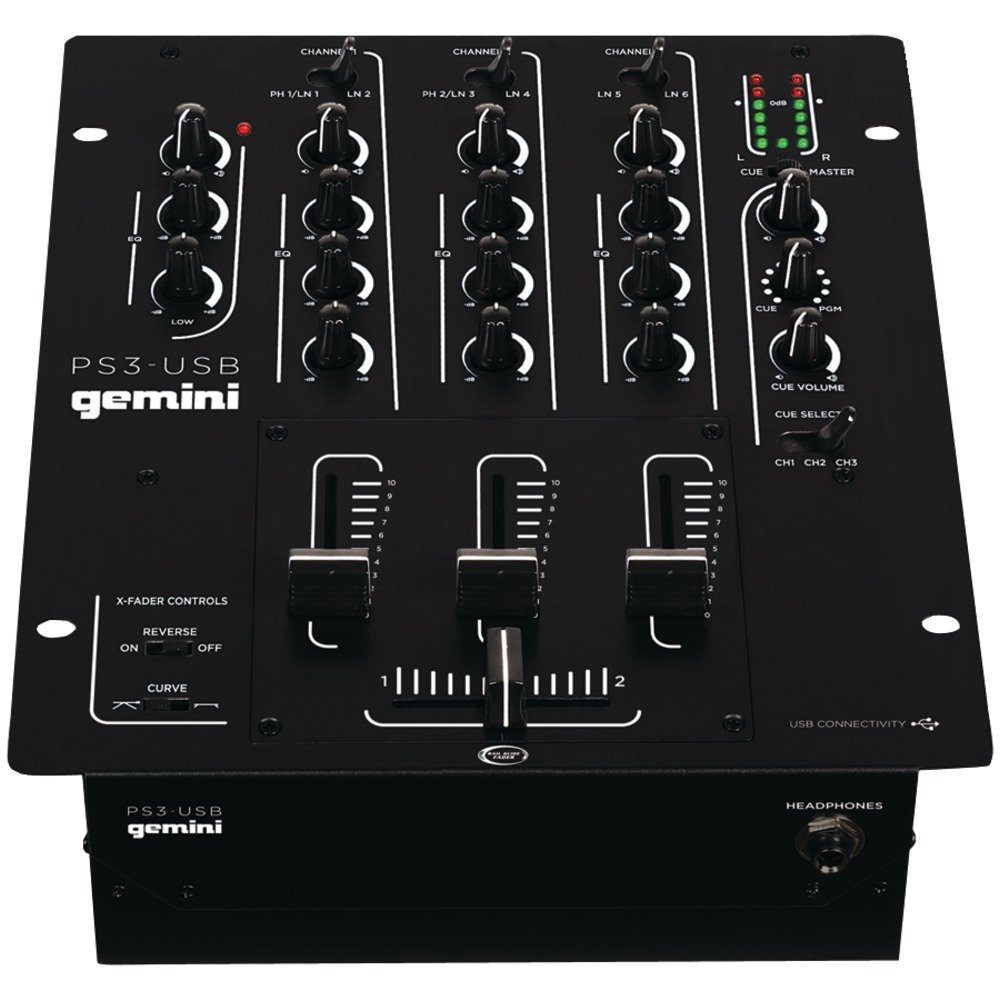
איור 1: חזית view of the Gemini PS3-USB Mixer, showing controls and inputs.
2. הוראות בטיחות
- מקור כוח: חבר את היחידה אך ורק לספק הכוח המצוין.
- אוורור: יש לוודא אוורור נאות. אין לחסום פתחי אוורור.
- מים ולחות: אין לחשוף את היחידה לגשם או לחות. אין להניח חפצים מלאים נוזלים על היחידה.
- חוֹם: הרחק את היחידה ממקורות חום כגון רדיאטורים, אוגרי חום, תנורים או מכשירים אחרים (כולל ampמחצבים) המייצרים חום.
- ניקוי: נקה רק עם מטלית יבשה.
- שֵׁרוּת: מסור את כל הטיפולים לאנשי שירות מוסמכים. אל תנסה לטפל במוצר זה בעצמך.
3. התקנה
3.1 פירוק
Carefully unpack the mixer and check for any signs of damage. Retain the packaging materials for future transport or storage.
3.2 חיבור חשמל
Connect the provided power adapter to the mixer's power input and then to a suitable electrical outlet.
3.3 חיבורי שמע
The PS3-USB features 5-line, 3-channel inputs with 2 convertible Phono/Line RCA inputs.
- כניסות פונו/קו: Connect turntables or line-level devices (CD players, media players) to the RCA inputs. Use the Phono/Line switch to select the appropriate input type for each channel.
- פלט מאסטר: Connect the Master RCA outputs to your ampליפר או רמקולים מופעלים.
- פלט הקלטה: Connect the Record RCA outputs to a recording device if you wish to record your mix.
- אוזניות: Plug your 1/4" (6.3mm) headphones into the front panel headphone connector.
3.4 חיבור USB
Connect the mixer to your Mac or PC using a standard USB cable. This allows for simultaneous playback and recording through your computer's media player software.
4. הוראות הפעלה
4.1 Controls and Functions Overview
Familiarize yourself with the mixer's layout:
- Channel Gain Control: מכוונן את עוצמת הקלט עבור כל ערוץ.
- 3-Band Rotary EQ: Provides control over High, Mid, and Low frequencies for each channel.
- Faders בערוץ: Control the volume of each individual channel.
- Crossfader: A user-replaceable Rail Glide crossfader with curve and reverse controls for blending between channels.
- נפח מאסטר: שולט ברמת הפלט הכוללת של המיקסר.
- מד VU: Visual indicators for master or cue levels.
- Cue Section: Includes rotary cue volume, CUE/PGM controls, and a split cue switch for headphone monitoring.
- מדור מיקרופון: Features a rotary microphone volume control and a 2-band EQ for microphone input.
4.2 ערבוב בסיסי
- Connect your audio sources to the appropriate Phono/Line inputs.
- Set the Phono/Line switch for each channel to match your source.
- Adjust the Gain control for each active channel to achieve a healthy input level without clipping (distortion).
- Use the channel faders to bring up the volume of your desired audio sources.
- Utilize the 3-band EQ to shape the sound of each channel.
- Use the crossfader to smoothly transition between channels.
- Monitor your mix using headphones via the Cue section and adjust the Master Volume for the main output.
4.3 השמעה והקלטה באמצעות USB
Once connected via USB, your computer should recognize the PS3-USB as an audio device.
- השמעה: Select the PS3-USB as the output device in your computer's sound settings or media player software to route audio through the mixer.
- הַקלָטָה: Select the PS3-USB as the input device in your recording software. The mixer's master output will be sent to your computer for recording.
5. תחזוקה
- ניקוי: השתמשו במטלית רכה ויבשה לניקוי החלק החיצוני של המיקסר. אין להשתמש בחומרי ניקוי נוזליים או ממסים.
- Crossfader Replacement: The Rail Glide crossfader is user-replaceable. Refer to the Gemini website or authorized service centers for replacement parts and instructions if needed.
- אִחסוּן: When not in use for extended periods, store the mixer in a cool, dry place, preferably in its original packaging.
6. פתרון תקלות
| בְּעָיָה | סיבה אפשרית | פִּתָרוֹן |
|---|---|---|
| No sound output from master. | Master volume too low; incorrect input selection; amplifier/speaker issues. | Increase Master Volume. Check Phono/Line switches. Verify ampחיבורי מגבר/רמקול וחשמל. |
| אין צליל מערוץ ספציפי. | Channel fader down; Gain too low; incorrect Phono/Line selection; source device off/muted. | Raise channel fader. Adjust Gain. Correct Phono/Line switch. Check source device. |
| שמע מעוות. | Input Gain too high; Master Volume too high; faulty cable. | Reduce channel Gain. Reduce Master Volume. Replace cables. |
| USB recording/playback not working. | Incorrect USB connection; computer audio settings incorrect; driver issues. | Ensure USB cable is securely connected. Select PS3-USB as audio device in computer settings. Restart computer. |
7. מפרטים
- דֶגֶם: PS3USB
- ערוצים: 3
- כניסות: 5-Line, 2 Convertible Phono/Line RCA, USB
- פלטים: Master RCA, Record RCA, 1/4" (6.3mm) Headphone
- EQ: 3-Band Rotary EQ per channel, 2-Band EQ for Microphone
- Crossfader: User-replaceable Rail Glide with Curve and Reverse controls
- קישוריות: USB for Mac/PC Playback & Recording
- Dimensions (Approximate Shipping): 12.00 אינץ' x 10.00 אינץ' x 3.25 אינץ'
- Weight (Approximate Shipping): 6.2 פאונד (2.8 ק"ג)
- UPC: 747705208149
8. אחריות ותמיכה
This Gemini product is covered by a אחריות ל-90 יום from the date of purchase. This warranty covers manufacturing defects and workmanship under normal use. It does not cover damage caused by misuse, accident, modification, or unauthorized repair.
For technical support, service inquiries, or warranty claims, please contact your authorized Gemini dealer or visit the official Gemini webאתר ליצירת קשר.
אנא שמור את הוכחת הרכישה שלך לצורך אימות האחריות.