
מָבוֹא
This manual provides essential instructions for setting up, operating, and maintaining your Canon PowerShot ELPH 310 HS digital camera. Please read this manual thoroughly to ensure proper use and to maximize your camera's performance.
מה יש בקופסה
בעת פירוק האריזה, יש לוודא שכל הפריטים הבאים כלולים:
- Canon PowerShot ELPH 310 HS Camera
- מארז סוללות NB-4L
- Battery Charger CB-2LV
- רצועת יד
- כבל USB
- תקליטור (תוכנה/מנהלי התקנים)
הגדרה
1. טעינת הסוללה
Insert the Battery Pack NB-4L into the Battery Charger CB-2LV. Plug the charger into a power outlet. The charging indicator light will show the charging status. Once fully charged, remove the battery.
2. הכנסת הסוללה וכרטיס הזיכרון
Open the battery/card compartment cover on the camera. Insert the charged battery pack, ensuring correct orientation. Insert a compatible SD/SDHC/SDXC memory card into the card slot until it clicks into place. Close the compartment cover securely.

תמונה: חזית view of the Canon PowerShot ELPH 310 HS digital camera, showcasing its silver finish and lens.
הפעלת המצלמה
1. הפעלה/כיבוי
הקש על הפעלה/כיבוי button located on the top or side of the camera to power it on or off. The lens will extend when powered on.
2. צילום בסיסי
- התמקדות: Gently press the shutter button halfway down to focus. The camera will emit a beep and display a green frame when focus is achieved.
- צילום תמונה: לחץ על לחצן הצמצם עד הסוף כדי לצלם את התמונה.
- זום: השתמש בידית הזום סביב כפתור הצילום כדי לכוונן את הזום האופטי (8x).
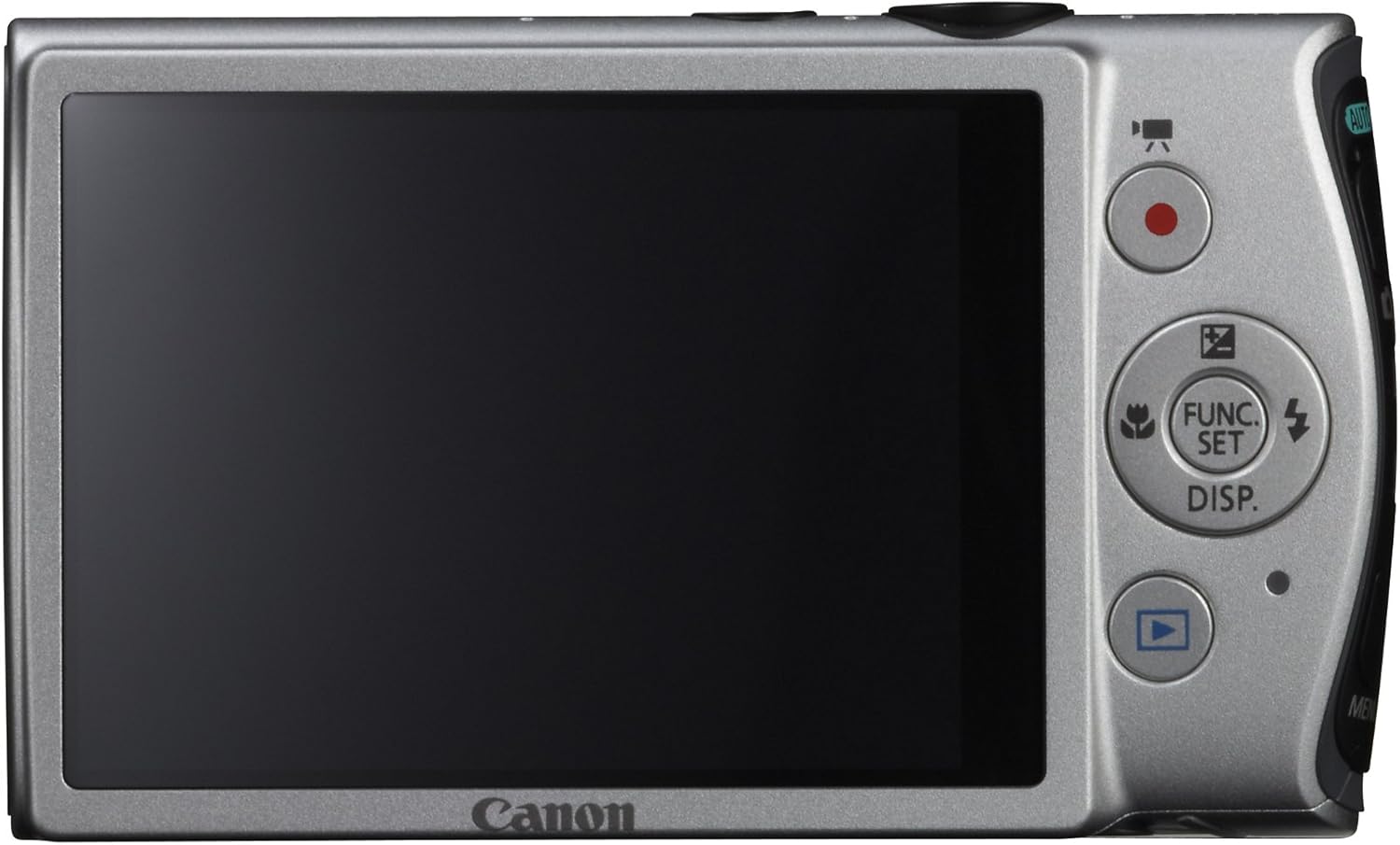
תמונה: אחורי view of the Canon PowerShot ELPH 310 HS, displaying the 3.0-inch LCD screen and various control buttons for navigation and function selection.
3. מצבי צילום
The PowerShot ELPH 310 HS offers various shooting modes to suit different situations. Use the mode dial or menu to select:
- חכם אוטומטי: Automatically detects scenes and applies optimal settings for point-and-shoot simplicity.
- תוכנית (P): Allows for automatic aperture/shutter speed selection based on conditions, with some user control.
- Movie Digest: Records a short video clip before each still image, combining them into a daily video.
- פרץ במהירות גבוהה: Captures rapid action at approximately 8.7 frames per second.
- סרט בהילוך סופר איטי: Records video at high frame rates (up to 240 fps) for slow-motion playback.
- מצבי סצנה מיוחדים: Includes options like Handheld Night Scene, Portrait, Beach, Snow, Fireworks, Fisheye Effect, Miniature Effect, Toy Camera Effect, and more for specific photographic effects.
4. הקלטת וידאו
To record videos, press the dedicated movie button. The camera supports Full HD 1080p video at 24 fps and 720p HD video at 30 fps. The iFrame movie format is also supported for easier editing.
5. Image Stabilization (Intelligent IS)
The camera features Intelligent IS, which automatically selects the best shake correction method for your shooting situation. This includes modes for stills (Normal, Panning, Macro, Tripod) and videos (Dynamic, Powered, Macro, Tripod) to ensure steady images and footage.
תַחזוּקָה
1. ניקוי המצלמה
- עֲדָשָׁה: השתמשו במטלית רכה ונטולת סיבים המיועדת במיוחד לעדשות מצלמה. הימנעו מלגעת בעדשה ישירות עם האצבעות.
- מסך LCD: Wipe gently with a soft, dry cloth. Do not use abrasive cleaners.
- גוף המצלמה: Use a soft, dry cloth to wipe away dust and smudges.
2. טיפול בסוללה
- אחסן סוללות במקום קריר ויבש כאשר אינן בשימוש.
- הימנעו מפריקה מלאה של הסוללה לעתים קרובות כדי להאריך את חייה.
- אין לחשוף סוללות לטמפרטורות קיצוניות.
3. אחסון
בעת אחסון המצלמה לתקופות ממושכות, הוציאו את הסוללה וכרטיס הזיכרון. אחסנו את המצלמה בסביבה יבשה וללא אבק, רצוי בתיק או נרתיק למצלמה.
פתרון בעיות
| בְּעָיָה | סיבה / פתרון אפשרי |
|---|---|
| המצלמה לא נדלקת. | ייתכן שהסוללה התרוקנה או שהוכנסה בצורה שגויה. ודא שהסוללה טעונה ומוכנסת כהלכה. |
| התמונות מטושטשות. | Camera shake, subject movement, or incorrect focus. Ensure proper grip, use Intelligent IS, or check focus settings. |
| שגיאת כרטיס זיכרון. | Memory card may be full, corrupted, or incompatible. Try formatting the card (this will erase all data) or use a different card. |
| הפלאש לא יופעל. | Flash may be set to OFF or Red-Eye Reduction mode. Check flash settings in the menu. |
| לא ניתן להקליט וידאו. | Memory card may be full or too slow. Ensure sufficient space and use a high-speed memory card. |
מפרטים
| תכונה | פְּרָט |
|---|---|
| שם הדגם | Canon PowerShot ELPH 310 HS |
| חיישן תמונה | 12.1 מגה פיקסל CMOS |
| מעבד תמונה | DIGIC 4 |
| זום אופטי | 8x |
| עֲדָשָׁה | עדשה רחבת זווית 28 מ"מ (שווה ערך ל-35 מ"מ: 28-224 מ"מ) |
| ייצוב תמונה | אופטי (IS חכם) |
| הקלטת וידאו | Full HD 1080p (24 fps), HD 720p (30 fps) |
| מסך LCD | 3.0-inch PureColor LCD (461,000 dots) |
| אמצעי אחסון | כרטיסי זיכרון SD, SDHC, SDXC |
| קישוריות | HDMI, USB |
| סוֹלְלָה | NB-4L Lithium-ion Battery Pack |
| מִשׁקָל | משקל כ-0.31 פאונד (כולל סוללה וכרטיס זיכרון) |
אחריות ותמיכה
למידע על אחריות ותמיכה טכנית, אנא עיין בתיעוד המצורף למוצר שלך או בקר באתר הרשמי של קנון. webאתר. שמור את קבלת הרכישה כהוכחת קנייה לתביעות אחריות.
תמיכת קנון Webאֲתַר: www.usa.canon.com/support