
InFocus IN126
מדריך למשתמש של מקרן InFocus IN126 DLP
Model: IN126 | Brand: InFocus
1. המוצר נגמרview
The InFocus IN126 is a DLP projector designed for various projection needs, offering high brightness and a clear image. This manual provides essential information for the proper setup, operation, and maintenance of your projector.
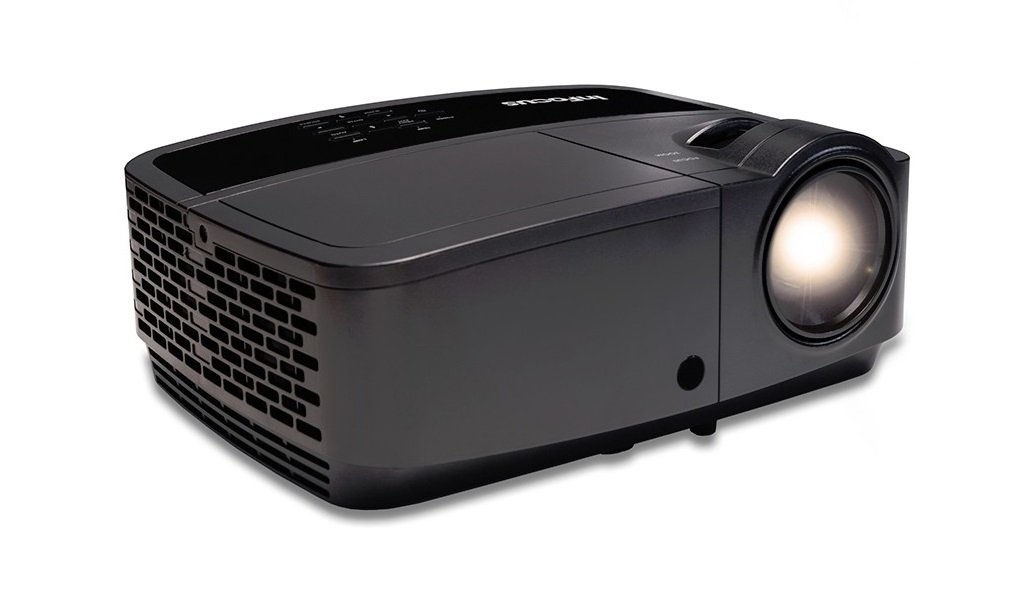
תמונה 1.1: חזית view of the InFocus IN126 DLP Projector.
תכונות עיקריות:
- High brightness of up to 3200 lumens for clear images in various lighting conditions.
- High 3000:1 contrast ratio for sharp detail.
- Compact and portable design, weighing approximately 4.8 lbs. (2.17 kg).
- 3D-Ready capability for immersive viewחוויות.
- HDMI connectivity for versatile input options.
2. התקנה והתקנה
2.1 פירוק
Carefully remove the projector and all accessories from the packaging. Verify that all components are present according to the packing list.
2.2 מיקום המקרן
Place the projector on a stable, flat surface or mount it securely. Ensure adequate ventilation around the projector to prevent overheating. Position the projector at an appropriate distance from the screen to achieve the desired image size.
2.3 חיבור התקנים
Connect your video source (e.g., laptop, gaming console) to the projector using an HDMI cable. Ensure the cable is securely plugged into both the source device and the projector's HDMI input port.

Image 2.1: An InFocus projector set up for a business presentation, demonstrating typical usage.
2.4 הפעלה/כיבוי
- כדי להפעיל: Connect the power cord to the projector and a power outlet. Press the power button on the projector or remote control. The power indicator light will illuminate.
- כדי לכבות: Press the power button twice. The projector will enter a cooling cycle before completely shutting down. Do not unplug the projector during the cooling cycle.
2.5 התאמת תמונה
- מוֹקֵד: סובבו את טבעת המיקוד שעל העדשה עד שהתמונה חדה וברורה.
- תיקון אבן מפתח: Use the keystone adjustment feature (usually found in the projector's menu or via dedicated buttons) to correct trapezoidal image distortion if the projector is not perfectly perpendicular to the screen.
3. הפעלת המקרן
3.1 בחירת מקור קלט
Press the 'Source' or 'Input' button on the remote control or projector control panel to cycle through available input sources (e.g., HDMI, VGA). Select the input corresponding to your connected device.
3.2 ניווט בתפריט
Use the arrow buttons on the remote or control panel to navigate the on-screen display (OSD) menu. Press 'Enter' or 'OK' to confirm selections and 'Menu' or 'Exit' to go back or close the menu.
3.3 התאמות תמונה
Within the OSD menu, you can adjust various picture settings:
- בְּהִירוּת: מתאים את הבהירות או הכהות הכללית של התמונה.
- לְהַשְׁווֹת: שולט בהבדל בין החלקים הבהירים ביותר והכהים ביותר בתמונה.
- צֶבַע: מתאים את עוצמת הצבעים.
- יחס גובה-רוחב: Selects the display format (e.g., 4:3, 16:9).
3.4 הגדרות שמע
If your projector has built-in speakers or is connected to an external audio system, you can adjust the volume and other audio settings through the OSD menu.
3.5 פעולה תלת-ממדית
The IN126 projector is 3D-Ready. To view 3D content, you will need compatible 3D glasses, a 3D-enabled source device, and 3D content. Refer to your 3D glasses and source device manuals for specific instructions on enabling 3D mode.
4. תחזוקה
4.1 ניקוי העדשה
השתמשו במטלית רכה ונטולת סיבים המיועדת במיוחד לעדשות אופטיות כדי לנגב בעדינות את עדשת המקרן. הימנעו משימוש בחומרי ניקוי שוחקים או משימוש בכוח מופרז, העלולים לשרוט את העדשה.
4.2 Cleaning the Projector Casing
נגב את החלק החיצוני של המקרןasinז עם רך, דamp בַּד. אין להשתמש בכימיקלים קשים או בממיסים.
4.3 תחזוקת מסנן אוויר
Regularly check and clean the air filter to ensure proper airflow and prevent overheating. Refer to the full product manual for instructions on locating and cleaning or replacing the air filter.
4.4 ל'amp תַחֲלִיף
המקרן lamp has an estimated operating life of up to 20,000 hours. When the lamp reaches the end of its life, a warning message may appear, or the image brightness may significantly decrease. Refer to the full product manual for detailed instructions on safe lamp replacement. Always use genuine InFocus replacement lamps.
5. פתרון תקלות
This section addresses common issues you might encounter with your InFocus IN126 projector.
5.1 אין תמונה על המסך
- Ensure the projector is powered on and the power indicator light is solid.
- ודא שכל חיבורי הכבלים (HDMI, חשמל) מאובטחים.
- ודא שמקור הקלט הנכון נבחר במקרן.
- Confirm the source device (laptop, etc.) is powered on and outputting a signal.
5.2 Image is Distorted or Blurry
- כוונן את טבעת המיקוד על העדשה.
- Use keystone correction to fix trapezoidal distortion.
- Ensure the projector is placed on a stable surface and is not vibrating.
- Check the resolution settings of your source device; ensure it is compatible with the projector's native resolution (1280 x 720).
5.3 אין סאונד
- הגבירו את עוצמת הקול הן במקרן והן במכשיר המקור.
- אם משתמשים ברמקולים חיצוניים, ודאו שהם מחוברים כראוי ומופעלים.
- Check audio settings in the projector's OSD menu.
5.4 התחממות יתר של המקרן
- Ensure there is sufficient space around the projector for ventilation.
- Clean the air filter to remove any dust buildup.
- אין לחסום את פתחי האוורור.
6. מפרטים
The following table outlines the key technical specifications for the InFocus IN126 DLP Projector:
| תכונה | מִפרָט |
|---|---|
| מותג | InFocus |
| שם הדגם | IN126 DLP |
| סוג תצוגה | DLP |
| רזולוציה מקורית | 1280 x 720 |
| רזולוציית תצוגה מקסימלית | 1920 x 1080 |
| בְּהִירוּת | 3200 lumens (ANSI) |
| יחס ניגודיות | 3000:1 |
| חיי הפעלה של מקור אור | 20000 שעות |
| Lamp מהtage | 230 וואט |
| טכנולוגיית קישוריות | HDMI |
| תכונה מיוחדת | 3D מוכן |
| גורם צורה | נייד |
| סוג הרכבה | מתקן לשולחן |
| משקל פריט | 4.85 פאונד (2.2 ק"ג) |
| הסמכת בדיקות חיצוניות | UL, c-UL, FCC, CE |
7. מידע על אחריות
The InFocus IN126 DLP Projector comes with a limited manufacturer's warranty. For specific details regarding warranty coverage, duration, and terms, please refer to the warranty card included with your product or visit the official InFocus webאתר. שמור את הוכחת הרכישה שלך לצורך תביעות אחריות.
8. תמיכת לקוחות
For further assistance, technical support, or to inquire about replacement parts, please visit the official InFocus support website or contact their customer service department. Contact information can typically be found on the InFocus website or in the documentation included with your projector.
Ask a question about this manual
Ask about setup, troubleshooting, compatibility, parts, safety, or missing instructions. Manuals+ will review the question and use this page’s manual context to help answer it.