
1. הקדמה
This manual provides essential information for the safe and efficient operation of your InFocus IN112 Portable DLP Projector. Please read these instructions thoroughly before using the projector and retain them for future reference.
The InFocus IN112 is designed for versatile use, offering high brightness and a strong contrast ratio. It incorporates BrilliantColor technology for clear image reproduction and is 3D-ready. Its compact and lightweight design facilitates easy portability and installation.
2. מה בקופסה
ודא שכל הפריטים המפורטים להלן כלולים באריזת המוצר שלך:
- מקרן InFocus IN112
- כבל חשמל
- RGB cable (VGA cable)
- A/V cable (Composite Video cable)
- הוראות בטיחות
- מדריך למשתמש (מסמך זה)
- שְׁלַט רָחוֹק
3. מקרן מעלview

איור 1: למעלה View - Displays the control panel with buttons for power, source selection, menu navigation, and keystone adjustment, along with the focus ring for the lens.

איור 2: צד View - Shows the ventilation grilles essential for heat dissipation during operation. Ensure these are not obstructed.
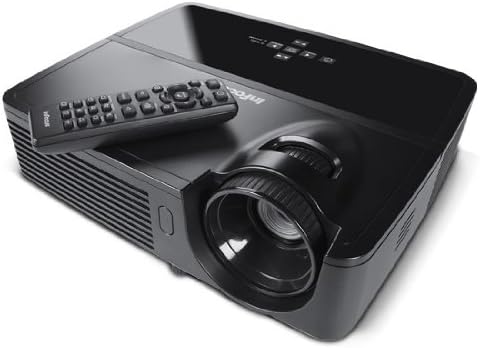
איור 3: זוויתי View עם מרחוק - Illustrates the projector from an angle, highlighting the lens and the included remote control for convenient operation.

איור 4: אחורי View - Details the various input and output ports, including power, audio in/out, video, computer (VGA), RS232, and Mini USB.
4. התקנה
4.1 מיקום
Position the projector on a stable, flat surface or mount it securely. Ensure adequate ventilation around the projector to prevent overheating. The distance from the screen will determine the image size. Adjust the projector's position to achieve the desired image size and clarity.
4.2 חיבור מתח
- חבר את כבל החשמל המצורף לשקע החשמל של המקרן.
- חבר את הקצה השני של כבל החשמל לשקע חשמל מוארק.
4.3 חיבור מקורות קלט
The IN112 projector offers multiple input options:
- VGA (Computer In 1 & 2): Use the RGB cable to connect to a computer's VGA output.
- סרטון מורכב: Use the A/V cable to connect to devices with composite video output.
- S-Video: Connect to devices with S-Video output.
- כניסת שמע: חבר מקורות שמע חיצוניים באמצעות כבל סטריאו 3.5 מ"מ.
- RS232C: For control and automation systems.
- USB B Mini: For control and firmware updates.
ודא שכל הכבלים מחוברים היטב לפני הפעלת המקרן.
5. הוראות הפעלה
5.1 הפעלה/כיבוי
- כדי להפעיל, לחץ על כּוֹחַ button on the control panel or remote control. The power indicator light will illuminate.
- כדי לכבות, לחץ על כּוֹחַ button again. Confirm shutdown if prompted. Allow the projector to cool down before unplugging.
5.2 התאמת תמונה
- מוֹקֵד: סובבו את טבעת המיקוד שעל עדשת המקרן עד שהתמונה חדה וברורה.
- אֶבֶן רֹאשָׁה: השתמש ב- אֶבֶן רֹאשָׁה buttons on the control panel or remote to correct trapezoidal image distortion if the projector is not perfectly perpendicular to the screen.
5.3 בחירת מקור
הקש על מָקוֹר button on the control panel or remote control to cycle through available input sources (VGA1, VGA2, Video, S-Video).
5.4 ניווט בתפריט
הקש על תפריט/יציאה כדי לגשת לתפריט התצוגה שעל המסך (OSD). השתמש בלחצני החצים כדי לנווט וב- לִבחוֹר or לְהַכנִיס לחצן כדי לאשר את הבחירות. לחץ תפריט/יציאה שוב כדי לסגור את התפריט.
5.5 מצב אקו
Activate Eco Mode to extend lamp life and reduce power consumption. This mode is suitable for environments with lower ambient light. The lamp life is approximately 6,000 hours in Eco Mode compared to 5,000 hours in normal mode.
5.6 3D Content Projection
The IN112 is 3D-ready. To project 3D content, you will need compatible 3D source material, a 3D-capable player, and active 3D glasses (sold separately). Refer to your 3D source device's manual for specific setup instructions.
6. תחזוקה
6.1 ל'amp תַחֲלִיף
המקרן lamp בעל אורך חיים מוגבל. כאשר ה-lamp אינדיקטור (Temp/Lamp) illuminates or the image brightness significantly decreases, the lamp may need replacement. The lamp door is conveniently located on the top of the projector for easy access, even when installed.
זְהִירוּת: Ensure the projector is powered off and completely cooled before attempting lamp replacement. Refer to the detailed lamp replacement instructions in the full service manual for safety and proper procedure.
6.2 ניקוי
The IN112 projector is designed without filters, eliminating the need for filter cleaning or replacement. Periodically wipe the exterior casing with a soft, dry cloth. For the lens, use a specialized lens cleaning cloth and solution to avoid scratches.
7. פתרון תקלות
| בְּעָיָה | סיבה אפשרית | פִּתָרוֹן |
|---|---|---|
| לא הוצגה תמונה | Power cable disconnected, incorrect input source selected, source device not powered on. | Check power connections. Press the מָקוֹר button to select the correct input. Ensure the source device is on. |
| התמונה מטושטשת | עדשה לא בפוקוס. | כוונן את טבעת המיקוד בעדשת המקרן. |
| התמונה היא טרפזית | המקרן אינו ניצב למסך. | השתמש ב- אֶבֶן רֹאשָׁה buttons to correct the image shape. |
| Colors appear incorrect or dull | Color settings require adjustment. | Access the OSD menu and navigate to image settings to adjust color, brightness, and contrast. |
| המקרן מתחמם יתר על המידה ונכבה | Ventilation obstructed, high ambient temperature. | Ensure clear airflow around the projector. Operate in a well-ventilated area. |
8. מפרטים
| תכונה | פְּרָט |
|---|---|
| מספר דגם | IN112 |
| טכנולוגיית תצוגה | DLP with BrilliantColor |
| רזולוציה מקורית | SVGA (800 x 600) |
| בהירות (ANSI Lumens) | 2700 (2200 in Eco Mode) |
| יחס ניגודיות | 3000:1 |
| Lamp Life (Average) | 5,000 hours (Normal), 6,000 hours (Eco Mode) |
| מוכן לתלת מימד | כֵּן |
| קישוריות | 2x VGA In, Composite Video, S-Video, 3.5mm Stereo In, RS232C, USB B Mini |
| מידות המוצר | 13 x 5.5 x 12.5 אינץ' |
| משקל פריט | 4.78 פאונד (2.17 ק"ג) |
| שפת הפעלה | אַנגְלִית |
9. אחריות ותמיכה
9.1 אחריות למוצר
The InFocus IN112 projector is backed by a comprehensive warranty:
- אחריות מוגבלת לשנה על המקרן.
- אחריות מלאה לשנה כיסוי חלקים ועבודה.
- אחריות ל-6 חודשים על ה-lamp.
Please retain your proof of purchase for warranty claims. For detailed terms and conditions, refer to the official InFocus warranty documentation or visit the InFocus webאֲתַר.
9.2 תמיכה טכנית
For technical assistance, troubleshooting, or service inquiries, please contact InFocus customer support. Contact information can typically be found on the InFocus official webבאתר או בתיעוד המצורף.
10. Related Product Information (IN130 Series)
הסרטון הבא מספק סקירה כלליתview of features found in the InFocus IN130 Series projectors. While specific models may vary, many core functionalities and design principles are shared across InFocus projector lines, offering general insight into InFocus projector capabilities.
Video: InFocus IN130 Series Overview - This video highlights features such as HDMI + Power for streaming sticks, high brightness, vivid colors, long lamp life, 3D readiness, and various connectivity options. Note: This video is for the IN130 series, but demonstrates general InFocus projector features.