
1. הקדמה
This manual provides essential instructions for the safe and efficient operation of your Sharp CD-DH950P 240W Mini-Component System. This system features a 5-disc CD changer, a cassette deck, an iPod/iPhone docking station, a USB host for digital audio playback, and an AM/FM tuner. Please read this manual thoroughly before using the system and retain it for future reference.
2. מידע בטיחות
- מקור כוח: חברו את המכשיר אך ורק לשקע AC בעל עוצמת הקול שצוינה.tage.
- אוורור: יש לוודא אוורור נאות. אין לחסום פתחי אוורור.
- מים ולחות: אין לחשוף את היחידה לגשם, לחות או נוזלים מטפטפים/מתיזים.
- חוֹם: הרחק את היחידה ממקורות חום כגון רדיאטורים, אוגרי חום, תנורים או מכשירים אחרים המייצרים חום.
- ניקוי: נתקו את המכשיר משקע החשמל לפני הניקוי. השתמשו במטלית רכה ויבשה.
- שֵׁרוּת: אל תנסה לתת שירות למוצר זה בעצמך. הפנה את כל השירות לאנשי שירות מוסמכים.
3. תכולת החבילה
ודא שהחבילה שלך מכילה את הפריטים הבאים:
- Main Unit (CD-DH950P)
- דובר שמאל
- דובר ימני
- שלט רחוק עם סוללות
- אנטנת לולאה AM
- אנטנת חוט FM
- כבל חשמל
4. התקנה
4.1 חיבור הרמקולים
Connect the speaker wires from the main unit to the corresponding terminals on the back of each speaker. Ensure correct polarity (red to red, black to black) for optimal sound quality. The left speaker connects to the left speaker output, and the right speaker to the right speaker output.
4.2 חיבור האנטנות
- אנטנת FM: Connect the supplied FM wire antenna to the FM antenna terminal on the rear of the main unit. Extend the wire for better reception.
- אנטנת AM: Connect the supplied AM loop antenna to the AM antenna terminals on the rear of the main unit. Position the antenna for best reception.
4.3 חיבור מתח
Plug the power cord into the AC IN jack on the rear of the main unit, then plug the other end into a standard AC wall outlet.
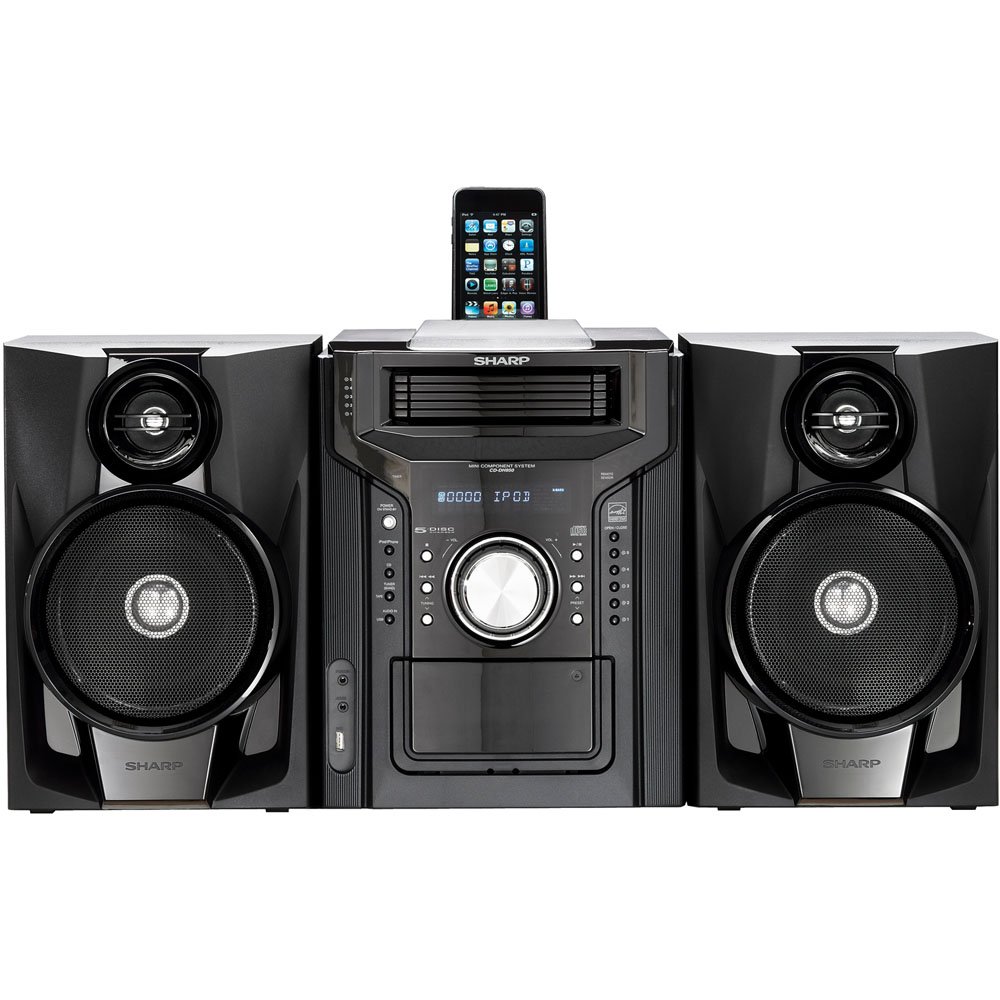
איור 4.3.1: בסך הכל view of the Sharp CD-DH950P Mini-Component System, showing the main unit flanked by two speakers, with an iPhone docked on top of the main unit.
5. הוראות הפעלה
5.1 הפעלה/כיבוי ובקרת עוצמת קול
- הקש על כּוֹחַ בלוח הקדמי או בשלט רחוק כדי להפעיל או לכבות את היחידה.
- סובב את ה כֶּרֶך כפתור בלוח הקדמי או השתמש ב VOL +/- כפתורים בשלט רחוק כדי לכוונן את עוצמת הקול.
5.2 השמעת תקליטורים
This system features a 5-disc CD changer.
- הקש על פתח/סגור לחצן כדי לפתוח את מגש התקליטורים.
- Place up to five CDs on the disc trays, label side up.
- לִלְחוֹץ פתח/סגור שוב כדי לסגור את המגש.
- הקש על CD כפתור כדי לבחור את פונקציית התקליטור.
- הקש על PLAY/PAUSE כפתור להפעלת השמעה.
- השתמש ב- לְדַלֵג buttons to navigate between tracks or discs.
5.3 הפעלת מקלט הקלטת
- הקש על TAPE OPEN/CLOSE button to open the cassette deck.
- הכנס קלטת קלטת.
- הקש על סרט הדבקה כפתור כדי לבחור את פונקציית הקסטה.
- לִלְחוֹץ לְשַׂחֵק כדי להתחיל בהפעלה.
- To record, ensure the source is selected (e.g., CD, Tuner) and press the רְשׁוּמָה כפתור על גבי דיפון הקסטות.
5.4 iPod/iPhone Docking
The system includes a top-mounted docking slot for compatible iPod and iPhone devices (30-pin connector).
- Carefully place your iPod or iPhone into the docking slot.
- The system will automatically switch to iPod/iPhone mode or you may need to press the אייפוד / אייפון לַחְצָן.
- Use the system's controls or your device's controls to play music. The device will also charge while docked.
5.5 USB Host Playback
Connect a USB storage device containing MP3 or WMA audio files to the USB port on the front panel.
- הכנס את התקן ה-USB ליציאת ה-USB.
- הקש על USB button to select the USB function.
- Use the playback controls to navigate and play files.
מקלט AM/FM 5.6
- הקש על כַּונָן כפתור כדי לבחור רדיו AM או FM.
- השתמש ב- כוונון +/- כפתורים כדי לכוון תחנה באופן ידני.
- כדי לבצע סריקה אוטומטית, לחצו והחזיקו את המקש כוונון +/- כפתורים.
- To store a preset, tune to the desired station, then press זֵכֶר ואחריו מספר מוגדר מראש.
5.7 קלט שמע
Connect an external audio device (e.g., MP3 player, smartphone) to the AUDIO IN jack on the front panel using a 3.5mm stereo cable.
- Connect your device to the AUDIO IN jack.
- הקש על אודיו IN כפתור כדי לבחור מקור זה.
- שלוט בהשמעה מהמכשיר המחובר שלך.
6. תחזוקה
6.1 ניקוי היחידה
Wipe the exterior of the unit with a soft, dry cloth. Do not use abrasive cleaners, waxes, or solvents. Ensure the unit is unplugged before cleaning.
6.2 CD and Cassette Care
- Handle CDs by their edges to avoid fingerprints and scratches. Clean discs with a soft, lint-free cloth from the center outwards.
- Store cassette tapes away from strong magnetic fields and direct sunlight.
7. פתרון תקלות
| בְּעָיָה | סיבה אפשרית | פִּתָרוֹן |
|---|---|---|
| אין כוח | כבל חשמל לא מחובר; שקע חשמל פגום | ודא שכבל החשמל מחובר היטב; נסה שקע אחר |
| אין קול | עוצמת קול נמוכה מדי; רמקולים לא מחוברים; נבחר מקור שגוי | הגברת עוצמת הקול; בדיקת חיבורי הרמקולים; בחירת מקור קלט נכון |
| תקליטור לא מתנגן | Disc inserted incorrectly; Disc is dirty or scratched | Insert disc correctly (label side up); Clean or replace disc |
| קליטת רדיו גרועה | Antenna not positioned correctly; Weak signal | Adjust position of AM/FM antennas; Try auto-tuning or manual fine-tuning |
| iPod/iPhone not charging/playing | Device not properly docked; Device not compatible (e.g., newer connector) | Re-dock the device; Note that this system uses a 30-pin connector, newer devices may require an adapter (not included) |
8. מפרטים
- מותג: חַד
- דֶגֶם: CD-DH950P
- כוח פלט כולל: 240 Watts RMS (85W/ch FTC)
- תצורת רמקול: 2.1 ערוצים
- פורמטי שמע נתמכים: CD, MP3, WMA
- יחס אות לרעש: 100 dB
- מכשירים תואמים: MP3 Player, Smartphone (via 30-pin dock or USB/Audio In)
- מידות (L x W x H): 27.6 x 13.6 x 13.5 אינץ'
- משקל פריט: 24.4 פאונד
- UPC: 074000369863, 074000369290
9. מידע על אחריות
This product is covered by a 1-year limited warranty from the date of purchase. Please refer to the warranty card included with your product for full terms and conditions, or contact Sharp customer service for details.
10. תמיכה
For further assistance, technical support, or service inquiries, please contact Sharp customer service. Contact information can typically be found on the Sharp official webבאתר או בתיעוד המצורף למוצר שלך.