
Microsoft HD-3000 (T3H-00001)
מדריך למשתמש של Microsoft LifeCam HD-3000
Model: T3H-00001 | Brand: Microsoft
מָבוֹא
ה-Microsoft LifeCam HD-3000 הוא מצלמת HD ברזולוציה גבוהה webcam designed for clear video communication and recording. It offers a true HD-quality experience with 720p video chat and cinematic 16:9 widescreen recording. Featuring TrueColor Technology, it automatically adjusts to deliver bright and colorful video in various lighting conditions. Its universal attachment base allows for versatile placement on desktops, laptops, or notebooks.
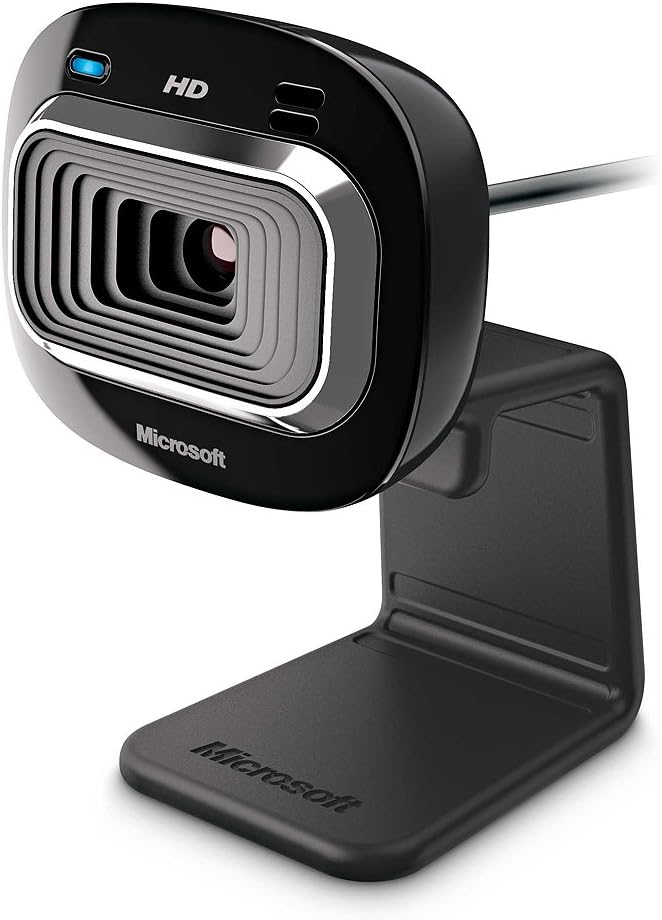
איור 1: חזית view of the Microsoft LifeCam HD-3000.
התקנה והתקנה
Setting up your LifeCam HD-3000 is straightforward. Follow these steps for quick installation:
- פרק את ה Webפִּקָה: Carefully remove the LifeCam HD-3000 from its packaging. Ensure all components, including the USB cable and mounting buckle, are present.
- התחבר למחשב שלך: Plug the USB 2.0 connector of the LifeCam into an available USB port on your desktop, laptop, or notebook. The webcam is designed for plug-and-play functionality on compatible Windows operating systems (Windows 8, Windows 7, Windows Vista, Windows XP SP2 or higher).
- מקם את Webפִּקָה: The universal attachment base is flexible and can be securely placed on top of your monitor, laptop screen, or directly on your desk. Adjust the webcam's angle as needed for optimal viewing. The rubberized base helps prevent scratches on your screen.
- התקנת דרייבר (במידת הצורך): In most cases, your operating system will automatically detect and install the necessary drivers. If prompted, follow the on-screen instructions to complete the driver installation. You may also visit the official Microsoft support webאתר לדרייברים העדכניים ביותר.
- תצורת תוכנה: For full functionality and advanced settings, it is recommended to install the Microsoft LifeCam software (if not pre-installed or automatically downloaded). This software allows for customization of video settings, photo capture, and special effects.

Figure 2: The flexible base allows for easy mounting on various surfaces.
Operating Your LifeCam HD-3000
Once installed, your LifeCam HD-3000 is ready for use with various communication and recording applications.
- וידאו צ'אט: ה webcam is optimized for 720p HD video chat, providing clear and vibrant visuals for your online conversations. It is compatible with popular video conferencing applications like Skype, Zoom, and Microsoft Teams.
- Widescreen Recording: Utilize the 16:9 widescreen format for cinematic video recording. This is ideal for creating content for online video platforms.
- TrueColor Technology: The TrueColor Technology automatically adjusts exposure and white balance to ensure your video remains bright and colorful, even in challenging lighting conditions. This feature operates in the background, providing optimal image quality without manual intervention.
- מיקרופון מובנה: The LifeCam HD-3000 includes a digital microphone for clear audio capture during video calls and recordings. Ensure your communication software is configured to use the LifeCam's microphone as the input device.
- צילום תמונה: Use the dedicated LifeCam software or your preferred application to capture still images.
תַחזוּקָה
To ensure the longevity and optimal performance of your Microsoft LifeCam HD-3000, follow these simple maintenance guidelines:
- ניקוי העדשה: נגב בעדינות את webעדשת המצלמה עם מטלית רכה ונטולת סיבים. עבור כתמים עקשניים, נגבו מעטampen the cloth with a small amount of lens cleaning solution. Avoid using abrasive materials or harsh chemicals.
- טיפול בכבלים: Avoid bending or crimping the USB cable excessively. Store the cable neatly when not in use to prevent damage.
- אִחסוּן: כאשר אינו בשימוש למשך תקופות ממושכות, יש לאחסן את webמצלמת במקום קריר ויבש הרחק מאור שמש ישיר וטמפרטורות קיצוניות.
- עדכוני תוכנה: Periodically check for software and driver updates from the official Microsoft support website to ensure compatibility and access to the latest features and performance improvements.
פתרון בעיות
אם נתקלת בבעיות עם מצלמת LifeCam HD-3000 שלך, נסה את שלבי פתרון הבעיות הבאים:
- Webמצלמת רשת לא זוהתה:
- Ensure the USB cable is securely plugged into a working USB 2.0 port. Try a different USB port.
- הפעל מחדש את המחשב.
- Check Device Manager (Windows) to see if the webcam is listed and if there are any driver issues (indicated by a yellow exclamation mark). Reinstall drivers if necessary.
- Poor Video Quality (Grainy, Dark, Washed Out):
- Ensure adequate lighting in your environment. While TrueColor Technology helps, sufficient ambient light is crucial for best results.
- בדוק את הגדרות הווידאו של האפליקציה שלך כדי לוודא שנבחרה רזולוציית 720p.
- ודא שהעדשה נקייה וללא כתמים.
- אין שמע מהמיקרופון:
- Check your computer's sound settings and ensure the LifeCam HD-3000 microphone is selected as the default recording device.
- Verify microphone settings within your video conferencing application.
- Ensure the microphone is not muted in your system settings or application.
- Video Freezes or Lags:
- Close other applications that might be consuming significant system resources (CPU, RAM, network bandwidth).
- Ensure your internet connection is stable and has sufficient bandwidth for HD video streaming.
- עדכן את מנהלי ההתקנים הגרפיים שלך.
מפרטים
| תכונה | פְּרָט |
|---|---|
| מידות המוצר | 1.75 x 1.55 x 4.29 אינץ' |
| משקל פריט | 3.2 אונקיות |
| מספר דגם של פריט | T3H-00001 |
| יַצרָן | מיקרוסופט |
| טכנולוגיית חיישן צילום | CMOS |
| רזולוציית לכידת וידאו | 720p (1280 x 720) |
| צמצם מקסימלי | 1.2 פ |
| פורמט לכידת וידאו | MP4 |
| פורמט שמע נתמך | PCM |
| טכנולוגיית קישוריות | USB |
| צֶבַע | שָׁחוֹר |
| דרישות מערכת | Windows 8, Windows 7, Windows Vista, Windows XP (with Service Pack 2 (SP2) or higher); VGA video calling: Intel Dual-Core 1.6 GHz or higher, 1 GB of RAM; 720p HD recording: Intel Dual-Core 3.0 GHz or higher, 2GB of RAM; 1.5 GB free space; USB 2.0; Windows-compatible speakers or headphones. |

Figure 3: Dimensions of the LifeCam HD-3000.
אחריות ותמיכה
Microsoft products typically come with a limited warranty. For detailed warranty information, product registration, and technical support, please visit the official Microsoft support webאתר. שמור את הוכחת הרכישה שלך לצורך תביעות אחריות.
לסיוע נוסף, ניתן גם לעיין ב- חנות מיקרוסופט באמזון.
סרטוני מוצר רשמיים
אין סרטוני מוצר רשמיים שנוצרו על ידי מוכרים זמינים להטמעה כרגע.
Ask a question about this manual
Ask about setup, troubleshooting, compatibility, parts, safety, or missing instructions. Manuals+ will review the question and use this page’s manual context to help answer it.