
מָבוֹא
The GIGABYTE GM-M7600 is a wireless precision optical mouse designed for comfortable and reliable use. This manual provides instructions for setting up, operating, maintaining, and troubleshooting your device.
תוכן החבילה
אנא בדקו את תוכן החבילה כדי לוודא שכל הפריטים נמצאים:
- GIGABYTE GM-M7600 Wireless Optical Mouse
- Portable Nano USB Receiver
- 2 x AAA סוללות
הגדרה
1. התקנת סוללות
The GM-M7600 mouse requires two AAA batteries for operation. The batteries are included in the package.
- אתר את מכסה תא הסוללה בחלק התחתון של העכבר.
- החלק או הרם בעדינות את המכסה כדי לפתוח את התא.
- הכנס את שתי סוללות ה-AAA, וודא שהקוטבים החיוביים (+) והשליליים (-) מיושרים כהלכה עם הסימונים בתוך התא.
- סגור היטב את מכסה תא הסוללות.
2. חיבור מקלט ה-USB
The mouse connects to your computer via a portable Nano USB receiver.
- Locate the Nano USB receiver. It may be stored inside the mouse's battery compartment or packaged separately.
- Plug the Nano USB receiver into an available USB port on your computer (Laptop or Personal Computer).
- Your operating system (e.g., Windows XP, Linux) should automatically detect and install the necessary drivers. This process may take a few moments.
- לאחר התקנת הדרייברים, העכבר מוכן לשימוש.
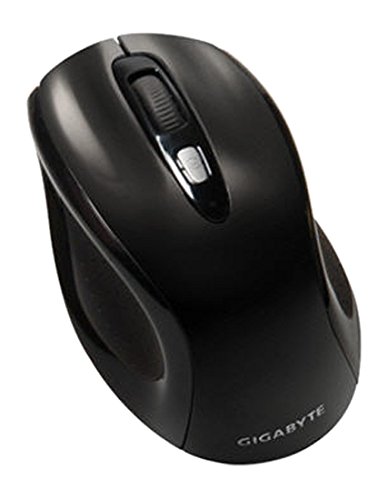
איור 1: GIGABYTE GM-M7600 Wireless Optical Mouse. This image displays the ergonomic design of the mouse, highlighting its form factor and the location of its buttons. The Nano USB receiver is typically stored within the mouse or connected to a computer's USB port.
הוראות הפעלה
1. הפעלה / כיבוי
The mouse typically has a power switch on its underside. Slide the switch to the 'ON' position to activate the mouse. Slide it to 'OFF' when not in use to conserve battery life.
2. התאמת DPI (רגישות)
The GM-M7600 features an adjustable DPI switch, allowing you to change the mouse sensitivity between 800 DPI and 1600 DPI. This switch is usually located near the scroll wheel. Press the DPI button to toggle between the two sensitivity settings.
3. פונקציות עכבר בסיסיות
- לחיצה שמאלית: כפתור ראשי לבחירת פריטים, פתיחה files, ואינטראקציה עם תוכנה.
- מקש ימני: כפתור משני לגישה לתפריטי הקשר ואפשרויות נוספות.
- גלגל גלילה: משמש לגלילה בין מסמכים ו web pages. It can also function as a middle click button.
תַחזוּקָה
1. ניקיון
כדי לשמור על ביצועים ומראה אופטימליים:
- Disconnect the mouse from your computer and turn off the power switch.
- השתמש במטלית רכה נטולת מוך מעט דampנגב את פני העכבר במים או בתמיסת ניקוי עדינה.
- הימנעו משימוש בכימיקלים חזקים, חומרי ניקוי שוחקים או ריסוס נוזלים ישירות על העכבר.
- Clean the optical sensor area on the underside of the mouse with a dry cotton swab to remove any dust or debris.
2. החלפת סוללה
When the mouse performance degrades or it stops responding, it may be time to replace the batteries.
- כבה את העכבר באמצעות מתג ההפעלה.
- Open the battery compartment as described in the 'Installing Batteries' section.
- הוציאו את סוללות ה-AAA הישנות.
- הכניסו שתי סוללות AAA חדשות, תוך הקפדה על הקוטביות הנכונה (+/-).
- Close the battery compartment and turn the mouse back on.
פתרון בעיות
If you encounter issues with your GIGABYTE GM-M7600 mouse, try the following solutions:
- עכבר לא מגיב:
- ודא שהעכבר מופעל.
- בדוק אם הסוללות מותקנות כראוי ויש להן מספיק טעינה. החלף אותן במידת הצורך.
- Ensure the Nano USB receiver is securely plugged into a working USB port on your computer. Try a different USB port.
- הפעל מחדש את המחשב.
- תנועת סמן לא יציבה:
- נקו את החיישן האופטי בחלק התחתון של העכבר.
- ודא שאתה משתמש בעכבר על משטח מתאים. הימנע ממשטחים מחזירי אור או שקופים.
- Check for any wireless interference. Move the mouse closer to the receiver or away from other wireless devices.
- DPI switch not working:
- ודא שהעכבר דלוק ומחובר.
- לחץ בחוזקה על כפתור ה-DPI.
מפרטים
| שם הדגם | GM-M7600 |
| מותג | ג'יגאבייט |
| טכנולוגיית קישוריות | 2.4GHz Radio Frequency Wireless |
| איתור תנועה | אוֹפּטִי |
| DPI מתכוונן | 800 / 1600 DPI |
| מספר כפתורים | 3 (שמאל, ימין, גלגל גלילה/לחיצה אמצעית) |
| מקור כוח | 2 x AAA סוללות (כלולות) |
| סוג מקלט | Portable Nano USB Receiver |
| מכשירים תואמים | מחשב נייד, מחשב אישי |
| תמיכה במערכת הפעלה | לינוקס, חלונות XP |
| חומר המארז | Plastic with Rubberized Finish |
| צֶבַע | שָׁחוֹר |
אחריות ותמיכה
For warranty information and technical support, please refer to the warranty card included with your product or visit the official GIGABYTE webאֲתַר. שמור את קבלה הרכישה שלך לתביעות אחריות.