
1. הקדמה
The BUFFALO Giga Switching Hub LSW3-GT-24NSR is a 24-port Gigabit Ethernet switch designed for high-speed network environments. It is ideal for small to medium-sized offices and workplaces requiring robust and reliable network connectivity. This device supports full Gigabit speeds across all ports, ensuring efficient data transfer.
Key features include a fanless design for silent operation and enhanced reliability, as well as a loop detection function to prevent network disruptions caused by accidental network loops.
2. מידע בטיחות
אנא קראו והבינו את אמצעי הזהירות הבאים לפני השימוש במכשיר כדי למנוע פציעה או נזק.
- ספק כוח: השתמשו רק במתאם החשמל המצורף. ודאו ששקע החשמל עומד בדרישות המתח שצוינו.tagדרישות ה.
- אוורור: אין לחסום פתחי אוורור. יש לוודא זרימת אוויר מספקת סביב המכשיר כדי למנוע התחממות יתר.
- סְבִיבָה: Avoid exposing the device to water, high humidity, extreme temperatures, or direct sunlight.
- טיפול: Do not drop or subject the device to strong impacts. Do not attempt to open or repair the device yourself. Refer all servicing to qualified personnel.
- כבלים: Ensure all network cables are properly connected and secured.
3. תכולת החבילה
ודא שכל הפריטים נמצאים בחבילה:
- BUFFALO Giga Switching Hub LSW3-GT-24NSR Unit
- כבל חשמל
- Rack Mount Brackets (if included with your model)
- רגליות גומי (להנחת שולחן עבודה)
4. התקנה
4.1 התקנה פיזית
The LSW3-GT-24NSR can be installed on a desktop or mounted in a 19-inch equipment rack.
מיקום בשולחן העבודה:
- Attach the included rubber feet to the bottom of the unit to prevent slipping and provide stability.
- הנח את היחידה על משטח ישר ויציב עם אוורור נאות.
הרכבה על מתלה:
- Attach the rack mount brackets to the sides of the unit using the provided screws.
- Secure the unit into a standard 19-inch equipment rack using appropriate rack screws (not included).
4.2 חיבור כבלי רשת
Connect your network devices (computers, servers, other switches) to any of the 24 RJ-45 ports on the front panel using standard Ethernet cables (Category 5e or higher recommended for Gigabit speeds).

איור 1: הפאנל הקדמי מעלview with 24 Ethernet Ports and Status LEDs.
4.3 חיבור חשמל
- Connect the power cable to the AC IN port on the rear of the device.
- חבר את הקצה השני של כבל החשמל לשקע חשמל מתאים.
- The device will power on automatically. The POWER LED on the front panel should illuminate.

איור 2: הפאנל האחורי מעלview with AC IN Power Port.
5. הוראות הפעלה
5.1 מחווני LED
The front panel features several LED indicators to monitor the status of the switch and its ports.
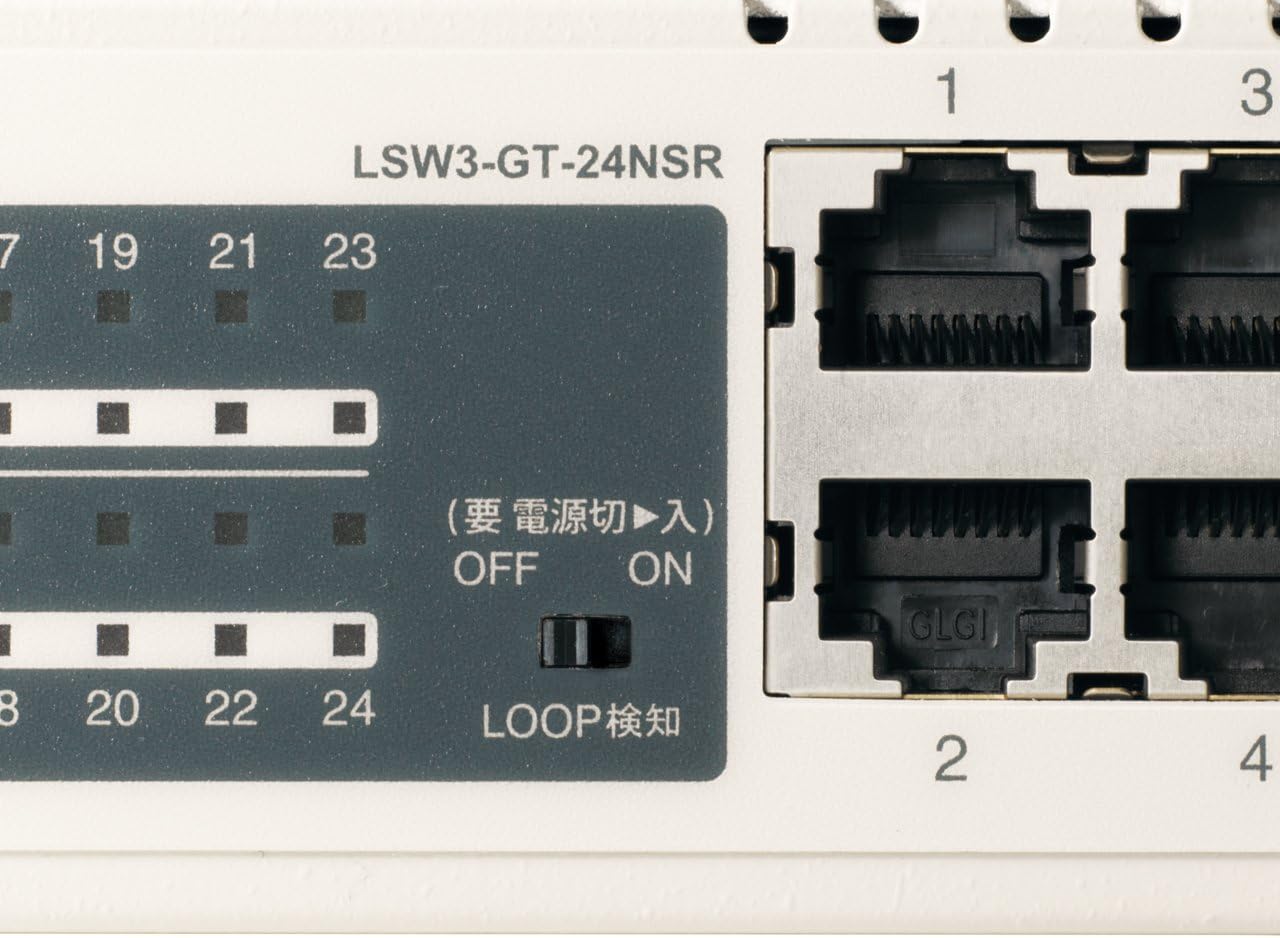
איור 3: מפורט view of LED Indicators and Loop Detection Switch.
| שם LED | סטָטוּס | תֵאוּר |
|---|---|---|
| כּוֹחַ | On | המכשיר מופעל. |
| קישור / מעשה (לכל נמל) | On | A network device is connected and a link is established. |
| הַברָקָה | נתונים מועברים או מתקבלים דרך הפורט. | |
| 1000/100/10 מיליון (לכל נמל) | יָרוֹק | Port is operating at 1000 Mbps (Gigabit Ethernet). |
| כָּתוֹם | Port is operating at 100 Mbps (Fast Ethernet). | |
| כבוי | Port is operating at 10 Mbps (Ethernet). | |
| LOOP DETECT | On | A network loop has been detected. |
5.2 Loop Detection Function
The LSW3-GT-24NSR features a hardware switch for enabling or disabling the loop detection function. This function helps prevent network instability caused by accidental network loops.
Figure 4: Loop Detection Switch (ON/OFF).
- עַל: Loop detection is active. If a loop is detected, the corresponding port will be automatically shut down to prevent network broadcast storms, and the LOOP DETECT LED will illuminate.
- OFF Loop detection is disabled.
It is recommended to keep the loop detection function ON for network stability.
6. תחזוקה
6.1 ניקוי ההתקן
To maintain optimal performance, periodically clean the exterior of the switch.
- נתק את כבל החשמל לפני הניקוי.
- השתמש במטלית רכה ויבשה כדי לנגב את פני השטח.
- Do not use liquid cleaners, aerosols, or solvents, as these may damage the casing או רכיבים פנימיים.
6.2 שיקולים סביבתיים
Ensure the device is operated within its specified environmental conditions:
- טֶמפֶּרָטוּרָה: 0°C עד 40°C (32°F עד 104°F)
- לַחוּת: 10% עד 85% (לא מתעבה)
7. פתרון תקלות
If you encounter issues with your BUFFALO Giga Switching Hub, refer to the following common problems and solutions.
7.1 אין כוח
- סימפטום: נורית POWER כבויה.
- פִּתָרוֹן: Check if the power cable is securely connected to both the device and the power outlet. Ensure the power outlet is functional.
7.2 No Link or Slow Speed on a Port
- סימפטום: The LINK/ACT LED for a connected port is off, or the 1000/100/10M LED indicates a lower speed than expected (e.g., 100M instead of 1000M).
- פִּתָרוֹן:
- ודא שכבל ה-Ethernet מחובר היטב בשני הקצוות.
- Try a different Ethernet cable. Ensure it is a Category 5e or higher cable for Gigabit speeds.
- חבר את המכשיר ליציאה אחרת במתג.
- Check the network adapter settings on the connected device (computer, server) to ensure it is configured for auto-negotiation or the correct speed.
7.3 Network Instability / LOOP DETECT LED is On
- סימפטום: The LOOP DETECT LED is illuminated, and network performance is degraded or unstable.
- פִּתָרוֹן:
- A network loop has been detected. This typically occurs when two ports on the same switch (or different switches) are connected to each other, creating an infinite data path.
- Carefully inspect your network cabling to identify and remove any redundant connections that form a loop.
- If the loop detection switch is ON, the affected port will be automatically shut down. Once the loop is resolved, the port should resume normal operation.
8. מפרטים
| תכונה | תֵאוּר |
|---|---|
| מותג | תְאוֹ |
| מספר דגם | LSW3-GT-24NSR |
| ספירת נמלים | 24 x 10/100/1000BASE-T RJ-45 יציאות |
| קיבולת מיתוג | 48 ג'יגה-ביט לשנייה (ללא חסימה) |
| שיעור העברה | 35.7 Mpps |
| גודל טבלת כתובות MAC | ערכים 8K |
| תמיכת מסגרת ג'מבו | עד 9KB |
| תכונות | Auto-MDI/MDIX, Auto-Negotiation, Loop Detection Function, Fanless Design |
| ספק כוח | ספק כוח AC פנימי |
| מידות (ב x D x H) | (Specific dimensions not provided in source, typical for 1U rackmount) |
| מִשׁקָל | (Specific weight not provided in source) |
| טמפרטורת הפעלה | 0 מעלות צלזיוס עד 40 מעלות צלזיוס |
| לחות הפעלה | 10% עד 85% (לא מתעבה) |
9. אחריות ותמיכה
This BUFFALO product is covered by a manufacturer's warranty. Please refer to the warranty card included with your product or visit the official BUFFALO webבאתר לקבלת תנאי האחריות המפורטים.
For technical support, product registration, or further assistance, please visit the official BUFFALO support webבאתר או צרו קשר עם מחלקת שירות הלקוחות שלהם. פרטי קשר ניתן למצוא בדרך כלל באתר היצרן webבאתר או באריזת המוצר.