
מָבוֹא
The Taylor Pro Digital 4-Event Timer is designed to track up to four separate timing events simultaneously. This device features a large LCD display for clear visibility and offers versatile placement options with its integrated magnets and built-in stand. It supports countdown timing up to 99 hours, 59 minutes, and 59 seconds, and includes a memory function for recalling previous settings.
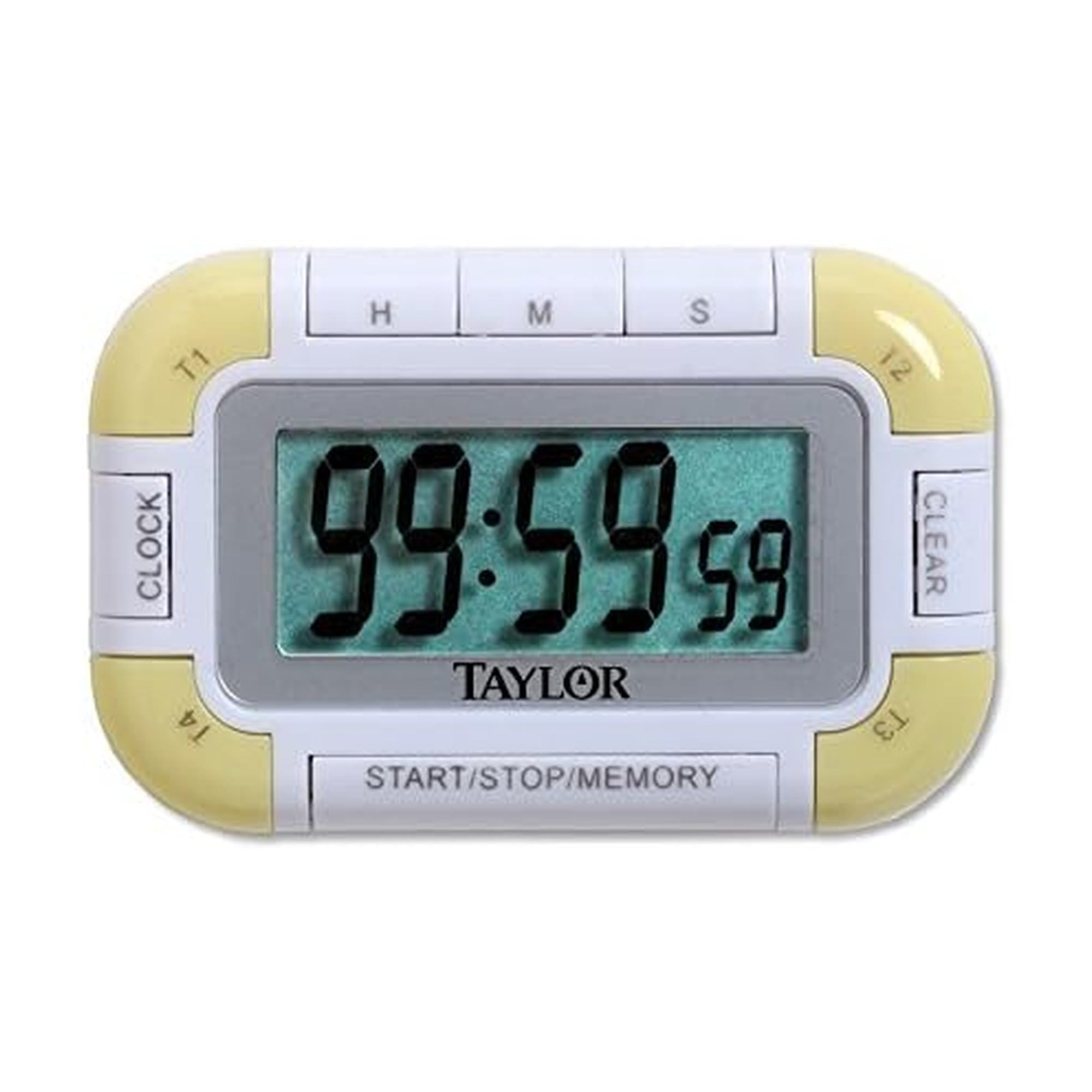
איור 1: חזית view of the Taylor Pro Digital 4-Event Timer.
מידע בטיחות
WARNING: This product contains button cell batteries. Swallowing a button cell battery can cause severe internal burns in as little as 2 hours and can lead to death. Keep new and used batteries away from children. If the battery compartment does not close securely, stop using the product and keep it away from children. If you think batteries might have been swallowed or placed inside any part of the body, seek immediate medical attention.

Figure 2: Button cell battery safety warning.
תוכן החבילה
- Taylor Pro Digital 4-Event Timer (Model 5862)
- מדריך הוראות
- 2 x Product Specific Batteries (pre-installed or included separately)
תכונות המוצר
- ארבעה טיימרים עצמאיים: Track up to four events simultaneously.
- תצוגת LCD גדולה: 0.8-inch display for clear time readings.
- מיקום רב תכליתי: Strong magnets for metal surfaces and a built-in stand for countertops.
- Extended Countdown: Sets times up to 99 hours, 59 minutes, 59 seconds.
- Distinctive Alarms: Each timer has a unique beep pattern.
- פונקציית זיכרון: Recalls the last set time for each event.

איור 3: מפורט view of the timer's display and control buttons.
הגדרה
התקנת סוללה
- אתר את תא הסוללות בגב הטיימר.
- פתח את מכסה התא.
- Insert two product-specific batteries, ensuring correct polarity (+/-).
- סגור היטב את מכסה תא הסוללות.
הפעלה ראשונית
Once batteries are installed, the timer should automatically power on and display '00:00:00' or the current time if a clock function is present (refer to display for confirmation).
הוראות הפעלה
Selecting a Timer (T1, T2, T3, T4)
הקש על T1/T2/T3/T4 buttons to select the desired timer. The active timer will be indicated on the display.
הגדרת טיימר ספירה לאחור
- Select the desired timer (T1-T4).
- הקש על HR כפתור כדי להגדיר שעות, MIN for minutes, and SEC for seconds. Each press increases the value. Hold the button for faster adjustment.
- כדי למחוק זמן מוגדר, לחצו על בָּרוּר button while the timer is selected and stopped.
Starting and Stopping a Timer
- After setting the desired time, press the התחל/עצור כפתור כדי להתחיל את הספירה לאחור.
- כדי להשהות את הספירה לאחור, לחצו התחל/עצור שׁוּב.
- כדי להמשיך, לחץ התחל/עצור שׁוּב.
פונקציית אזעקה
When a timer reaches zero, it will emit an audible alarm. Each of the four timers has a distinct alarm sound to help differentiate between events. Press any button to silence the alarm.
פונקציית זיכרון
The timer automatically stores the last set time for each of the four events. To recall a previously set time, select the desired timer (T1-T4) and press the זֵכֶר button. The last set time for that specific timer will be displayed.
תַחזוּקָה
ניקוי
נגב את הטיימר עם רך, דamp מטלית. אין להשתמש בחומרי ניקוי שוחקים או לטבול את המכשיר במים.
החלפת סוללה
When the display becomes dim or the timer functions erratically, it is time to replace the batteries. Follow the battery installation steps outlined in the Setup section.
פתרון בעיות
| בְּעָיָה | סיבה אפשרית | פִּתָרוֹן |
|---|---|---|
| התצוגה ריקה או עמומה. | סוללות חלשות או מתות. | החלף סוללות בחדשות, תוך הקפדה על קוטביות נכונה. |
| הטיימר לא מופעל. | Time not set or START/STOP not pressed. | Ensure a time is set for the selected timer. Press START/STOP. |
| האזעקה לא נשמעת. | Volume setting too low (if applicable) or timer not reaching zero. | Ensure timer counts down to zero. Check for any mute function (if available). |
| הכפתורים אינם מגיבים. | Low batteries or internal malfunction. | החלף סוללות. אם הבעיה נמשכת, צור קשר עם תמיכת הלקוחות. |
מפרטים
- מספר דגם: 5862
- מותג: טיילור
- חוֹמֶר: פּלָסטִי
- צֶבַע: לבן/ירוק
- משקל פריט: 2.4 אונקיות
- מידות המוצר: 7 x 5.1 x 6.68 אינץ'
- גודל מסך: 0.8 אינץ' (LCD)
- מספר טיימרים: 4
- Max Countdown: 99 שעות, 59 דקות, 59 שניות
- סוללות: 2 Product Specific batteries (required)
אַחֲרָיוּת
This Taylor Pro Digital 4-Event Timer (Model 5862) comes with a אחריות לשנה covering parts and labor from the date of purchase. This warranty does not cover damage caused by misuse, accident, unauthorized modifications, or normal wear and tear. Please retain your proof of purchase for warranty claims.
תְמִיכָה
For further assistance, troubleshooting not covered in this manual, or warranty inquiries, please contact Taylor customer support. Refer to the product packaging or the official Taylor webאתר לקבלת פרטי הקשר העדכניים ביותר.