
1. הקדמה
This manual provides essential instructions for the safe and effective use of your Nikon Coolpix S3000 digital camera. The Coolpix S3000 is a compact 12.0-megapixel camera featuring a 4x wide-angle Zoom-NIKKOR glass lens, a bright 2.7-inch LCD, and a 4-way VR Image Stabilization System, designed for capturing high-quality photos and 640 x 480 movies with sound.
Please read this manual thoroughly before using the camera to ensure proper operation and to maximize your photographic experience.
2. התקנה
2.1 פריקה ובדיקה ראשונית
Carefully unpack all items from the box. Ensure all components are present and undamaged. If any items are missing or damaged, contact your retailer.
2.2 הכנסת הסוללה
- Locate the battery chamber cover on the bottom of the camera.
- Slide the cover latch to open the battery chamber.
- Insert the supplied rechargeable battery, ensuring the correct orientation as indicated inside the chamber.
- Close the battery chamber cover until it clicks securely into place.

איור 2.2.1: חזית view of the Nikon Coolpix S3000 digital camera in green. This image shows the lens, flash, and the Nikon Coolpix branding.
2.3 הכנסת כרטיס זיכרון
The camera supports SD and SDHC memory cards. A memory card is required to store photos and videos.
- פתח את מכסה תא הסוללה/כרטיס הזיכרון.
- הכנס את כרטיס הזיכרון לחריץ כאשר התווית פונה לכיוון הנכון (בדרך כלל לכיוון חזית המצלמה) עד שייכנס למקומו בנקישה.
- סגור היטב את המכסה.
2.4 טעינת הסוללה
Connect the camera to the supplied AC adapter using the USB cable. The charging indicator will illuminate. Charging is complete when the indicator turns off.
2.5 Initial Power On and Date/Time Settings
הקש על הפעלה/כיבוי button to power on the camera. The first time you power on, you will be prompted to set the date, time, and time zone. Use the multi-selector to navigate and the OK לחצן לאישור.
3. הפעלת המצלמה
3.1 בקרות מצלמה מעלview
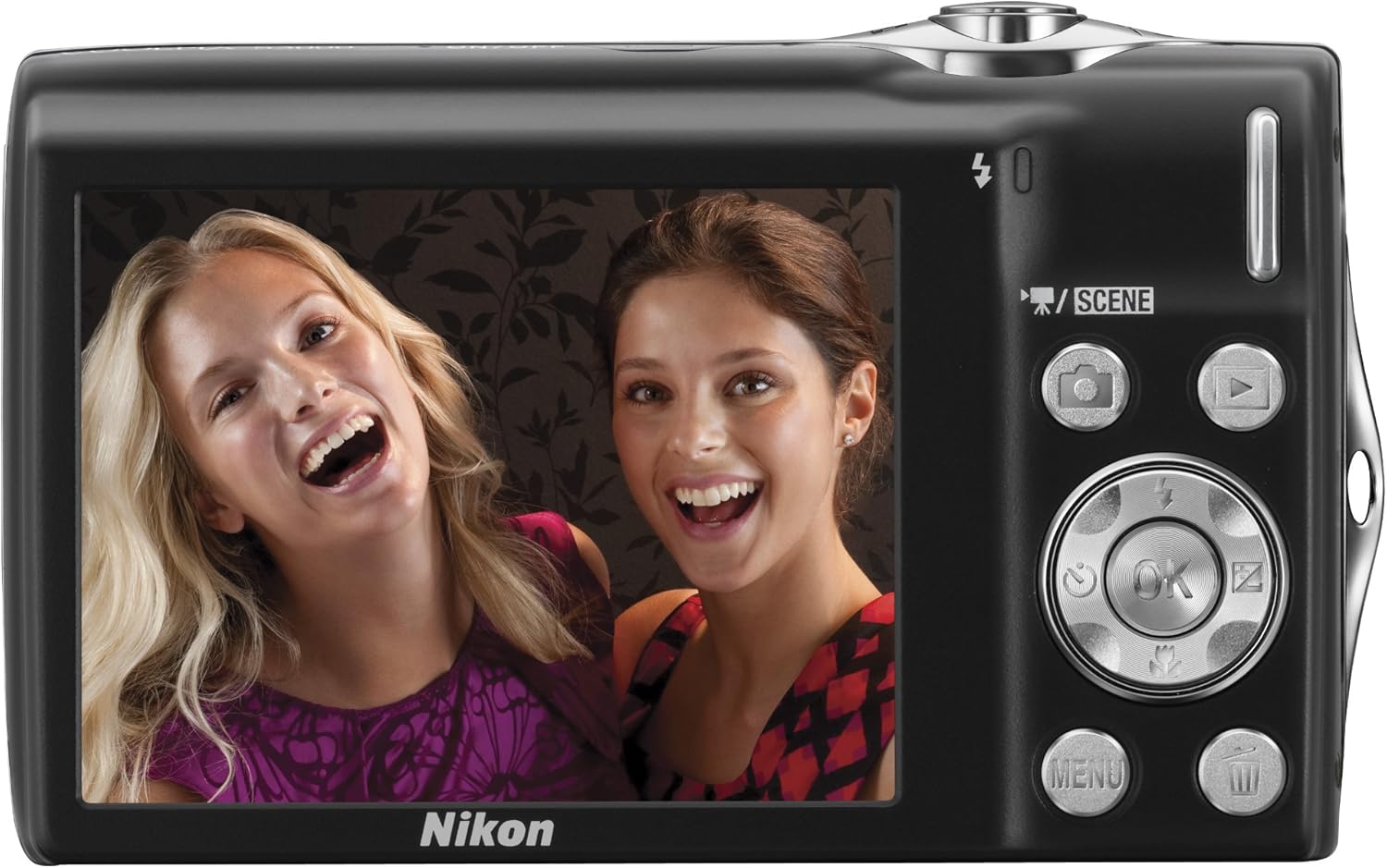
איור 3.1.1: אחורי view of the Nikon Coolpix S3000, showing the 2.7-inch LCD screen, multi-selector, and various control buttons like the camera, playback, menu, and OK buttons.
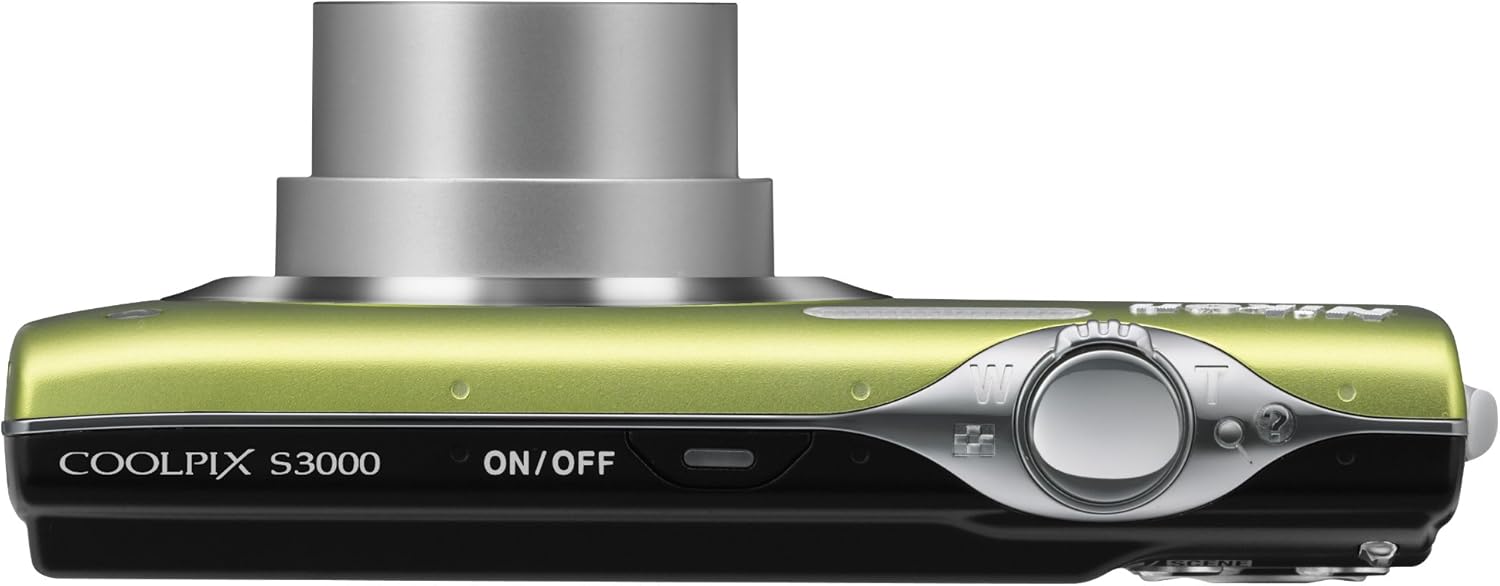
איור 3.1.2: למעלה view of the Nikon Coolpix S3000, highlighting the ON/OFF button and the shutter release button with zoom control.
3.2 צילום תמונות
- הפעלה: הקש על הפעלה/כיבוי לַחְצָן.
- בחר מצב: השתמש ב- סְצֵינָה button or navigate through the menu to select a shooting mode (e.g., Auto, Scene modes like Portrait, Landscape, Night Portrait).
- מסגרת את הצילום שלך: Use the LCD monitor to compose your image.
- זום: השתמש בידית הזום סביב כפתור הצילום כדי לכוונן את הזום האופטי (4x).
- מוֹקֵד: Press the shutter button halfway down to focus. The focus indicator will light up when focus is achieved.
- לִלְכּוֹד: לחץ על כפתור הצילום עד הסוף כדי לצלם את התמונה.

איור 3.2.1: חזית view of the Nikon Coolpix S3000 with its 4x optical zoom lens extended, ready for shooting.
3.3 הקלטת סרטונים
The Coolpix S3000 can record videos at 640 x 480 resolution at 30 frames per second with sound.
- Switch to video recording mode (refer to the camera's menu or dedicated video button if available).
- לחץ על לחצן הצילום כדי להתחיל בהקלטה.
- לחץ שוב על לחצן הצילום כדי להפסיק את ההקלטה.
3.4 מצב השמעה
הקש על השמעה button (often indicated by a triangle icon) to view your captured photos and videos. Use the multi-selector to scroll through images. Press the zoom buttons to zoom in on photos or view מספר תמונות בו זמנית.
3.5 ניווט בתפריט
הקש על תַפרִיט button to access camera settings. Use the multi-selector to navigate through options and the OK button to confirm selections. Settings include image quality, white balance, ISO sensitivity, and more.
4. תחזוקה
4.1 ניקוי המצלמה
- עֲדָשָׁה: השתמשו במטלית רכה ונטולת סיבים המיועדת במיוחד לעדשות מצלמה. נגבו בעדינות בתנועה מעגלית. הימנעו מלגעת בעדשה עם האצבעות.
- צג LCD: Wipe gently with a soft, dry cloth. Do not apply pressure.
- גוף המצלמה: Use a soft, dry cloth to wipe away dust and smudges. For stubborn dirt, slightly dampen the cloth with water and wipe, then dry thoroughly.
- Avoid using organic solvents like alcohol or benzene.
4.2 טיפול בסוללה
- Always use the genuine Nikon battery and charger.
- אל תחשוף את הסוללה לטמפרטורות קיצוניות.
- אם המצלמה לא תהיה בשימוש למשך תקופה ממושכת, הוציאו את הסוללה.
4.3 אחסון
Store the camera in a cool, dry, well-ventilated area, away from direct sunlight, high humidity, and strong electromagnetic fields. Use a camera case for protection during transport.
5. פתרון תקלות
| בְּעָיָה | סיבה / פתרון אפשרי |
|---|---|
| המצלמה לא נדלקת. | הסוללה התרוקנה או שהוכנסה בצורה שגויה. ודא שהסוללה טעונה ומוכנסת כהלכה. |
| התמונות מטושטשות. | Camera shake: Hold the camera steady or use a tripod. Subject movement: Use a faster shutter speed. Lens is dirty: Clean the lens. |
| הודעת "שגיאת כרטיס זיכרון". | Memory card is damaged, full, or incorrectly inserted. Reinsert the card, try a different card, or format the card (this will erase all data). |
| הפלאש לא יופעל. | Flash is set to "Off" or "Red-eye reduction" mode. Ensure flash is set to "Auto" or "Fill-flash". Subject may be too far away. |
| לא ניתן להקליט וידאו. | Insufficient memory card space. Camera may be in photo mode. |
If the problem persists after trying these solutions, please contact Nikon customer support.
6. מפרטים
| תכונה | פְּרָט |
|---|---|
| שם הדגם | Nikon Coolpix S3000 |
| רזולוציית חיישן תמונה | 12 מגה פיקסל |
| זום אופטי | 4x |
| זום דיגיטלי | 2x |
| גודל מסך | 2.7 אינץ' |
| ייצוב תמונה | 4-way VR Image Stabilization System |
| רזולוציית וידאו | 640 x 480 (30 פריימים לשנייה) |
| נתמך File פוּרמָט | JPEG |
| סוג זיכרון | SD/SDHC memory cards, Internal |
| טכנולוגיית קישוריות | USB |
| משקל פריט | 4.16 אונקיות |
7. אחריות ותמיכה
7.1 מידע אחריות
Your Nikon Coolpix S3000 camera is covered by a limited warranty. Please refer to the warranty card included with your product for specific terms and conditions, including warranty period and coverage details. Keep your proof of purchase for warranty claims.
7.2 תמיכת לקוחות
For technical assistance, service, or further information, please visit the official Nikon support website or contact their customer service department. You can find contact details and FAQs on the חנות ניקון באמזון or the official Nikon global webאֲתַר.