
1. הקדמה
Welcome to your Muvit Msound Stereo Bluetooth Wireless Headset. This manual provides comprehensive instructions for the proper setup, operation, and maintenance of your new headset to ensure optimal performance and longevity. Please read this guide thoroughly before using the product.
2. המוצר נגמרview
2.1 תכולת החבילה
- Muvit Msound Stereo Bluetooth Wireless Headset
- כבל טעינה USB
- מתאם קיר
- מדריך למשתמש

2.2 רכיבי אוזניות
The Muvit Msound headset features a foldable, neckband design for portability and comfort. It includes integrated controls for easy management of audio and calls.
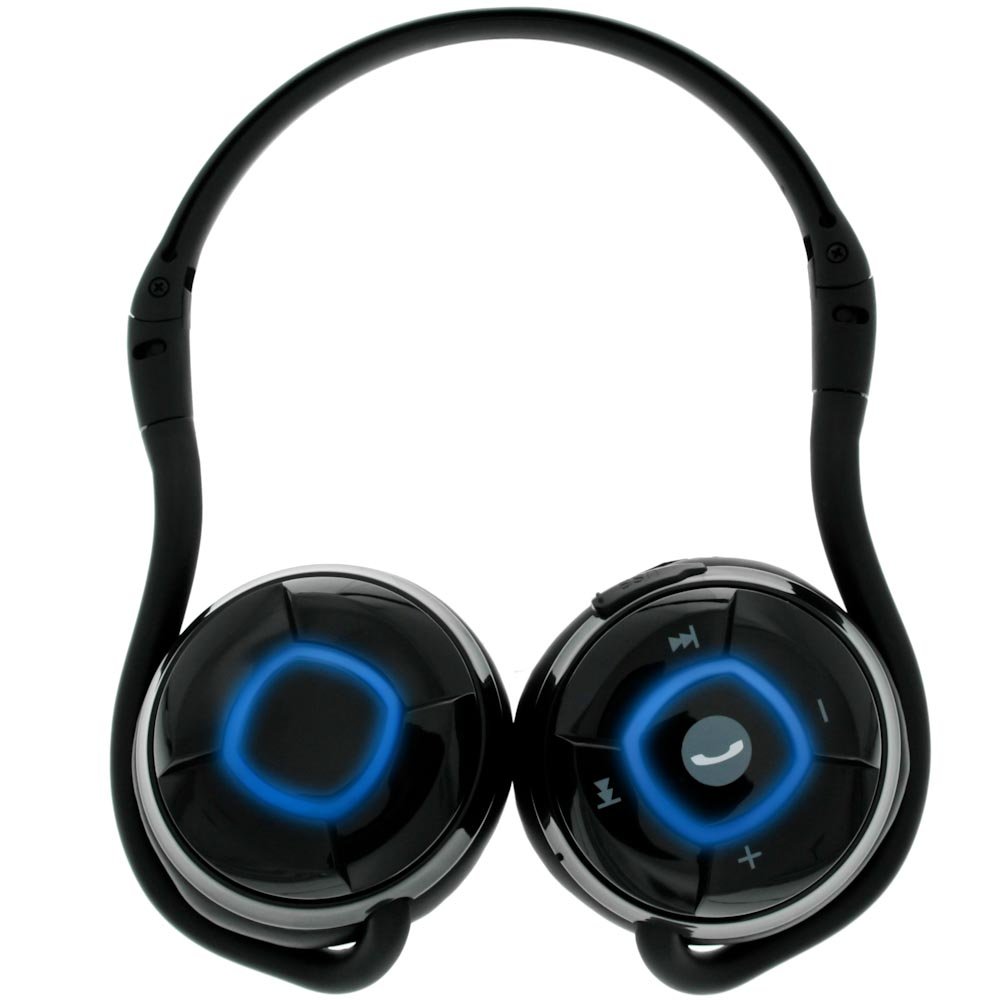


לחצני שליטה:
- לחצן רב תכליתי: Located centrally, used for power on/off, play/pause music, and answering/ending calls.
- הגברת עוצמת הקול (+): מגביר את עוצמת השמע.
- להנמיך קול (-): מקטין את עוצמת השמע.
- הרצועה הבאה (>>|): מדלג לרצועת האודיו הבאה.
- רצועה קודמת (|<<): Skips to the previous audio track.
תכונות אחרות:
- מחוון LED: Provides status information (e.g., power, pairing, charging).
- יציאת טעינה מסוג USB: לחיבור כבל הטעינה.
- מיקרופון מובנה: Omni-directional microphone for hands-free calls.
3. התקנה
3.1 טעינת האוזניות
Before initial use, fully charge your Muvit Msound headset. The headset is powered by a Li-ion battery.
- Connect the small end of the USB charging cable to the USB charging port on the headset.
- Connect the larger end of the USB charging cable to the provided wall adapter.
- חבר את מתאם הקיר לשקע חשמל.
- מחוון LED יראה את מצב הטעינה (למשל, אדום לטעינה, כחול לטעינה מלאה).
- לאחר טעינה מלאה, נתק את כבל הטעינה.
3.2 צימוד עם מכשיר בלוטות'
The Muvit Msound headset connects wirelessly via Bluetooth to your mobile device or other Bluetooth-enabled audio sources.
- וודא שהדיבורית האישית כבויה.
- Press and hold the Multifunction Button until the LED indicator flashes rapidly (e.g., alternating red and blue), indicating pairing mode.
- On your mobile device, navigate to the Bluetooth settings and ensure Bluetooth is enabled.
- חפש available devices. The headset should appear as "Muvit Msound" or similar.
- Select "Muvit Msound" from the list to initiate pairing.
- Once successfully paired, the LED indicator will change (e.g., slow blue flashes) and you may hear an audible confirmation.
- The headset has an operating range of up to 10 meters from the paired device.
4. תפעול
4.1 הפעלה/כיבוי
- כדי להפעיל: Press and hold the Multifunction Button for approximately 3 seconds until the LED indicator lights up and you hear a power-on tone.
- כדי לכבות: Press and hold the Multifunction Button for approximately 5 seconds until the LED indicator turns off and you hear a power-off tone.
4.2 השמעת מוזיקה
After pairing, you can control music playback directly from the headset.
- הפעל/השהה: לחץ על הלחצן הרב-תכליתי פעם אחת.
- הרצועה הבאה: Press the Next Track (>>|) button once.
- רצועה קודמת: Press the Previous Track (|<<) button once.
- הגבר קול: לחץ על כפתור הגברת עוצמת הקול (+).
- להנמיך קול: לחץ על כפתור הנמכת עוצמת הקול (-).
4.3 ניהול שיחות
המיקרופון המובנה מאפשר שיחות ללא ידיים.
- תשובה לשיחה: When a call comes in, press the Multifunction Button once.
- סיום שיחה: During a call, press the Multifunction Button once.
- דחה שיחה: When a call comes in, press and hold the Multifunction Button for approximately 2 seconds.
- חיוג חוזר למספר האחרון: In standby mode, double-press the Multifunction Button.
5. תחזוקה
טיפול נכון מבטיח את אורך החיים והביצועים של האוזניות שלכם.
- ניקוי: השתמשו במטלית רכה ויבשה לניקוי האוזניות. אין להשתמש בחומרי ניקוי שוחקים או ממסים.
- אִחסוּן: כאשר אינן בשימוש, יש לאחסן את האוזניות במקום קריר ויבש, הרחק מאור שמש ישיר וטמפרטורות קיצוניות. העיצוב המתקפל מאפשר אחסון קומפקטי.
- טיפול בסוללה: הימנעו מפריקה מלאה של הסוללה לעתים קרובות. טען את האוזניות באופן קבוע, גם אם אינן בשימוש למשך פרקי זמן ממושכים, כדי לשמור על תקינות הסוללה.
- חשיפה למים: אוזניות אלו אינן עמידות למים. יש להימנע מחשיפה למים או ללחות מוגזמת.

6. פתרון תקלות
If you encounter issues with your Muvit Msound headset, refer to the following common solutions:
| בְּעָיָה | סיבה אפשרית | פִּתָרוֹן |
|---|---|---|
| האוזניות לא נדלקות | סוללה חלשה | טען את האוזניות במלואן. |
| לא ניתן להתאים למכשיר | Headset not in pairing mode / Bluetooth off on device / Device out of range | Ensure headset is in pairing mode (rapid LED flash). Turn on Bluetooth on your device. Move device closer to headset (within 10m). |
| אין צליל או איכות צליל ירודה | Volume too low / Headset not connected / Interference | Increase volume on both headset and device. Re-pair the headset. Move away from other wireless devices. |
| המיקרופון לא עובד | Headset not selected as audio input / Microphone blocked | Ensure headset is selected as the input device in your phone's call settings. Check for any obstructions near the microphone. |
7. מפרטים
- מספר דגם: Msound
- יַצרָן: Muvit
- מידות המוצר: 15.01 x 11 x 6.5 ס"מ
- משקל פריט: 160 גרם
- טכנולוגיית קישוריות: אַלחוּט
- תקשורת אלחוטית: בלוטות'
- תכונה מיוחדת: Neckband design
- תכונת כבל: בלי כבל
- טווח Bluetooth: עד 10 מטר (33 רגל)
- GTIN: 03700165374912
8. אחריות ותמיכה
למידע על אחריות ותמיכת לקוחות, אנא עיין בתיעוד המצורף לרכישה שלך או צור קשר עם הקמעונאי. שמור את הוכחת הרכישה שלך עבור כל תביעת אחריות.