
מָבוֹא
This manual provides detailed instructions for the proper use and maintenance of your Royal DM2070 Electronic Organizer. Please read this manual thoroughly before operating the device to ensure safe and efficient use. Keep this manual for future reference.
מידע בטיחות
- אין לחשוף את המכשיר לטמפרטורות קיצוניות, לאור שמש ישיר או לחות גבוהה.
- הימנע מלהפיל את המכשיר או לחשוף אותו למכות חזקות.
- אל תנסה לפרק או לתקן את המכשיר בעצמך. יש לפנות לכל מטפל מוסמך בתחום התחזוקה.
- הרחק את המכשיר ממים ומנוזלים אחרים.
- יש להשתמש רק בסוג הסוללה שצוין להחלפה.
תוכן החבילה
ודא שכל הפריטים נמצאים בחבילה שלך:
- Royal DM2070 Electronic Organizer
- Stylus (if applicable)
- מדריך להתחלה מהירה
- תעודת אחריות
הגדרה
1. התקנת סוללה
The Royal DM2070 requires batteries for operation. Follow these steps to install them:
- אתר את מכסה תא הסוללה בגב המכשיר.
- החלק או הרם את המכסה כדי לפתוח את התא.
- הכניסו את הסוללות הנדרשות, תוך הקפדה על קוטביות נכונה (+ ו-) כפי שמסומן בתוך התא.
- החזר היטב את מכסה תא הסוללות.
2. הפעלה ראשונית והגדרות
After installing batteries, power on your device and configure basic settings:
- לחץ והחזק את כּוֹחַ כפתור עד שהמסך יידלק.
- The device may prompt you to set the date and time. Use the navigation buttons or stylus to enter the correct information.
- אשר את ההגדרות שלך כדי להשלים את ההגדרה הראשונית.
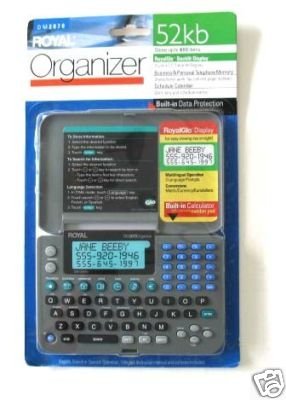
Image: Royal DM2070 Electronic Organizer. This image displays the device's front view, highlighting its screen and keypad, essential for navigation and data entry.
הוראות הפעלה
1. ניווט
The DM2070 features a keypad and potentially a stylus for navigation. Use the arrow keys to move between menu options and press לְהַכנִיס or a designated selection button to confirm.
2. Entering Data
To enter information such as contacts, appointments, or notes:
- Navigate to the desired application (e.g., 'Contacts', 'Calendar', 'Notes').
- Select 'New Entry' or a similar option.
- Use the alphanumeric keypad to input text. Some models may offer an on-screen keyboard via stylus.
- Save your entry before exiting the application.
3. שימוש באפליקציות
The DM2070 includes various applications:
- לוּחַ שָׁנָה: View daily, weekly, or monthly schedules. Add and edit appointments.
- אנשי קשר: Store names, phone numbers, addresses, and email information.
- הערות: Create and manage text notes or memos.
- מחשבון: בצע חישובים אריתמטיים בסיסיים.
- ממיר מטבע: Convert between different currencies (requires manual update of exchange rates on some models).
תַחזוּקָה
1. ניקוי המכשיר
To keep your DM2070 in optimal condition:
- נגב את המסך ו-casinנגבו בעזרת מטלית רכה, יבשה ונטולת סיבים.
- עבור סימנים עקשניים, מעט דמוי עורampשטפו את המטלית במים; הימנעו מכימיקלים חזקים או חומרי ניקוי שוחקים.
- Ensure no moisture enters openings.
2. טיפול בסוללה
- החלף סוללות מיד כאשר מופיע מחוון סוללה חלשה.
- הסר את הסוללות אם המכשיר לא ישמש למשך תקופה ממושכת כדי למנוע דליפות.
פתרון בעיות
If you encounter issues with your Royal DM2070, refer to the following common solutions:
| בְּעָיָה | סיבה אפשרית | פִּתָרוֹן |
|---|---|---|
| המכשיר לא נדלק. | סוללות מתות או מותקנות בצורה שגויה. | החלף סוללות בחדשות, תוך הקפדה על קוטביות נכונה. |
| המסך ריק או קפוא. | תקלה בתוכנה או סוללה חלשה. | Try a soft reset (refer to Quick Start Guide for specific button combination) or replace batteries. |
| Data loss. | Battery depletion or improper shutdown. | Ensure batteries are fresh. Always save data before powering off. |
| לוח המקשים לא מגיב. | Dust/debris under keys or internal issue. | Clean keypad gently. If problem persists, contact support. |
מפרטים
Key technical specifications for the Royal DM2070 Electronic Organizer:
| תכונה | פְּרָט |
|---|---|
| מותג | מַלכּוּתִי |
| מספר דגם | DM2070 |
| חומר כיסוי | עוֹר |
| פוּרמָט | מְאַרגֵן |
| משקל פריט | 181 גרם |
| מידות פריט (LxWxH) | 24.4 x 14.5 x 1 סנטימטרים |
| קהל יעד | מְבוּגָר |
אחריות ותמיכה
The Royal DM2070 Electronic Organizer comes with a standard manufacturer's warranty. Please refer to the warranty card included in your package for specific terms and conditions. For technical support, service, or inquiries, please contact Royal customer service through the contact information provided on the warranty card or the official Royal webאֲתַר.