
Technics SL-PD807
מדריך למשתמש של נגן תקליטורים Technics SL-PD807 MASH עם 5 דיסקים
Model: SL-PD807
מָבוֹא
תודה על הרכישהasing the Technics SL-PD807 MASH 5 Disc CD Player. This manual provides detailed instructions for the proper setup, operation, and maintenance of your new audio component. Please read this manual thoroughly before using the unit to ensure optimal performance and longevity.
The SL-PD807 features a 5-disc carousel changer, allowing for extended playback without interruption, and incorporates MASH (Multi-stage Noise Shaping) D/A conversion for high-quality audio reproduction.
מידע בטיחות חשוב
- מקור כוח: Ensure the unit is connected to an AC 120V, 60Hz power supply.
- אוורור: אין לחסום פתחי אוורור. יש להשאיר מרווח מספיק סביב היחידה לזרימת אוויר תקינה ולמנוע התחממות יתר.
- לַחוּת: אין לחשוף את המכשיר לגשם או לחות. אין להניח חפצים מלאים בנוזלים, כגון אגרטלים, על המכשיר.
- ניקוי: נתקו את המכשיר משקע החשמל לפני הניקוי. השתמשו במטלית יבשה לניקוי.
- שֵׁרוּת: אל תנסה לטפל ביחידה זו בעצמך. יש לפנות לכל טיפול וטיפול באנשי שירות מוסמכים.
תוכן החבילה
אנא ודאו שכל הפריטים נמצאים בחבילה:
- Technics SL-PD807 MASH 5 Disc CD Player
- כבל חשמל
- כבלי שמע RCA
Note: A remote control is not included with this unit.
הגדרה
1. פורקים
Carefully remove the CD player and all accessories from the packaging. Retain the packaging materials for future transport or storage.
2. מיקום
Place the CD player on a stable, level surface away from direct sunlight, heat sources, and excessive dust or vibrations. Ensure there is sufficient space around the unit for proper ventilation.

איור 1: חֲזִית view of the Technics SL-PD807 CD Player with included RCA cables.
3. חיבורים
חבר את נגן התקליטורים שלך amplifier or receiver using the supplied RCA audio cables.
- Connect one end of the RCA audio cables (red and white plugs) to the 'LINE OUT' jacks on the rear of the SL-PD807.
- Connect the other end of the RCA audio cables to an available 'CD IN' or 'AUX IN' input on your amplifier/receiver. Match the red plug to the 'R' (right) input and the white plug to the 'L' (left) input.
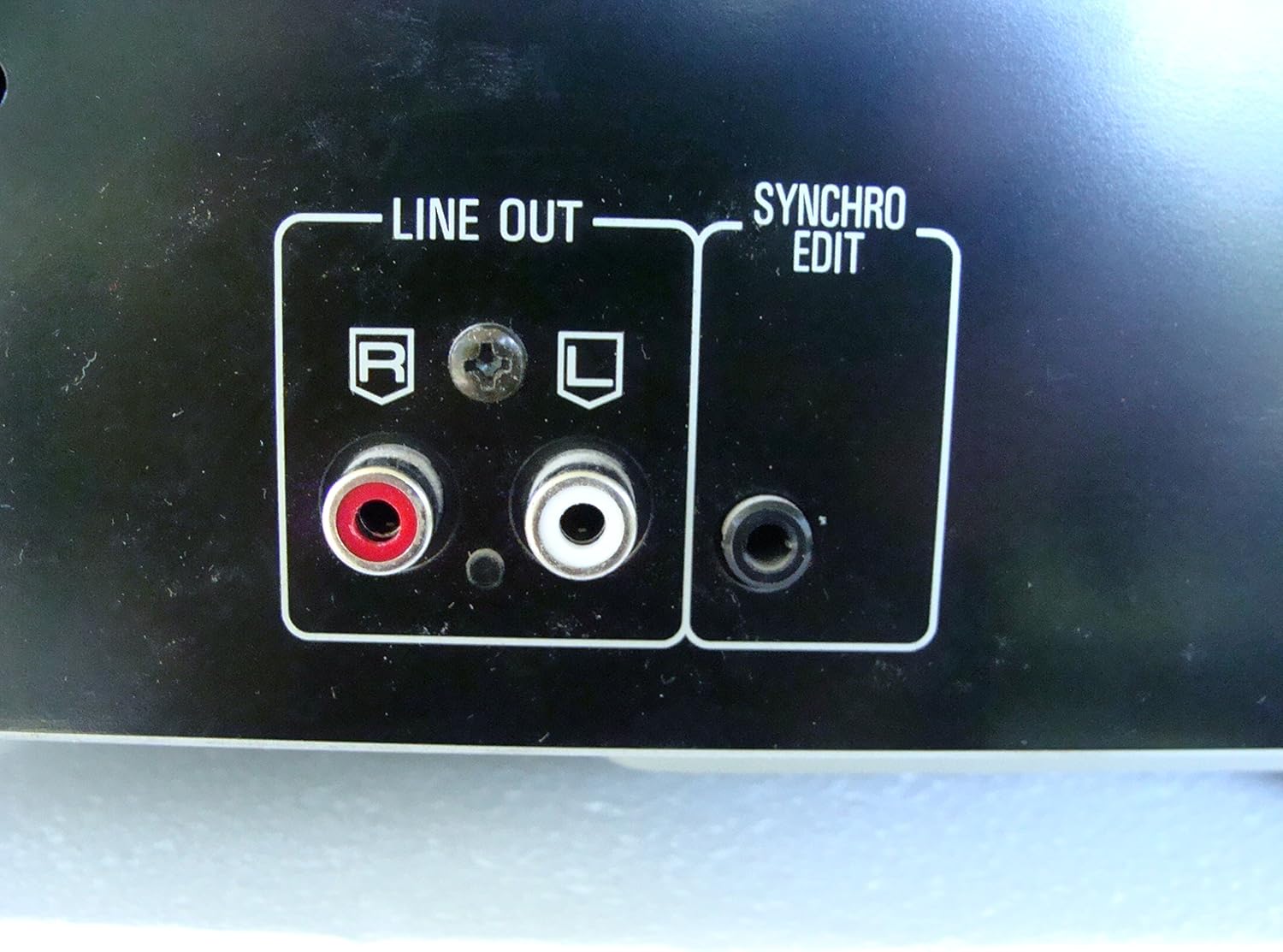
איור 2: Rear panel connections, highlighting the 'LINE OUT' (RCA) and 'SYNCHRO EDIT' ports.
- Plug the power cord into the AC inlet on the rear of the CD player, then plug the other end into a standard AC wall outlet.
הוראות הפעלה
1. הפעלה/כיבוי
הקש על כּוֹחַ button located on the front left of the unit to turn the CD player on or off.
2. טעינת דיסקים
The SL-PD807 features a 5-disc carousel. Press the פתח/סגור button to open the disc tray. Place up to five CDs onto the numbered disc slots with the label side facing up. Press פתח/סגור שוב כדי לסגור את המגש.

איור 3: Front panel controls including disc tray, display, and playback buttons.
3. ניגון בסיסי
- לְשַׂחֵק: הקש על לְשַׂחֵק כפתור (►) כדי להתחיל את ההשמעה.
- הַפסָקָה: הקש על הַפסָקָה button (⏸) to temporarily stop playback. Press again to resume.
- עצור: הקש על לְהַפְסִיק כפתור (■) כדי לעצור את ההפעלה.
- דלג על מסלולים: הקש על לְדַלֵג buttons (⏭︎ / ⏮︎) to skip to the next or previous track.
- לְחַפֵּשׂ: החזק את ה- לְחַפֵּשׂ buttons (⏪︎ / ⏩︎) to fast forward or rewind within a track.
4. Disc Exchange
You can exchange discs while another disc is playing. Press the דילוג על דיסק button to rotate the carousel to an empty slot or a disc you wish to remove/replace. The currently playing disc will continue to play until you select a new disc to play.
5. מצבי השמעה
- משחק אקראי: הקש על אַקרַאִי button to play tracks on the current disc or all loaded discs in a random order.
- הפעלה בתוכנית: השתמש ב- תָכְנִית button to create a custom playback sequence of tracks from the loaded discs. Refer to the on-screen display for programming steps.
- הפעלה חוזרת: הקש על לַחֲזוֹר עַל לחזרה על הרצועה הנוכחית, הדיסק הנוכחי או כל הדיסקים.
תַחזוּקָה
1. ניקוי היחידה
נגבו את החלק החיצוני של היחידה בעזרת מטלית רכה ויבשה. במקרה של כתמים עקשניים, נגבו קלותampen the cloth with water and a mild detergent, then wipe dry. Do not use abrasive cleaners, benzene, thinner, or alcohol, as these can damage the finish.

איור 4: Top surface of the unit, illustrating areas that may require cleaning or show wear.
2. טיפול בדיסק
- טפלו בתקליטורים בקצוותיהם כדי למנוע טביעות אצבעות על משטח הנגינה.
- Keep discs clean. Wipe from the center outwards with a soft, lint-free cloth if necessary.
- אחסן דיסקים בקופסאות שלהם כדי להגן עליהם מפני אבק ושריטות.
פתרון בעיות
If you experience problems with your CD player, please consult the following table before seeking service.
| בְּעָיָה | סיבה אפשרית | פִּתָרוֹן |
|---|---|---|
| אין כוח | כבל החשמל אינו מחובר היטב. | בדוק את חיבור כבל החשמל ליחידה ולשקע בקיר. |
| אין קול | RCA audio cables not connected correctly. Amplifier/receiver input not selected. | Ensure RCA cables are securely connected to both the CD player and ampמפיץ. בחר את הקלט הנכון במכשיר שלך ampמקלט/מקלט. |
| Disc does not play / Skipping | הדיסק מלוכלך או שרוט. הדיסק הוכנס בצורה שגויה. | Clean the disc with a soft, lint-free cloth. Ensure the disc is placed label-side up in the tray. Try another disc. |
| Carousel does not rotate | Obstruction in the disc tray. | Ensure no foreign objects are obstructing the carousel mechanism. |
מפרטים
The following are the technical specifications for the Technics SL-PD807 MASH 5 Disc CD Player:
| תכונה | מִפרָט |
|---|---|
| שם הדגם | SL-PD807 |
| יַצרָן | טֶכנִיקָה |
| קיבולת דיסק | 5 דיסקים |
| דרישות חשמל | AC 120V, 60Hz, 13W |
| מידות חבילה | 17 x 17 x 5 אינץ' |
| משקל פריט | 15.02 פאונד |
| טכנולוגיית קישוריות | עזר, אינפרא אדום |
| תכונה מיוחדת | הגנה נגד דילוגים |

איור 5: Product label displaying model number and power specifications.
אחריות ותמיכה
For information regarding warranty coverage and customer support for your Technics SL-PD807 CD Player, please refer to the warranty card included with your purchase or visit the official Technics website. If you require further assistance, please contact Technics customer service.
Ask a question about this manual
Ask about setup, troubleshooting, compatibility, parts, safety, or missing instructions. Manuals+ will review the question and use this page’s manual context to help answer it.