
KLH KL-300i
KLH AUDIO KL-300i Nostalgia 5-n-1 System
Model: KL-300i
מָבוֹא
תודה על הרכישהasing the KLH AUDIO KL-300i Nostalgia 5-n-1 System. This integrated audio system combines classic and modern audio playback capabilities, including a turntable, CD player, cassette player, AM/FM radio, and an iPod dock. This manual provides essential information for setting up, operating, and maintaining your system to ensure optimal performance and longevity.
מידע בטיחות
אנא קרא בעיון את כל הוראות הבטיחות לפני הפעלת מוצר זה. שמור מדריך זה לעיון עתידי.
- מקור כוח: חברו את המכשיר אך ורק לשקע חשמל AC בעל עוצמת הקול שצוינה.tage.
- אוורור: יש לוודא אוורור נאות. אין לחסום פתחי אוורור.
- מים ולחות: אין לחשוף את המכשיר לגשם או לחות. אין להניח חפצים מלאים בנוזלים, כגון אגרטלים, על המכשיר.
- חוֹם: אין למקם את היחידה ליד מקורות חום כגון רדיאטורים, אוגרי חום, תנורים או מכשירים אחרים (כולל ampמחצבים) המייצרים חום.
- ניקוי: נתקו את המכשיר משקע החשמל לפני הניקוי. השתמשו במטלית יבשה בלבד.
- שֵׁרוּת: אל תנסה לתת שירות למוצר זה בעצמך. הפנה את כל השירות לאנשי שירות מוסמכים.
תוכן החבילה
ודא שכל הפריטים המפורטים להלן כלולים בחבילה:
- KLH AUDIO KL-300i Main Unit
- שְׁלַט רָחוֹק
- כבל קלט עזר
- AM/FM Antenna Wire
- מדריך הוראות (מסמך זה)
המוצר נגמרview
Familiarize yourself with the various components and controls of your KLH AUDIO KL-300i system.
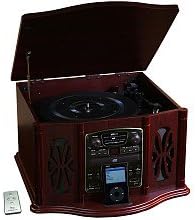
This image displays the KLH AUDIO KL-300i Nostalgia 5-n-1 System. The unit features a dark wood finish. The top lid is open, revealing a turntable. Below the turntable, the front panel includes controls for the CD player, AM/FM radio tuner, and an iPod dock. A small remote control is visible to the left of the main unit.
פקדי לוח קדמי:
- לחצן הפעלה: מפעיל או מכבה את היחידה.
- בורר פונקציות: Switches between Phono, CD, Radio, iPod, and Aux modes.
- ידית עוצמת הקול: כוונון עוצמת הקול הראשית.
- פקדי נגן תקליטורים: הפעלה/השהיה, עצירה, דילוג קדימה/אחורה.
- מקלט רדיו: AM/FM band selector, Tuning knob.
- תחנת עגינה לאייפוד: Connector for iPod devices.
- שקע Aux-In: כניסת 3.5 מ"מ עבור התקני שמע חיצוניים.
- שקע אוזניות: פלט 3.5 מ"מ להאזנה פרטית.
לוח עליון:
- פָּטֵיפוֹן: For playing vinyl records.
- מִכסֶה: מגן על הפטיפון כאשר אינו בשימוש.
לוח צד:
- סיפון קלטות: For playing audio cassette tapes.
הגדרה
Follow these steps for initial setup of your audio system.
- מיקום: Place the unit on a stable, flat surface away from direct sunlight, heat sources, and excessive dust or moisture. Ensure there is adequate space around the unit for ventilation.
- חיבור אנטנה: For optimal AM/FM radio reception, connect the supplied antenna wire to the antenna terminal on the rear of the unit. Extend the wire fully for better reception.
- חיבור חשמל: חבר את כבל החשמל לשקע חשמל רגיל.
- הפעלה ראשונית: Press the Power button on the front panel to turn on the unit.
הוראות הפעלה
תפעול כללי:
- הפעלה/כיבוי: לחץ על לחצן ההפעלה כדי להפעיל או לכבות את היחידה.
- בחירת פונקציה: Use the Function Selector knob or buttons to choose your desired audio source (Phono, CD, Radio, iPod, Aux).
- התאמת עוצמת הקול: Rotate the Volume knob to increase or decrease the sound level.
תפעול פטיפון:
- Lift the lid of the unit.
- הנח תקליט ויניל על מגש הפטיפון.
- Select the appropriate speed (33 1/3, 45, or 78 RPM) using the speed selector switch. For 45 RPM records, place the included adapter on the spindle if needed.
- Gently lift the tonearm and position the stylus over the desired starting groove of the record.
- הנמיכו את זרוע הטונוס באיטיות על התקליט. הנגינה תתחיל אוטומטית.
- To stop playback, gently lift the tonearm and return it to its rest.
תפעול נגן תקליטורים:
- Press the Function Selector to CD mode.
- לחץ על כפתור הוצאה כדי לפתוח את מגש התקליטורים.
- הנח תקליטור כאשר צד התווית פונה כלפי מעלה במגש.
- Press the Eject button again to close the tray. The CD will begin playing automatically or display the track count.
- Use the Play/Pause, Stop, and Skip buttons to control playback.
תפעול נגן הקלטות:
- הכנס קלטת לתוך חריץ הקלטת בצד היחידה.
- לחץ על לחצן ההפעלה כדי להתחיל את ההשמעה.
- Use the Fast Forward (FF) button to advance the tape quickly.
- To stop playback, press the Stop/Eject button. Pressing it halfway will eject the tape.
פעולת רדיו AM/FM:
- Press the Function Selector to Radio mode.
- Select either AM or FM band using the band selector switch.
- Rotate the Tuning knob to search for radio stations.
- Adjust the antenna wire for best reception.
iPod Dock Operation:
- Press the Function Selector to iPod mode.
- Carefully place your compatible iPod device onto the iPod dock connector.
- Use your iPod's controls to select and play music. Audio will be routed through the KLH AUDIO system's speakers.
Aux-In Operation:
- Press the Function Selector to Aux mode.
- Connect an external audio device (e.g., MP3 player, smartphone) to the Aux-In jack on the front panel using the supplied 3.5mm auxiliary cable.
- Play audio from your external device. The sound will be played through the KLH AUDIO system's speakers.
שימוש בשלט רחוק:
The remote control primarily operates the CD player functions (Play, Pause, Stop, Skip). Note that the remote cannot turn the unit on or off.
תַחזוּקָה
Proper care will ensure the longevity of your system.
- ניקוי היחידה: נגבו את החלק החיצוני של היחידה בעזרת מטלית רכה ויבשה. אין להשתמש בחומרי ניקוי שוחקים, שעווה או ממסים.
- טיפול בסטיילוס: Handle the turntable stylus with extreme care. Clean the stylus periodically with a soft brush, brushing from back to front.
- טיפול בתקליטורים/קסטות: Keep CDs and cassette tapes clean and free of dust. Store them in their cases when not in use.
פתרון בעיות
If you experience issues with your system, refer to the following common problems and solutions.
| בְּעָיָה | סיבה אפשרית | פִּתָרוֹן |
|---|---|---|
| אין כוח | כבל החשמל אינו מחובר היטב. | בדוק את חיבור כבל החשמל ליחידה ולשקע בקיר. |
| אין סאונד | עוצמת קול נמוכה מדי; פונקציה שגויה נבחרה; אוזניות מחוברות. | Increase volume; Select correct function; Disconnect headphones. |
| פטיפון לא מסתובב | Unit not powered on; Belt dislodged. | Ensure unit is on; Contact service if belt issue suspected. |
| קליטת רדיו גרועה | האנטנה לא מורחבת או ממוקמת כראוי. | Extend and adjust the antenna wire for better signal. |
| תקליטור לא מתנגן | CD inserted incorrectly; CD is scratched or dirty. | Ensure CD is label-side up; Clean or replace CD. |
מפרטים
| תכונה | מִפרָט |
|---|---|
| מקור כוח | AC 120V ~ 60Hz |
| מידות (ב x D x H) | Approx. 17" x 17" x 10.5" (43.2 cm x 43.2 cm x 26.7 cm) |
| מהירויות פטיפון | 33 1/3, 45, 78 סל"ד |
| טווח תדרי רדיו | AM: 530-1710 kHz, FM: 88-108 MHz |
| תאימות CD | CD, CD-R / RW |
| תחנת עגינה לאייפוד | Compatible with older generation iPods (30-pin connector) |
אחריות ותמיכה
This product is covered by a limited manufacturer's warranty. For specific warranty terms and conditions, please refer to the warranty card included with your purchase or contact KLH customer support. If you require technical assistance or have questions not covered in this manual, please contact KLH customer service through their official webאתר או פרטי הקשר שסופקו עם המוצר שלך.
Ask a question about this manual
Ask about setup, troubleshooting, compatibility, parts, safety, or missing instructions. Manuals+ will review the question and use this page’s manual context to help answer it.