
מָבוֹא
This manual provides detailed instructions for the proper use and maintenance of your Casio WV-59E-1AVEF digital watch. This timepiece features radio-controlled timekeeping, ensuring accurate time display by receiving time calibration signals. Please read this manual thoroughly to ensure optimal performance and longevity of your watch.
Key features include display illumination, world time function, 5-bar water resistance, and an automatic calendar.
המוצר נגמרview
The Casio WV-59E-1AVEF is a robust digital watch designed for daily wear. It features a square case, digital display, and a comfortable resin strap. The watch is equipped with multiple buttons for navigating its various functions.
איור 1: חֲזִית view of the Casio WV-59E-1AVEF digital watch, displaying the time, date, and various mode indicators.
פקדים ותצוגה
- לְהַצִיג: Shows time, date, and function indicators.
- כפתורים: Typically located on the sides of the watch for mode selection, adjustment, and illumination.

איור 2: צַד view of the Casio WV-59E-1AVEF watch, highlighting the control buttons on the left and right sides of the case.

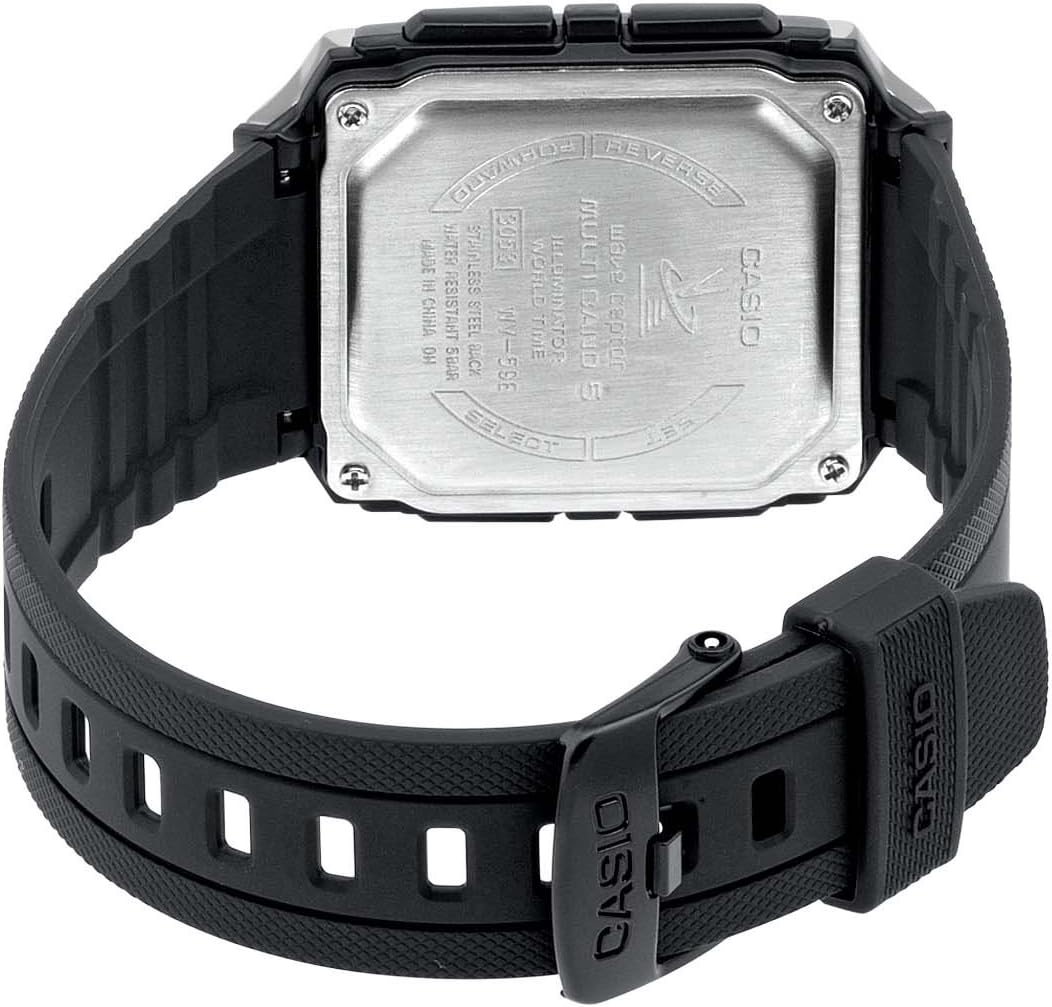
איור 3: אֲחוֹרִי view of the Casio WV-59E-1AVEF watch, showing the stainless steel case back with model number WV-59E, water resistance rating, and 'Wave Ceptor' branding.
הגדרה
Initial Time Setting and Time Zone
Upon first use or after a battery change, you may need to set your home city (time zone) manually. This is crucial for the watch to receive the correct time calibration signal.
- במצב שמירת זמן, לחצו והחזיקו את הלחצן לְהַתְאִים (בדרך כלל בצד שמאל למעלה) עד שקוד העיר יתחיל להבהב.
- השתמש ב- קָדִימָה ו לַהֲפוֹך buttons (usually on the right side) to select your desired home city code. Refer to the world time map for city codes corresponding to your region.
- הקש על MODE button (usually bottom-left) to cycle through other settings like DST (Daylight Saving Time) and 12/24-hour format. Adjust these as needed using the קָדִימָה ו לַהֲפוֹך כפתורים.
- הקש על לְהַתְאִים שוב כדי לצאת ממסך ההגדרות.
Radio Signal Reception (Wave Ceptor)
Your watch automatically receives time calibration signals to maintain accurate time. Automatic reception typically occurs in the early hours of the morning. For best reception, place the watch near a window overnight.
To manually initiate signal reception:
- במצב שמירת זמן, לחצו והחזיקו את הלחצן לְקַבֵּל button (refer to watch diagram for exact button, often bottom-right) for about two seconds.
- The watch will display "RCV" or "GET" to indicate it is attempting to receive the signal.
- Keep the watch stationary and away from sources of interference (e.g., computers, televisions) during reception.
- Successful reception will be indicated by "OK" or "RCVD". If reception fails, "ERR" or "FAIL" will be displayed.

איור 4: The 'Wave Ceptor' logo, indicating the watch's radio-controlled timekeeping capability.
מצבי הפעלה
הקש על MODE button (usually bottom-left) to cycle through the different modes:
- מצב שמירת זמן: מציג את השעה והתאריך הנוכחיים.
- מצב זמן עולם: מאפשר לך view the current time in various cities around the world.
- מצב שעון עצר: מודד את הזמן שחלף.
- מצב אזעקה: הגדר אזעקות יומיות.
מצב זמן עולמי
In World Time Mode, use the קָדִימָה ו לַהֲפוֹך כפתורים לגלילה בין קודי ערים שונים view הזמנים הנוכחיים שלהם.
מצב שעון עצר
- היכנסו למצב שעון עצר.
- הקש על התחל/עצור button (often top-right) to start and stop the stopwatch.
- הקש על אִתחוּל button (often bottom-right) to reset the stopwatch to zero.
מצב אזעקה
- היכנס למצב אזעקה.
- השתמש ב- קָדִימָה ו לַהֲפוֹך buttons to select an alarm number (if multiple are available).
- לחץ והחזק את לְהַתְאִים עד שזמן האזעקה יתחיל להבהב.
- השתמש ב- קָדִימָה ו לַהֲפוֹך buttons to set the alarm hour and minute.
- הקש על לְהַתְאִים לחצן כדי לשמור את הגדרת האזעקה.
- הקש על הפעלה/כיבוי button (often top-right) to toggle the alarm on or off.
תְאוּרָה
הקש על אוֹר button (usually top-right or a dedicated button) to illuminate the display for easy viewבתנאי תאורה חלשה.
תַחזוּקָה
החלפת סוללה
The watch is powered by a Lithium metal battery. When the display becomes dim or functions become unreliable, it is time to replace the battery. It is recommended to have battery replacement performed by a qualified watch technician to ensure proper sealing and water resistance.
Water Resistance (50 Meters / 5 Bar)
Your watch is water resistant to 50 meters (5 bar). This means it is suitable for everyday use and can withstand splashes, rain, showering, and shallow swimming. It is לֹא suitable for diving, snorkeling, or high-impact water sports. Do not operate buttons while the watch is wet or submerged.
ניקוי
Wipe the watch case and strap with a soft, dry cloth. For resin straps, you can use a mild soap solution and rinse thoroughly, then dry completely. Avoid using harsh chemicals or abrasive cleaners.
פתרון בעיות
- Time is incorrect or not synchronizing:
- Ensure your home city code is set correctly for your time zone.
- Place the watch near a window overnight for automatic reception.
- Manually initiate signal reception (refer to "Radio Signal Reception" section).
- Check for strong interference sources nearby (e.g., electronic devices).
- ייתכן שהסוללה חלשה ודורשת החלפה.
- התצוגה עמומה או ריקה:
- ייתכן שהסוללה התרוקנה. החלף את הסוללה.
- Ensure the watch is not in a power-saving mode (if applicable to your model).
- הכפתורים אינם מגיבים:
- ודא שהשעון אינו במצב נעילה (אם רלוונטי).
- If the watch is wet, dry it thoroughly before operating buttons.
- A low battery can affect button responsiveness.
מפרטים

איור 5: Diagram illustrating the dimensions of the Casio WV-59E-1AVEF watch face, with measurements in millimeters and inches for reference.
| מותג | קאסיו |
| שם הדגם | WV-59E |
| מספר דגם | WV-59E-1AVEF |
| צורת פריט | מְרוּבָּע |
| סוג תצוגה | דִיגִיטָלי |
| סוג חומר המארז | אַקרִילִי |
| סוג חומר חלון חיוג | אַקרִילִי |
| סוג חומר הלהקה | שְׂרָף |
| צבע להקה | שָׁחוֹר |
| צבע חוגה | שָׁחוֹר |
| סוג אבזם | אַבזָם |
| קוטר המארז | 39 מילימטרים |
| עובי המארז | 12.5 מילימטרים |
| רוחב פס | 18 מילימטרים |
| משקל פריט | 40 גרם |
| סוג תנועה | קְוָרץ |
| עומק עמידות למים | 50 Meters (5 Bar) |
| מקור כוח | מופעל על ידי סוללה (סוללת ליתיום מתכת אחת כלולה) |
| תכונות מיוחדות | Radio-controlled time, Stopwatch, Alarm, Illumination, World Time, Automatic Calendar |
| רכיבים כלולים | Resin strap |
| קוד פריטים בינלאומי | 04971850882220 |
אחריות ותמיכה
למידע על אחריות ותמיכת לקוחות, אנא עיינו בכרטיס האחריות המצורף למוצר שלכם או בקרו באתר הרשמי של Casio. webאתר. שמור את קבלת הרכישה כהוכחת קנייה.
For service or repairs, contact an authorized Casio service center.