
1. הקדמה
This manual provides detailed instructions for the installation, operation, and maintenance of the Lutron MA-ALFQ35 Maestro Companion Fan and Light Control. This device is designed to work in conjunction with a compatible Lutron Maestro Multi-Location Fan and Light Control (MA-LFQ3 or MA-LFQM) to provide multi-location control of your ceiling fan speed and light levels.
2. מידע בטיחות חשוב
אזהרה: סכנת התחשמלות.
- יש לנתק תמיד את החשמל במפסק החשמל או בתיבת הנתיכים לפני התקנה או טיפול במכשיר זה.
- Do not use this device with any fan or light control other than specified Lutron Maestro models.
- Installation must be performed by a qualified electrician or in accordance with all local and national electrical codes.
- אל תחרוג מהוואט המרביtage ratings for connected loads.
- מוצר זה מיועד לשימוש פנימי בלבד.
3. המוצר נגמרview
The Lutron MA-ALFQ35 is a companion control unit that extends the functionality of a primary Maestro Multi-Location Fan and Light Control. It allows you to adjust both the fan speed and light intensity from additional locations within a room or area. This unit does not function independently and must be paired with a compatible Maestro master control.
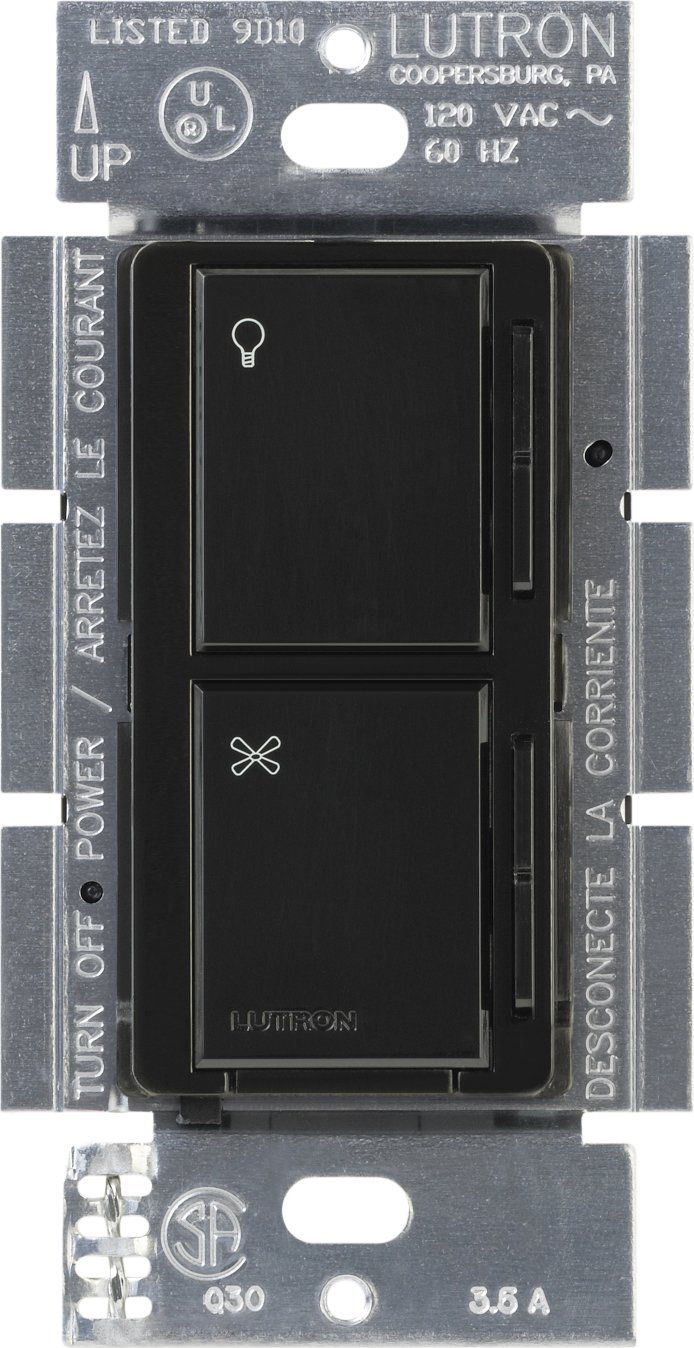
תמונה 1: חזית view of the Lutron MA-ALFQ35 Maestro Companion Fan and Light Control. This black wall-mounted unit features separate touch controls for light (top) and fan (bottom), with a small Lutron logo at the base.
תכונות מפתח כוללות:
- Multi-location control for fan speed and light level.
- Adjusts fan speed and light level from up to three locations (when used with additional companion controls).
- Sets and recalls 7 distinct light levels and fan speeds.
- Touch control method for intuitive adjustments.
4. תאימות
This companion control unit is designed to operate exclusively with specific Lutron Maestro Multi-Location Fan and Light Controls. It is not a standalone device and will not function without a compatible master unit.
Compatible Master Control Models:
- Lutron MA-LFQ3
- Lutron MA-LFQM
Ensure you have one of these master units installed before attempting to install the MA-ALFQ35 companion control.
5. התקנה (הגדרה)
Installation of the MA-ALFQ35 companion control requires basic electrical wiring knowledge. If you are unsure about any steps, consult a qualified electrician.
5.1 לפני שתתחיל
- כבה את המתח: Locate the circuit breaker or fuse box that controls the power to the fan and light fixture. Turn off the power completely to prevent electric shock. Verify power is off using a voltagבודק e.
- זיהוי חיווט: Carefully remove the existing wall plate and switch. Identify the wiring in the wall box. This companion control typically requires a neutral wire, a hot wire, and a traveler wire connected to the master control. Refer to the wiring diagram provided with your לִשְׁלוֹט Maestro Multi-Location Fan and Light Control for specific connections.
- הכינו חוטים: Strip insulation from wires if necessary, ensuring approximately 1/2 inch (12 mm) of bare wire is exposed.
5.2 Wiring the Companion Control
The MA-ALFQ35 companion control connects to the master control unit via traveler wires. The exact wiring configuration will depend on your specific setup (e.g., 3-way or 4-way control). Always follow the wiring instructions provided with the לִשְׁלוֹט Lutron Maestro Multi-Location Fan and Light Control (MA-LFQ3 or MA-LFQM).
- Connect the appropriate wires from the wall box to the terminals on the MA-ALFQ35.
- ודא שכל חיבורי החוטים מאובטחים.
5.3 Mounting and Finishing
- התקן את הבקרה: Carefully push the wired MA-ALFQ35 into the wall box. Secure it with the provided mounting screws.
- התקנת לוחית קיר: Attach a coordinating Claro wallplate (sold separately) over the companion control.
- החזר כוח: הפעל מחדש את החשמל במפסק החשמל או בתיבת הנתיכים.
- פונקציונליות בדיקה: Test both the fan and light controls from all locations to ensure proper operation.
6. תפעול
The Lutron MA-ALFQ35 companion control provides intuitive touch-based operation for your ceiling fan and lights.
6.1 בקרת אור
- הפעלה/כיבוי: Tap the top section of the control (light icon) to turn the lights on or off.
- התאם את הבהירות: Press and hold the top section to dim or brighten the lights. Release when the desired brightness is reached. The control supports 7 distinct light levels.
- אחזור הגדרה מראש: A quick tap will often recall the last set brightness level.
6.2 בקרת מהירות מאוורר
- הפעלה/כיבוי: Tap the bottom section of the control (fan icon) to turn the fan on or off.
- התאם מהירות: Press and hold the bottom section to increase or decrease the fan speed. Release when the desired speed is reached. The control supports 7 distinct fan speeds.
- אחזור הגדרה מראש: A quick tap will often recall the last set fan speed.
7. תחזוקה
The Lutron MA-ALFQ35 requires minimal maintenance.
- ניקוי: To clean the surface of the control, wipe with a soft, damp מטלית. אין להשתמש בחומרי ניקוי שוחקים, ממסים או תרסיסים כימיים, מכיוון שאלה עלולים לפגוע בגימור או ברכיבים הפנימיים.
- אין חלקים שניתנים לשירות המשתמש: There are no user-serviceable parts inside this unit. Do not attempt to open or repair the control.
8. פתרון תקלות
If your Lutron MA-ALFQ35 companion control is not functioning as expected, consider the following:
- אין כוח: Ensure the circuit breaker or fuse supplying power to the fan and light circuit is in the ON position.
- לא מגיב: Verify that the master Maestro Multi-Location Fan and Light Control (MA-LFQ3 or MA-LFQM) is properly installed and functioning. The companion unit relies on the master unit for operation.
- חיווט שגוי: Double-check all wiring connections, especially the traveler wires between the companion and master units. Refer to the master unit's installation guide for correct wiring diagrams. Ensure all connections are secure.
- Incompatible Master Unit: Confirm that the master control unit is one of the specified compatible Lutron Maestro models (MA-LFQ3 or MA-LFQM). This companion control will not work with other types of fan or light controls.
- חיבורים רופפים: Turn off power at the breaker and re-check all wire connections in the wall box for tightness.
If problems persist after checking these points, contact Lutron customer support or a qualified electrician.
9. מפרטים
| דֶגֶם | MA-ALFQ35-BL |
| מותג | לוטרון |
| מצב פעולה | דולק כבוי |
| שיטת בקרה | לָגַעַת |
| מספר עמדות | 7 (for both fan speed and light level) |
| מהtage | 300 Watts (when used with compatible master) |
| מכשירים תואמים | MA-LFQ3, MA-LFQM |
| סוג הרכבה | Plug-In Mount |
| משקל פריט | 0.3 פאונד |
| צֶבַע | שָׁחוֹר |
10. אחריות ותמיכה
10.1 מידע אחריות
The Lutron MA-ALFQ35 Maestro Companion Fan and Light Control comes with a אחריות מוגבלת לשנה on materials and manufacture. Please retain your proof of purchase for warranty claims. This warranty covers defects in materials and workmanship under normal use.
10.2 תמיכת לקוחות
For technical assistance, troubleshooting beyond this manual, or warranty inquiries, please contact Lutron customer support. Visit the official Lutron webאתר לקבלת פרטי קשר ומשאבים נוספים.