מָבוֹא
This manual provides detailed instructions for the proper use and maintenance of your Sony Hi-MD MZ-RH1 Walkman Portable Mini Disc Player. The MZ-RH1 is a versatile portable audio device designed for high-quality audio playback and recording on MiniDisc media, including support for Hi-MD discs. It features an Organic EL display for clear information display and robust connectivity options.
Key features include compatibility with Sony audio systems, a compact Walkman product line design, and a sleek black finish. This device is designed for use with laptops, personal computers, headphones, and earphones.
1. התקנה
1.1 פריקה ובדיקה ראשונית
Carefully remove all components from the packaging. Verify that all included items, such as the main unit and any accessories (e.g., manual), are present and undamaged. If any items are missing or damaged, contact your retailer.
1.2 הפעלת המכשיר
The MZ-RH1 requires one Lithium-ion battery for operation. Insert the battery into the designated compartment according to the polarity indicators. Ensure the battery is fully charged before first use for optimal performance.
To charge the battery, connect the device to a power source using the appropriate charging cable (not specified if included, assume standard USB or proprietary). Refer to the charging indicator on the device for charging status.
1.3 חיבור ציוד היקפי
- Headphones/Earphones: Connect your headphones or earphones to the stereo mini-jack output.
- חיבור מחשב: The device can be connected to a laptop or personal computer for data transfer (e.g., uploading/downloading audio files). Use the appropriate USB cable (if applicable) to connect the device to your computer.
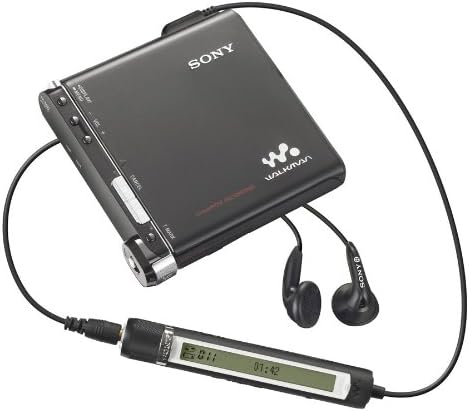
Figure 1.1: Sony MZ-RH1 connected to headphones and a wired remote control. This image illustrates the typical setup for audio playback, showing the compact player, connected earphones, and an inline remote for convenient control.
2. הוראות הפעלה
2.1 נגינה בסיסית
- Insert MiniDisc: Open the disc compartment and gently insert a MiniDisc or Hi-MD disc with the label facing up. Close the compartment securely.
- הפעלה: לחץ והחזק את לחצן ההפעלה עד שהתצוגה תיאר.
- בחר מסלול: Use the navigation controls (e.g., skip forward/backward buttons) to select the desired track.
- התחל השמעה: לחץ על כפתור ההפעלה.
- התאם את עוצמת הקול: Use the Volume + and - buttons to adjust the listening level.
- הפסק את ההפעלה: לחץ על לחצן עצור.
2.2 הקלטת אודיו
The MZ-RH1 supports Linear PCM recording, offering high-fidelity audio capture.
- Prepare Disc: Ensure a recordable MiniDisc or Hi-MD disc with sufficient free space is inserted.
- חיבור מקור שמע: Connect your audio source to the appropriate input jack (e.g., line-in, microphone-in).
- כוונון עוצמת ההקלטה: Use the REC LEVEL control (visible on the side of the device) to set the input level. Monitor the level meter on the display to avoid distortion.
- התחל להקליט: Press the REC button. The recording indicator will illuminate.
- הפסקת ההקלטה: Press the Stop button to end the recording.
- Mark Tracks: Use the T MARK button to manually add track marks during recording or playback for easier navigation.

איור 2.1: למעלה view of the Sony MZ-RH1 MiniDisc Player. This image highlights the main controls including DISPLAY/MENU, VOL +/-, CANCEL, T MARK, and the Organic EL display showing track information and recording levels. The REC LEVEL dial is visible on the right side.
2.3 Menu Navigation and Display
Use the DISPLAY/MENU button to access various settings and information. The Organic EL display provides clear text and graphical feedback, including track number, time elapsed, and recording levels.
3. תחזוקה
3.1 ניקוי ההתקן
- חִיצוֹנִי: Wipe the exterior of the player with a soft, dry cloth. For stubborn dirt, slightly dampen the cloth with water and then wipe dry. Avoid using abrasive cleaners or solvents.
- תא דיסק: Keep the disc compartment free of dust and debris. Do not insert foreign objects into the compartment.
3.2 טיפול בסוללה
- כדי להאריך את חיי הסוללה, יש להימנע מחשיפת המכשיר לטמפרטורות קיצוניות.
- אם המכשיר לא יהיה בשימוש לתקופה ממושכת, הסר את הסוללה.
- השלך סוללות משומשות בהתאם לתקנות המקומיות.
4. פתרון תקלות
This section addresses common issues you might encounter with your MZ-RH1. If the problem persists after trying these solutions, contact customer support.
| בְּעָיָה | סיבה אפשרית | פִּתָרוֹן |
|---|
| המכשיר לא נדלק. | הסוללה התרוקנה או הוכנסה בצורה שגויה. | טען את הסוללה. ודא שהסוללה מוכנסת עם הקוטביות הנכונה. |
| אין צליל במהלך השמעה. | Headphones not connected, volume too low, or disc error. | Check headphone connection. Increase volume. Try a different MiniDisc. |
| לא ניתן להקליט. | Disc is full, protected, or input level is too low. | Use a new or empty recordable disc. Check if the disc is write-protected. Adjust REC LEVEL. |
| התצוגה ריקה או עמומה. | Device is off, battery low, or display settings. | Power on the device. Charge battery. Check display brightness settings in menu. |
5. מפרטים
The following are the technical specifications for the Sony Hi-MD MZ-RH1 Walkman Portable Mini Disc Player:
- שם הדגם: Hi-MD MZ-RH1 Walkman
- יַצרָן: סוני
- מידות המוצר: 8.44 x 8.38 x 1.47 ס"מ
- משקל פריט: 582 גרם
- צֶבַע: שָׁחוֹר
- סוֹלְלָה: נדרשת סוללת ליתיום-יון אחת
- טכנולוגיית תצוגה: LCD (Organic EL)
- גודל מסך: 3.45 אינץ'
- סוג מדיה: MiniDisc
- קיבולת אחסון זיכרון: 1 GB (for Hi-MD discs)
- טכנולוגיית קישוריות: Stereo mini-jack in/out
- מכשירים תואמים: Laptop, Personal computer, Headphones, Earphones
6. אחריות ותמיכה
6.1 אחריות למוצר
For information regarding the warranty period and terms for your Sony MZ-RH1, please refer to the warranty card included with your product or visit the official Sony support webאתר. שמור את הוכחת הרכישה שלך לצורך תביעות אחריות.
6.2 תמיכת לקוחות
If you require further assistance or encounter issues not covered in this manual, please contact Sony customer support. You can find contact information on the official Sony webאתר או דרך התיעוד המצורף למוצר שלך.
למשאבים מקוונים, בקרו באתר חנות סוני באמזון for product information and potential support links.
