
1. נגמרview
The Canon PowerShot SD450 Digital ELPH camera is a compact digital camera designed for ease of use and high-quality imaging. It features a 5.0-megapixel sensor, a 3x optical zoom lens, and a 2.5-inch LCD display. The camera incorporates Canon's DIGIC II processor for efficient image processing and offers various shooting modes to suit different photographic situations.

איור 1.1: חזית view of the Canon PowerShot SD450 Digital ELPH camera with its lens retracted.
2. מה בקופסה
ודא שכל הפריטים הבאים כלולים בחבילה שלך:
- PowerShot SD450 body
- סוללות ליתיום NB-4L
- Battery charger CB-2LV
- 16 MB SD memory card SDC-16M
- רצועת יד WS-600
- CD-ROM לפתרון מצלמה דיגיטלית
- כבל ממשק USB IFC-400PCU
- Audio-video cable AVC-DC300
3. התקנה
3.1. טעינת הסוללה
- Insert the Lithium battery pack NB-4L into the battery charger CB-2LV.
- חבר את המטען לשקע חשמל. נורית חיווי הטעינה תידלק.
- לאחר השלמת הטעינה, נורית החיווי תשתנה או תכבה. הסר את הסוללה.
3.2. הכנסת הסוללה וכרטיס ה-SD
- פתח את מכסה תא הסוללה/כרטיס הכרטיס הממוקם בתחתית המצלמה.
- Insert the charged battery pack into the compartment, ensuring correct orientation.
- Insert the SD memory card into the card slot until it clicks into place.
- סגור היטב את מכסה התא.
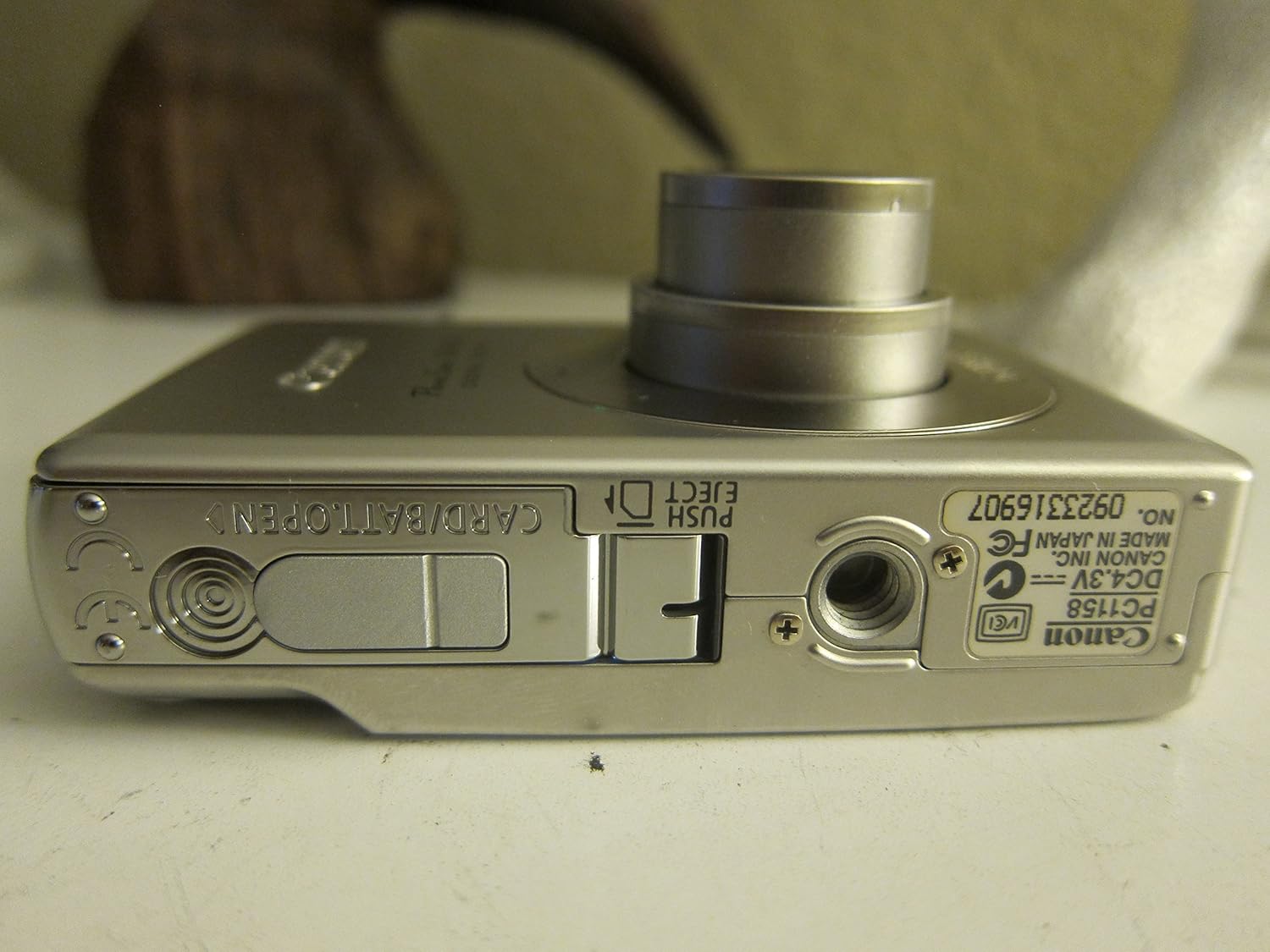
איור 3.1: תחתון view of the camera, illustrating the battery and SD card compartment.
3.3. הפעלה ראשונית והגדרות בסיסיות
- הקש על הפעלה/כיבוי כפתור להפעלת המצלמה.
- פעל לפי ההנחיות שעל המסך כדי להגדיר את התאריך, השעה והשפה.

איור 3.2: למעלה view של המצלמה, תוך הדגשת כפתור ההפעלה ושחרור התריס.
4. הפעלת המצלמה
4.1. צילום בסיסי
- הפעלה/כיבוי: הקש על הפעלה/כיבוי לַחְצָן.
- צילום תמונה: לחץ על לחצן הצילום עד חצי הדרך כדי להתמקד, ולאחר מכן לחץ על כפתור הצילום במלואו כדי לצלם את התמונה.
- זום: השתמש בידית הזום סביב כפתור הצילום כדי לכוונן את הזום האופטי של 3x.

איור 4.1: חזית view of the camera with the optical zoom lens extended.
4.2. מצבי צילום
The PowerShot SD450 offers various shooting modes to optimize settings for different scenes. Rotate the mode dial to select:
- אוטומטי: Camera automatically sets optimal exposure and focus.
- ידני: Allows for more control over settings like white balance and color tones (black and white, sepia, vivid, neutral).
- דְיוֹקָן: מטשטש את הרקע כדי להדגיש את הנושא.
- נוֹף: Ensures sharp focus on distant subjects.
- תמונת לילה: לצילום בתנאי תאורה נמוכים.
- מצבי סצנה: Includes specific settings for Kids & Pets, Foliage, Fireworks, Snow, Underwater, Beach, and Indoor.
- הצבעים שלי: Apply special effects like Color Swap or Custom Color directly in-camera.
4.3. מיקוד וחשיפה
- AiAF: The 9-point Artificial Intelligence Auto Focus system automatically focuses on subjects, even if off-center.
- שליטה בחשיפה: Select from Evaluative, Center-weighted, or Spot metering.
- רגישות ISO: Adjustable to Auto, 50, 100, 200, or 400 to control light sensitivity.
4.4. הקלטת וידאו
The camera can record high-quality movies:
- החלטות: VGA (640x480) or QVGA (320x240) at 30 or 15 frames per second.
- מצב סרט בקצב פריימים מהיר: Records at 60 frames per second for slow-motion playback.
- Compact Movie Mode (QQVGA): 160x120 at 15 frames per second, suitable for email sharing.
- Continuous filming is available until the file size reaches 1 GB or 60 minutes.
4.5. הפעלה מחדשview
כדי לחזורview התמונות והסרטונים שלך:
- הקש על השמעה לַחְצָן.
- Use the directional pad to navigate through images and videos.
- Intelligent Orientation Sensor: Automatically rotates stored images for correct playback when the camera is rotated.
- Slideshow Functions: Create impressive slideshows with transition effects directly on the camera.

איור 4.2: אחורי view of the camera, showing the LCD display during image playback.
4.6. הדפסת תמונות
The PowerShot SD450 supports direct printing:
- פיקטברידג': Connect directly to PictBridge-compatible printers (e.g., Canon PIXMA printers) for printing without a PC.
- לחצן הדפס/שיתוף: Simplifies direct printing and image uploading to Windows XP or Mac OS X.
5. תחזוקה
5.1. ניקוי המצלמה
- השתמש במטלית רכה ויבשה כדי לנקות את גוף המצלמה.
- For the lens and LCD screen, use a lens cleaning cloth and specialized cleaning solution if necessary. Avoid harsh chemicals.
5.2. טיפול בסוללה
- אחסן סוללות במקום קריר ויבש כאשר אינן בשימוש.
- הימנעו מפריקה מלאה של הסוללה לעתים קרובות כדי להאריך את חייה.
- Recharge the battery using only the provided Canon charger.
5.3. אחסון
- When storing the camera for extended periods, remove the battery.
- Store the camera in a protective case to prevent dust and scratches.
6. פתרון תקלות
| בְּעָיָה | פִּתָרוֹן |
|---|---|
| "Memory Error" message appears. |
|
| התמונות מטושטשות. |
|
| Flash is too strong or washes out subjects. |
|
| הסוללה מתרוקנת במהירות. |
|
| המצלמה לא נדלקת. |
|
7. מפרטים
| מותג | קָנוֹן |
| שם הדגם | Canon PowerShot SD450 |
| רזולוציית סטילס אפקטיבית | 5 מגה פיקסל |
| זום אופטי | 3x |
| גודל מסך | 2.5 אינץ' |
| ייצוב תמונה | דיגיטלי, אופטי |
| טווח ISO | אוטומטי, 50, 100, 200, 400 |
| מהירות תריס מינימלית | 15 שניות |
| מהירות תריס מקסימלית | 1/1500 שניות |
| רזולוציית לכידת וידאו | SD VGA 480p |
| פורמט לכידת וידאו | AVI |
| File פוּרמָט | JPEG, RAW |
| מידות (L x W x H) | 3.39 x 0.87 x 2.13 אינץ' |
| משקל פריט | 5.44 אונקיות |
| צֶבַע | כֶּסֶף |
| בעל טיימר עצמי | כֵּן |
| רמת עמידות במים | לא עמיד במים |
8. אחריות ותמיכה
למידע מפורט על האחריות, אנא עיינו בכרטיס האחריות המצורף למוצר שלכם או בקרו באתר הרשמי של קנון. website. The camera comes bundled with Canon software (ZoomBrowser EX 5.5, PhotoRecord 2.2, ImageBrowser 5.5, PhotoStitch 3.1, Movie Edit Task) for image management and editing. Purchasers are also eligible for membership to Canon iMAGE Gateway for additional support and services.
For technical support, driver downloads, or service inquiries, please visit the official Canon support webאתר או צור קשר עם שירות הלקוחות של קנון.