
1. הקדמה
This manual provides instructions for the setup, operation, and maintenance of your Bose MediaMate Computer Speakers. These speakers are designed to enhance the audio experience for your computer, whether for music, movies, or gaming. The compact design and upward-angled sound projection optimize audio delivery for desktop use, occupying minimal desk space.
2. מידע בטיחות
Please read and follow all safety instructions before using this product to prevent electric shock, fire, or injury. Keep this manual for future reference.
- אין לחשוף את הרמקולים למים או ללחות.
- אין למקם את הרמקולים ליד מקורות חום כגון רדיאטורים, אוגרי חום, תנורים או מכשירים אחרים (כולל ampמחצבים) המייצרים חום.
- השתמש רק בתוספות/אביזרים שצוינו על ידי היצרן.
- נתק את המכשיר מהחשמל במהלך סופות ברקים או כאשר אינו בשימוש לפרקי זמן ארוכים.
- הפנה כל טיפול לצוות שירות מוסמך. שירות נדרש כאשר המכשיר ניזוק בכל דרך שהיא, כגון כבל או תקע חשמל פגומים, נוזל נשפך או חפצים נפלו לתוך המכשיר, המכשיר נחשף לגשם או לחות, אינו פועל כרגיל , או הושמט.
3. תכולת החבילה
ודא שכל הפריטים נמצאים בחבילה שלך:
- Bose MediaMate Computer Speakers (2 units)
- מתאם מתח
- Audio Cable (3.5mm stereo jack)
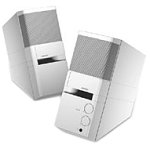
Image: The Bose MediaMate Computer Speakers in Gray. The image shows two compact speakers, one with visible volume and mix controls, and a headphone jack.
4. התקנה
Follow these steps to set up your Bose MediaMate Computer Speakers:
- מיקום: Place the speakers on a flat, stable surface on either side of your computer monitor. Ensure they are angled slightly upward towards your listening position for optimal sound.
- חיבור כבל שמע: Connect the 3.5mm audio cable from the back of the primary speaker (the one with controls) to the audio output jack on your computer.
- חבר חשמל: Plug the power adapter into the power input on the primary speaker, then plug the adapter into a wall outlet.
- הפעלה: Turn on the speakers using the volume knob. The power indicator light should illuminate.
5. הוראות הפעלה
Once set up, operating your MediaMate speakers is straightforward:
- בקרת עוצמת הקול: Use the large knob labeled "VOLUME" on the front of the primary speaker to adjust the overall sound level.
- בקרת ערבוב: The "MIX" knob allows you to blend audio from two different sources if you have a second device connected to the auxiliary input.
- שקע אוזניות: For private listening, plug your headphones into the headphone jack located on the front of the primary speaker. This will mute the speakers.
- כניסות כפולות: The speakers feature dual inputs, allowing you to connect and mix two audio sources simultaneously. For example, you can connect your computer and a portable music player.
6. תחזוקה
כדי להבטיח את אורך החיים והביצועים האופטימליים של הרמקולים שלכם:
- ניקוי: Use a soft, dry cloth to clean the exterior surfaces of the speakers. Do not use liquid cleaners or aerosols.
- אָבָק: Regularly dust the speaker grilles to prevent accumulation that could affect sound quality.
- אִחסוּן: אם מאחסנים את הרמקולים לתקופה ממושכת, נתקו אותם מהחשמל ואחסנו אותם במקום קריר ויבש.
7. פתרון תקלות
If you encounter issues with your Bose MediaMate speakers, refer to the following common problems and solutions:
| בְּעָיָה | סיבה אפשרית | פִּתָרוֹן |
|---|---|---|
| אין קול |
|
|
| צליל מעוות |
|
|
| רק רמקול אחד עובד |
|
|
8. מפרטים
- מותג: בוס
- דֶגֶם: MediaMate
- קישוריות: 3.5mm Audio Input, AC Power
- פלט שמע: סטריאו
- סוג רמקול: מולטימדיה
- חוֹמֶר: מַתֶכֶת
- גודל רמקול: 6 Centimeters (Audio Driver)
- משקל פריט: 3 פאונד
- צֶבַע: אָפוֹר
9. אחריות ותמיכה
Bose MediaMate Computer Speakers come with a limited warranty. For specific warranty details and duration, please refer to the warranty card included with your product or visit the official Bose webאֲתַר.
For technical support, product registration, or service inquiries, please contact Bose customer service:
- טֵלֵפוֹן: 800-444-2673
- Webאֲתַר: www.bose.com
Please have your product model number (MediaMate) and purchase date available when contacting support.